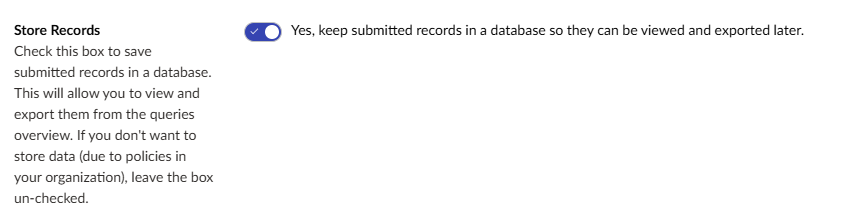
I been asked by one of my customers if it possible to delete a form entry once we have emailed it to them, I sort of got some code working.
But it crashes out with a FK Key Error.
public override Task ExecuteAsync(WorkflowExecutionContext context)
{
Guid formId = context.Form.Id;
var forms = _formService.Get(formId);
if (forms != null)
{
    var records = _recordService.GetAllRecords(forms);
    foreach (Record record in records)
    {
        if ( record.Id == context.Record.Id)
        {
            _recordService.DeleteAsync(record, forms);
            break;
        }

    }
}

return Task.FromResult(WorkflowExecutionStatus.Completed);
}
Here the part of the code I am using.
This is part of a work flow that fires after the records approved and been sent as an email to the customer.
Then I need it to delete the form record from the specific form.
So the only place there a copy of the data is in the person inbox.
SqlException: The INSERT statement conflicted with the FOREIGN KEY constraint “FK_UFRecordFields_UFRecords_Id”. The conflict occurred in database “CombinedSiteV132024”, table “dbo.UFRecords”, column ‘Id’.
The INSERT statement conflicted with the FOREIGN KEY constraint “FK_UFRecordFields_UFRecords_Id”. The conflict occurred in database “CombinedSiteV132024”, table “dbo.UFRecords”, column ‘Id’.
The INSERT statement conflicted with the FOREIGN KEY constraint “FK_UFRecordFields_UFRecords_Id”. The conflict occurred in database “CombinedSiteV132024”, table “dbo.UFRecords”, column ‘Id’.
The INSERT statement conflicted with the FOREIGN KEY constraint “FK_UFRecordFields_UFRecords_Id”. The conflict occurred in database “CombinedSiteV132024”, table “dbo.UFRecords”, column ‘Id’.
The INSERT statement conflicted with the FOREIGN KEY constraint “FK_UFRecordFields_UFRecords_Id”. The conflict occurred in database “CombinedSiteV132024”, table “dbo.UFRecords”, column ‘Id’.
The INSERT statement conflicted with the FOREIGN KEY constraint “FK_UFRecordFields_UFRecords_Id”. The conflict occurred in database “CombinedSiteV132024”, table “dbo.UFRecords”, column ‘Id’.
The INSERT statement conflicted with the FOREIGN KEY constraint “FK_UFRecordFields_UFRecords_Id”. The conflict occurred in database “CombinedSiteV132024”, table “dbo.UFRecords”, column ‘Id’.
The INSERT statement conflicted with the FOREIGN KEY constraint “FK_UFRecordFields_UFRecords_Id”. The conflict occurred in database “CombinedSiteV132024”, table “dbo.UFRecords”, column ‘Id’.
The INSERT statement conflicted with the FOREIGN KEY constraint “FK_UFRecordFields_UFRecords_Id”. The conflict occurred in database “CombinedSiteV132024”, table “dbo.UFRecords”, column ‘Id’.
The INSERT statement conflicted with the FOREIGN KEY constraint “FK_UFRecordFields_UFRecords_Id”. The conflict occurred in database “CombinedSiteV132024”, table “dbo.UFRecords”, column ‘Id’.
The INSERT statement conflicted with the FOREIGN KEY constraint “FK_UFRecordFields_UFRecords_Id”. The conflict occurred in database “CombinedSiteV132024”, table “dbo.UFRecords”, column ‘Id’.
The statement has been terminated.
The statement has been terminated.
The statement has been terminated.
The statement has been terminated.
The statement has been terminated.
The statement has been terminated.
The statement has been terminated.
The statement has been terminated.
The statement has been terminated.
The statement has been terminated.
The statement has been terminated.
The only problem we have is if I turn off the store in DB, we have a custom code that exports the record to file. We used the form Record ID as the filename and it sets each file name to 0.csv. So I can update that to the time and date when the file was exported.
Your workflow is step 2, but the foreign‑key constraint requires that the parent record still exists at step 3. It could be a race condition you could have faced.
If available, you could look into the RecordSaved event (if your version allows it) alternatively this may help
public class DeleteRecordAfterSave : ApplicationEventHandler
{
private readonly IRecordService _recordService;
private readonly IFormService _formService;

public DeleteRecordAfterSave(IRecordService recordService, IFormService formService)
{
    _recordService = recordService;
    _formService = formService;

    RecordService.RecordSaved += RecordService_RecordSaved;
}

private void RecordService_RecordSaved(object sender, RecordSavedEventArgs e)
{
    var record = e.Record;
    var form = _formService.Get(record.Form);

    // Only delete if your workflow marked it as approved
    if (record.State == "Approved")
    {
        _recordService.Delete(record, form);
    }
}

}
Or feel free to list your version and someone can point you in the right direction.
Another way is to wait until the successmessage/page is seen, you can get the recordId from the tempdata.. and delete then?
Thought this could be a little fraught with danger.. As if any workflows executing out of process you might be deleting the record before it’s still needed?
Perhaps a daily cleanup of records might be better? There’s something out of the box…
Umbraco Forms scheduled record deletion task will not run as it has been not enabled via configuration. To enable, set the configuration value at 'Umbraco:Forms:Options:ScheduledRecordDeletion:Enabled' to true.
If I’m reading your use case, you probably want to DisableRecordIndexing too.
Though I have to say only retaining data in emails for the client is also dangerous as then you have a single point of failure non-delivery of email for whatever reason and your lead is gone!
If it’s a data protection issue, then you have sensitive data fields if you want to restrict who can view what.
Also nothing worse than a shared inbox means multiple emails sent to the end user by the client rather than embrace the forms backoffice for a workflow of submitted → approved if one of the team already dealt with it.
Also ideally if this is high traffic and you want to see the end user get a success message as fast as possible the ideal is to take the actual email sending out of process and add to a message queue.