bjarnef
August 12, 2025, 9:14pm
1
Does anyone know if it is possible to make name field readonly via SendingContentNotification in Umbraco 13? It doesn’t seem to.
It is possible to hide content apps, tabs, properties and set properties to readonly.
I know it is possible in a custom view in e.g. in custom section and Umbraco UI Builder handle this now:
opened 07:30AM - 17 Sep 24 UTC
closed 02:41PM - 16 Dec 24 UTC
bug
state/sprint-candidate
release/13.1.6
release/14.0.1
release/15.0.1
**Describe the bug**
I have something something like the following which set lo… gin name in name property, but calling `.MakeReadOnly()` on this, doesn't make the name field readonly.
```
.AddUIBuilder(cfg =>
{
cfg.AddSectionAfter("media", "Repositories", sectionConfig => sectionConfig
.Tree(treeConfig => treeConfig
.AddCollection<MemberDto>(x => x.NodeId, "Member", "Member", "A member entity", "icon-umb-users", "icon-umb-users", collectionConfig => collectionConfig
.SetNameProperty(p => p.LoginName).MakeReadOnly()
.ListView(listViewConfig => listViewConfig
.AddField(p => p.LoginName).SetHeading("Login")
.AddField(p => p.Email)
)
.DisableCreate()
.DisableDelete()
.DisableUpdate()
)
)
);
})
```

**Environment (please complete the following information):**
- Server OS: Windows 10
- Browser Chrome
- Umbraco Version 13.4.1
- Product Version 13.1.5
---
_This item has been added to our backlog AB#45968_
The reason is some imported data, which shouldn’t be editable (and would be overwritten anyway).
It would probably make sense with a Readonly property on ContentVariantDisplay simular to Readonly property on ContentPropertyDisplay, but ideally only on name field as it can be controlled which properties to make readonly and actions can be removed.
It seems it may be easier to handle in the new backoffice.
With my journey on making Content Lock/Guard package, I am investigating on marking the content node as read only.
I have found something on the DocumentWorkspaceContext called readOnlyState
This has methods to addState and removeState, which my understanding is used to indicate that a node with a variant is set to read only.
For my use case for now I want to mark the entire node as readonly, including all variants and segments.
bjarnef
August 13, 2025, 11:24pm
2
It seems this should set readonly of name input field:
which is passed in here:
<div class="umb-split-view__content" ng-show="!vm.editor.loading">
<ng-form name="contentHeaderForm" ng-if="vm.content.apps.length > 0">
<umb-editor-content-header
menu="vm.page.menu"
hide-actions-menu="vm.page.hideActionsMenu"
disable-actions-menu="vm.disableActionsMenu"
name="vm.editor.content.name"
name-disabled="vm.nameDisabled"
name-readonly="vm.nameReadonly"
editor="vm.editor"
content="vm.content"
on-select-navigation-item="vm.selectApp(item)"
on-select-anchor-item="vm.selectAppAnchor(item, anchor)"
hide-change-variant="vm.page.hideChangeVariant"
show-back-button="vm.showBackButton()"
on-back="vm.onBack()"
split-view-open="vm.editorCount > 1"
on-open-in-split-view="vm.openSplitView(variant)"
on-close-split-view="vm.onCloseSplitView()"
and further here:
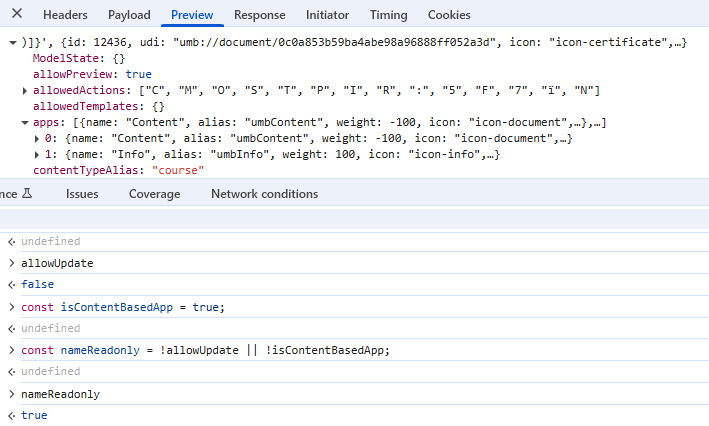
In content editor model A letter is removed from allowed actions, but for some reason it seems the name input in header is still editable.
nobledm
August 14, 2025, 5:42pm
3
Have you looked at any of the Label data types as a read-only property? Though not sure if it would cover whatever your use case is for limiting naming. I’d assume that’s restricted cause you have to be able to edit the name in order to create a node. So is what you’re actually needing is a ‘no renaming’ restriction?
You can programmatically set the value of a label and it is by default not an editable field but would be a property visible on the node.
bjarnef
August 26, 2025, 6:47am
4
Yes, it is however not possible to replace name field in header with a label - at least not from within notification handler.
I can use Label property editor for custom properties on the content type, but it is no issue making the readonly for most property editors supporting readonly mode.
The issue here is specificially to make name field in header readonly.
bjarnef
September 3, 2025, 6:35pm
5
It seems to be because <umb-editor-content-header> pass in following properties :
But vm.editor doesn’t contain the modified content model with adjusted actions.
If using vm.content here instead of vm.editor.content the name fields is readonly.
onAppChanged(activeApp);
});
$scope.$on("listView.itemsChanged", function ($event, $args) {
vm.disableActionsMenu = $args.items.length > 0;
});
          function onAppChanged(activeApp) {
              // set the name field to readonly if the user don't have update permissions or the active content app is not "Content" or "Info"
              const allowUpdate = vm.editor.content.allowedActions.includes('A');
              const isContentBasedApp = activeApp && contentAppHelper.isContentBasedApp(activeApp);
              vm.nameReadonly = !allowUpdate || !isContentBasedApp;
          }
/**
* Used to proxy a callback
* @param {any} item
*/
function selectAppAnchor(item, anchor) {
// call the callback if any is registered
bjarnef
December 5, 2025, 8:09am
7
This issue has now been resolved in
v13/dev ← bjarnef:bug/readonly-name-field
opened 06:45PM - 03 Sep 25 UTC
### Prerequisites
- [x] I have added steps to test this contribution in the d… escription below
### Description
When modifying allowed actions in `SendingContentNotification` and action `A` is not present, the name field was still editable.
I noticed the modified model (actions) in `ContentItemDisplay` in `notification.Content` property didn't affect `vm.editor.content` but `vm.content`.
Here it is clear `vm.content.allowedActions` is updated content, while `vm.editor,content.allowedActions` is just the normal editor model based on allowed actions for current user:
<img width="1272" height="760" alt="image" src="https://github.com/user-attachments/assets/89e552be-2045-499f-a21d-931832c026ae" />
Name field is readonly:
<img width="2560" height="1279" alt="image" src="https://github.com/user-attachments/assets/42ba58f1-6c40-44a5-aed3-3027e1568680" />
Also discussed here:
https://forum.umbraco.com/t/readonly-content-name-field/5090
### Test notes
Place the following class in `Composors` folder in **Umbraco.Web.UI** project:
```
using System.Data;
using Umbraco.Cms.Core;
using Umbraco.Cms.Core.Actions;
using Umbraco.Cms.Core.Composing;
using Umbraco.Cms.Core.Events;
using Umbraco.Cms.Core.Models.ContentEditing;
using Umbraco.Cms.Core.Models.PublishedContent;
using Umbraco.Cms.Core.Notifications;
using Umbraco.Cms.Core.PublishedCache;
using Umbraco.Cms.Core.Security;
using Umbraco.Cms.Web.Common.PublishedModels;
using Umbraco.Extensions;
namespace Umbraco.Cms.Web.UI.Composers
{
public class SiteComposer : IComposer
{
public void Compose(IUmbracoBuilder builder)
{
builder.AddNotificationHandler<SendingContentNotification, EditorSendingContentNotificationHandler>();
}
}
public class EditorSendingContentNotificationHandler : INotificationHandler<SendingContentNotification>
{
private readonly IBackOfficeSecurityAccessor _backOfficeSecurity;
private readonly IPublishedContentQuery _publishedContentQuery;
private readonly IPublishedSnapshotAccessor _publishedSnapshotAccessor;
public EditorSendingContentNotificationHandler(
IBackOfficeSecurityAccessor backOfficeSecurity,
IPublishedContentQuery publishedContentQuery,
IPublishedSnapshotAccessor publishedSnapshotAccessor)
{
_backOfficeSecurity = backOfficeSecurity;
_publishedContentQuery = publishedContentQuery;
_publishedSnapshotAccessor = publishedSnapshotAccessor;
}
public void Handle(SendingContentNotification notification)
{
/*if (!notification.Content.ContentTypeAlias.Equals("blogpost") || !notification.Content.ContentTypeAlias.Equals("contact"))
return;
var currentUser = _backOfficeSecurity?.BackOfficeSecurity?.CurrentUser;
if (currentUser == null)
return;
var userGroupAliasses = currentUser!.Groups.Select(userGroup => userGroup.Alias).ToList();*/
// Skip if user is admin.
/*if (userGroupAliasses.Any(alias => alias.Equals(Constants.Security.AdminGroupAlias)))
{
return;
}*/
notification.Content.Urls = null;
List<string> readOnlyProperties = [];
// Hide tabs/properties depending on user access.
var tabAliases = notification.Content.Variants.First().Tabs
.Select(x => x.Alias)
.WhereNotNull()
.ToList();
ReadOnlyProperties(notification.Content, readOnlyProperties);
//HideTabs(notification.Content, tabAliases);
HideActions(notification.Content,
[
$"{ActionUpdate.ActionLetter}",
$"{ActionUnpublish.ActionLetter}",
$"{ActionPublish.ActionLetter}",
$"{ActionRollback.ActionLetter}",
$"{ActionDelete.ActionLetter}"
]);
}
private static void ReadOnlyProperties(ContentItemDisplay contentItemDisplay, List<string> propertyAliases)
{
if (propertyAliases.Any())
{
foreach (var tab in contentItemDisplay.Variants.First().Tabs)
{
List<ContentPropertyDisplay> properties = new();
foreach (var prop in tab.Properties!)
{
if (propertyAliases.Contains(prop.Alias))
{
prop.Readonly = true;
//prop.Editor = "Umbraco.Label";
//prop.View = "readonlyvalue";
}
properties.Add(prop);
}
tab.Properties = properties;
}
}
}
private static void HideActions(ContentItemDisplay contentItemDisplay, string[] actions)
{
contentItemDisplay.AllowedActions = contentItemDisplay.AllowedActions?.Where(x => !actions.Contains(x));
}
private static void HideTabs(ContentItemDisplay contentItemDisplay, List<string> tabAliases)
{
if (tabAliases.Any())
{
contentItemDisplay.Variants.First().Tabs = contentItemDisplay.Variants.First().Tabs.Where(tab => !tabAliases.Contains(tab.Alias!) && tab.Properties?.Any() == true);
}
}
private static void HideProperties(ContentItemDisplay contentItemDisplay, List<string> propertyAliases)
{
if (propertyAliases.Any())
{
foreach (var tab in contentItemDisplay.Variants.First().Tabs)
{
tab.Properties = tab.Properties?.Where(property => !propertyAliases.Contains(property.Alias));
}
}
}
private static void HideEmptyTabs(ContentItemDisplay contentItemDisplay)
{
contentItemDisplay.Variants.First().Tabs = contentItemDisplay.Variants.First().Tabs.Where(tab => tab.Properties?.Any() == true);
}
}
}
```