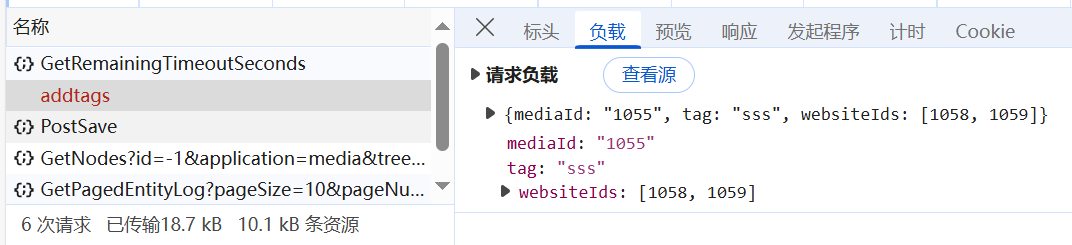
Why can't you request an interface

this is my DamTagsController

using Microsoft.AspNetCore.Mvc;
using Umbraco.Cms.Core.Cache;
using Umbraco.Cms.Core.Logging;
using Umbraco.Cms.Core.Models;
using Umbraco.Cms.Core.Routing;
using Umbraco.Cms.Core.Security;
using Umbraco.Cms.Core.Services;
using Umbraco.Cms.Core.Web;
using Umbraco.Cms.Infrastructure.Persistence;
using Umbraco.Cms.Infrastructure.Scoping;
using Umbraco.Cms.Web.Common.Filters;
using Umbraco.Cms.Web.Website.Controllers;
using UmbracoDemo.Models;

namespace UmbracoDemo.Controller
{
    public class DamTagsController(
            IUmbracoContextAccessor umbracoContextAccessor,
            IUmbracoDatabaseFactory databaseFactory,
            ServiceContext services,
            AppCaches appCaches,
            IProfilingLogger profilingLogger,
            IPublishedUrlProvider publishedUrlProvider,
            IMediaService _mediaService,
            IScopeProvider _scopeProvider,
            IMemberManager _memberManager) : SurfaceController(umbracoContextAccessor, databaseFactory, services, appCaches, profilingLogger, publishedUrlProvider)
    {


        [HttpPost]
        public IActionResult AddTags(int mediaId,string tag,List<int> websiteIds)
        {
            

            return Ok();
        }

        [HttpGet]
        public IActionResult GetTags(int mediaId )
        {
            using var scope = _scopeProvider.CreateScope();
            var tags = scope.Database.Fetch<MediaTags>("WHERE MediaId = @0", mediaId);
            scope.Complete();
            return Ok(tags);
        }
    }

    public class AddTagsRequest
    {
        public int mediaId { get; set; }
        public string tag { get; set; }
        public List<int> websiteIds { get; set; }
    }
}

this is custom app_plugins

<div ng-controller="DamTagsController">
    <input type="text" ng-model="newTag" placeholder="Add tag">
    <button ng-click="addTag()">Add</button>
    <ul>
        <li ng-repeat="tag in tags">{{tag.tag}}</li>
    </ul>
</div>
angular.module("umbraco").controller("DamTagsController", function ($scope, $http, relationResource, notificationsService, $routeParams) {
    $scope.addTag = function () {
        var data = {
            mediaId: $routeParams.id,
            tag: $scope.newTag,
            websiteIds: [1058, 1059]
        };
        $http.post("/umbraco/surface/damtags/addtags", data)
            .then(function (response) {
           
        });
    };
});

I can’t post to /umbraco/surface/damtags/addtags by calling the addTag function Return POST

https://localhost:44319/umbraco/surface/damtags/addtags 400 (Bad Request)
Possible unhandled rejections: {“data”:“”, “status”:400, “config”:{ “method": ‘POST’, ‘transformRequest’:[null], ” transformResponse":[null], ‘jsonpCallbackParam’: ‘callback’, ”url “: “/umbraco/surface/damtags/addtags”, “data”:{"mediaId “:123}, “headers”:{“Accept”: “application/json, text/plain, */* ”, “Content-Type”: “application/json; charset=utf-8”, “X-Requested-With “: “XMLHttpRequest”, “X-UMB-XSRF-TOKEN”: “CfDJ8AfCj-nqP4tPqfhn94K6Oebjtu_ eCikbMsIB1RqPGKWvtJF4Y1KeN3fmmPDEnvf1Irfk2bQX6LWqv3dSLMfU0G0OxD6RDlf0idi9UrxdTJfPGdx0yZA0_1tXhUIq0eBMqqZrawkjloyWnk0oqb-”. “Nhr9WDKJ8RRKFS_6CAeE6znuHTDI0rGodv8MzfZfrSw8YLw"}, ‘statusText’: “”, ‘xhrStatus’: ‘Done’}}.

$http.get(https://localhost:44319/umbraco/surface/damtags/gettags) It is possible to successfully request the
why,how to solve


For HttpPost you need to map the entire payload to a single parameter/model. So create a model with the mediaId, tag and websiteIds and use that model als the parameter of the AddTags function.

Not tested:

public class TagModel
{
    public int mediaId {get;set;}
    public string tag {get;set;}
    public IEnumerable<int> websiteIds {get;set;}
}


[HttpPost]
public IActionResult AddTags(TagModel data)
{
    return Ok();
}
1 Like

Think the problem is here: public IActionResult AddTags(int mediaId,string tag,List<int> websiteIds)

You should have 1 argument in this method, which is a model of the 3 inputs:

public class AddTagsRequest
{
    public int MediaId { get; set; }
    public string Tag { get; set; }
    public List<int> WebsiteIds { get; set; }
}

Then change the method to: public IActionResult AddTags([FromBody] AddTagsRequest tag)

That should help get you going.

Great minds think alike :smiley:

1 Like

Just as a note, this is dangerous what you’re doing here. You’re serving things straight from the database, which means that anybody in the world can hammer your database. Please consider at least putting a caching layer around this and/or rate limiting.

@Luuk @sebastiaan

using Microsoft.AspNetCore.Mvc;
using Umbraco.Cms.Core.Cache;
using Umbraco.Cms.Core.Logging;
using Umbraco.Cms.Core.Routing;
using Umbraco.Cms.Core.Services;
using Umbraco.Cms.Core.Web;
using Umbraco.Cms.Infrastructure.Persistence;
using Umbraco.Cms.Web.Website.Controllers;


namespace UmbracoDemo.Controller
{
    public class DamTagsController(
            IUmbracoContextAccessor umbracoContextAccessor,
            IUmbracoDatabaseFactory databaseFactory,
            ServiceContext services,
            AppCaches appCaches,
            IProfilingLogger profilingLogger,
            IPublishedUrlProvider publishedUrlProvider)
        : SurfaceController(umbracoContextAccessor, databaseFactory, services, appCaches, profilingLogger, publishedUrlProvider)
    {
        [HttpPost]
        public IActionResult AddTags([FromBody] TagModel data)
        {
            return Ok();
        }

        [HttpGet]
        public IActionResult GetTags(int mediaId)
        {
            return Ok();
        }
    }

    public class TagModel
    {
        public int mediaId { get; set; }
        public string tag { get; set; }
        public IEnumerable<int> websiteIds { get; set; }
    }
}
angular.module("umbraco").controller("DamTagsController", function ($scope, $http,$routeParams) {
    $scope.newTag = "";
    $scope.tags = [];

	$scope.addTag = function () {
		$scope.addTag = function () {
			var data = {
				mediaId: $routeParams.id,
				tag: $scope.newTag,
				websiteIds: [1058, 1059]
			};
			$http.post("/umbraco/surface/damtags/addtags", data)
				.then(function (response) {

				});
		};
	};

	$scope.loadTags = function (mediaId) {
		$http.get("/umbraco/surface/damtags/gettags", { params: { mediaId: mediaId } })
			.then(function (response) {
				$scope.tags = response.data;
			});
	};
	$scope.loadTags(111);
});


I modified the problem in the way you said, but the problem still exists.
call $scope.loadTags(111); The call to GetTags of DamTagsController can be successful.

I think instead of : SurfaceController, try : UmbracoApiController - that is more suitable for these kinds of requests. You URL then changes from /umbraco/surface/damtags/addtags to umbraco/api/damtags/addtags.

@sebastiaan @Luuk


Very good I can call AddTags by inheriting UmbracoApiController but why can I call GetTags by inheriting SurfaceController but not AddTags what is the reason?

A SurfaceController serves a different purpose. Usually a SurfaceController is for rendering partial (razor) views and handling form submissions. It not REALLY meant to be used as an endpoint for APIs, that’s what the UmbracoApiController is for.

SurfaceController is for submitting an HTML <form> and UmbracoApiController is exactly for what you’re trying to do, posting something to a controller asynchronously.

I see. Maybe because when inheriting SurfaceController and calling the post action, it is necessary to pass in RequestVerificationToken or antiforgeryToken in the header for verification.
Thank you for the answers from the two experts. Thank you.

This topic was automatically closed 30 days after the last reply. New replies are no longer allowed.