Hi @JafferHussain
Please add this on your .csproj file:
<ItemGroup Condition="'$(DesignTimeBuild)' == 'true'">
  <AdditionalFiles Include="**\*.cshtml" />

  <CompilerVisibleProperty Include="MSBuildProjectDirectory" />
</ItemGroup>
You may need to rebuild your solution and restart Visual Studio to force the design-time build context to refresh. After that, your breakpoints should bind normally in .cshtml files.
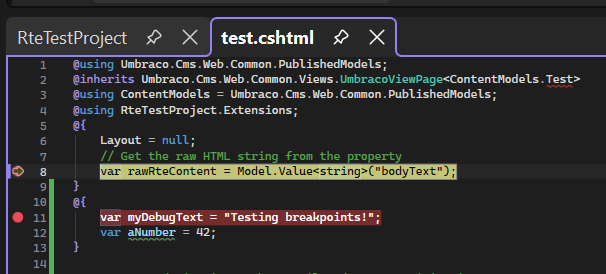
I just did a quick Umbraco 13 setup and tried it. Without this I was getting the same issue, after adding that code, I was able to add the breakpoint:
Here are some resources I found while looking into this:
opened 02:39AM - 14 Oct 25 UTC
closed 08:28AM - 24 Feb 26 UTC
author: migration bot
_This issue has been moved from [a ticket on Developer Community](https://develo… percommunity.visualstudio.com/t/Breakpoints-is-not-working-in-Razor-file/10978894)._
---
[severity:I'm unable to use this version] [regression] [worked-in:I don't this it ever worked in 2026.]
In Microsoft Visual Studio Community
Channel: Insiders
Version: 18.0.0 Insiders [11104.47]
Trying to set a breakpoint inside a "simple" .cshtml file isn't possible. If I switch to a an other version of VS, it is.
The status-bar in the bottom just responds: A breakpoint could not be inserted at this location.
---
### Original Comments
#### Feedback Bot on 09/10/2025, 01:18 PM:
<p>We have directed your feedback to the appropriate engineering team for further evaluation. The team will review the feedback and notify you about the next steps.</p>
#### Feedback Bot on 10/10/2025, 08:42 AM:
<p>This issue is currently being investigated. Our team will get back to you if either more information is needed, a workaround is available, or the issue is resolved.</p>
#### David Wengier [MSFT] on 10/10/2025, 01:03 PM:
<p>Thanks for reporting this issue. It’s a little surprising though, as we definitely had this bug in Insiders 1, but we fixed it for 2 in <a target='_blank' href="https://github.com/dotnet/razor/pull/12242">https://github.com/dotnet/razor/pull/12242</a> so you shouldn’t be running into it.</p>
<p>Does it repro 100% of the time for you? Or only sometimes? If you type a few characters in a Razor file, then close and reopen the file, does that make it work?</p>
<p>The other thing to check, and its a bit of the elephant in the room, is to run a repair in the VS installer, because the COMException in the tool window seems to indicate that you have something going on, and I can see in the logs that a debugger library has hit an error while loading.</p>
#### Janus Kamp Hansen (CodeOptimus) on 10/10/2025, 04:55 PM:
<p>Thank you for your answers. I appreciate that. I will try to follow up on your questions.</p>
<p>I can reproduce the problem, 100% of the time.</p>
<p>Wheather I try to set a breakpoint strait away after opening my project (any project) or I close the file and reopens it or another file.<br>
There are not differences either wheater I’ve just booted my machine or have had Visual Studio 2026 opened several times.<br>
Makes no difference - I can set breakpoints.</p>
<p>Using System.Diagnostics.Debugger.Break() makes the debugger break the code.</p>
<p>I’ve tried the “Repair”-feature of the Installed version from within the Visual Studio Installer, but after repairing it - no difference.</p>
#### David Wengier [MSFT] on 10/10/2025, 05:06 PM:
<p>Thanks for the quick response!</p>
#### Duncan Smart (lexonis.net) on 13/10/2025, 08:22 PM:
<p>Might be worth mentioning issue is for <strong><a target='_blank' href="http://ASP.NET">ASP.NET</a> Web Application (.NET Framework)</strong> projects (for us at least). I tried with a .NET Core Razor Pages and breakpoints still work there)</p>
#### David Wengier [MSFT] on 13/10/2025, 08:25 PM:
<p>That is definitely worth mentioning! It means when I was trying I was using entirely the wrong editor in VS! The .NET Framework editor is separate.</p>
#### Janus Kamp Hansen (CodeOptimus) on 13/10/2025, 08:39 PM:
<p>My project is NET9.0 project. Not a .NET Framework project.</p>
<pre><code><span class="hljs-tag"><<span class="hljs-name">Project</span> <span class="hljs-attr">Sdk</span>=<span class="hljs-string">"Microsoft.NET.Sdk.Web"</span>></span>
<span class="hljs-tag"><<span class="hljs-name">PropertyGroup</span>></span>
<span class="hljs-tag"><<span class="hljs-name">TargetFramework</span>></span>net9.0<span class="hljs-tag"></<span class="hljs-name">TargetFramework</span>></span>
<span class="hljs-tag"><<span class="hljs-name">ImplicitUsings</span>></span>enable<span class="hljs-tag"></<span class="hljs-name">ImplicitUsings</span>></span>
<span class="hljs-tag"><<span class="hljs-name">Nullable</span>></span>enable<span class="hljs-tag"></<span class="hljs-name">Nullable</span>></span>
<span class="hljs-tag"><<span class="hljs-name">NoWarn</span>></span>$(NoWarn); SYSLIB0021<span class="hljs-tag"></<span class="hljs-name">NoWarn</span>></span>
<span class="hljs-tag"></<span class="hljs-name">PropertyGroup</span>></span>
</code></pre>
<p>The chosen editor (If using “Open With”, while right-clicking on the .cshtml file) is: “HTML Editor (default)”.</p>
<p>Another observation: While Visual Studio is loading the editor comes into view and for a short while I am able to toggle breakpoints until all-of-a-sudden it stops working and VS statusbar says: A breakpoint could not be inserted at this location.</p>
#### David Wengier [MSFT] on 13/10/2025, 08:58 PM:
<p>Oops, sorry, didn’t notice that was a different person commenting. Just blindly responded to the email message 😃</p>
#### David Wengier [MSFT] on 13/10/2025, 09:23 PM:
<p>Looking at the logs from your report <a target='_blank' href="https://developercommunity.visualstudio.com/user/1523183/profile">Janus Kamp Hansen (CodeOptimus)</a> it looks like your project might be doing something custom with .razor files, which is making it incompatible with the Razor editor. I see this in the logs (and you should see it in the Output Window, under the “Razor Logger Output” category):</p>
<pre><code>[<span class="hljs-meta">Razor.LanguageClient.Cohost.IncompatibleProjectNotifier</span>] [<span class="hljs-number">09</span>:<span class="hljs-number">48</span>:<span class="hljs-number">05.1477085</span>] The Razor editor utilizes the Razor Source Generator, which requires *.razor and *.cshtml files to be AdditionalFiles <span class="hljs-keyword">in</span> the project. _Layout.cshtml appears to come <span class="hljs-keyword">from</span> <span class="hljs-string">'DinBilAuktion.dk'</span>, which has no Razor documents that are AdditionalFiles, so the editing experience will be limited. Is it <span class="hljs-keyword">using</span> the Razor SDK? No more messages will be logged <span class="hljs-keyword">for</span> <span class="hljs-keyword">this</span> project.
</code></pre>
<p>Does that sound reasonable? Or is this a standard web project?</p>
<p>If you create a new web application, or blazor application, from the default template does that still have the same issue?</p>
#### Janus Kamp Hansen (CodeOptimus) on 13/10/2025, 09:58 PM:
(private comment, text removed)
#### David Wengier [MSFT] on 13/10/2025, 10:21 PM:
<p><a target='_blank' href="/user/1514542">Duncan Smart (lexonis.net)</a> that’s a little surprising, the cohosting editor doesn’t support .NET Framework projects and should just defer to the same editor as if you have it off.</p>
#### Duncan Smart (lexonis.net) on 13/10/2025, 11:06 PM:
<p><a target='_blank' href="/user/95987">David Wengier [MSFT]</a> - our project is using <a target='_blank' href="https://github.com/CZEMacLeod/MSBuild.SDK.SystemWeb">https://github.com/CZEMacLeod/MSBuild.SDK.SystemWeb</a> (SDK-style projects for <a target='_blank' href="http://ASP.NET">ASP.NET</a> 4.x) which might make it a bit of an outlier.</p>
---
### Original Solutions
#### Duncan Smart (lexonis.net) solved on 13/10/2025, 10:18 PM, undefined votes:
<p>For a .NET Framework project, this workaround works for us: turn off <strong>Preview Features > Use Roslyn Cohost server for Razor</strong>.</p>
<p><img src="https://aka.ms/dc/image?name=B5181039bc29048b59baeb505de787b8a638959510308397570_20251013-121710-image.png&tid=5181039bc29048b59baeb505de787b8a638959510308397570" alt="image.png"></p>
#### Janus Kamp Hansen (CodeOptimus) solved on 13/10/2025, 10:24 PM, undefined votes:
<p>Deactivating the “Preview Feature” -> Use Roslyn Cohost server for Razor (requires restart) seems to do the trick.</p>
opened 11:12AM - 03 Feb 26 UTC
closed 05:23AM - 04 Feb 26 UTC
author: migration bot
_This issue has been moved from [a ticket on Developer Community](https://develo… percommunity.visualstudio.com/t/VS-2026-Insiders:-breakpoints-cant-be-s/11037578)._
---
[severity:It's more difficult to complete my work]
Hello,
It's impossible to set a breakpoint inside `@functions` blocks in Razor Views when using Roslyn Cohost server for Razor.
**Repro:**
- Start **VS 2026 Insiders [11426.168]** (latest one as of this writing).
- Make sure option **Use Roslyn Cohost server for Razor (requires restart)** is on.
- Create a new **ASP.NET Core Web App (Model-View-Controller)** project.
- Open file `Views\Home\Index.cshtml`.
- Replace contents with this code:
```csharp
@{
ViewData["Title"] = "Home Page";
}
@functions {
string GetTimeStamp()
{
return DateTime.Now.ToString("F");
}
}
<div class="text-center">
<h1 class="display-4">Welcome</h1>
<p>Learn about <a href="https://learn.microsoft.com/aspnet/core">building Web apps with ASP.NET Core</a>.</p>
@{
string timeStamp = GetTimeStamp();
<span>Current time: @timeStamp</span>
}
</div>
```
- Try setting a breakpoint on line `return DateTime.Now.ToString("F");`.
- **No breakpoint is set** and the status bar displays this message:
> A breakpoint could not be inserted at this location.
**Notes:**
- No problem when option **Use Roslyn Cohost server for Razor (requires restart)** is off.
- Any breakpoint set while the option is off _will still be hit_ when the option is set back on.
- Such a breakpoint can be _deleted_ but you can't recreate it while the option is on.
- Oddly enough, when the option is on, there are _no problems_ when setting a breakpoint in `@{}` blocks (e.g. on line `ViewData["Title"] = "Home Page";` or on line `string timeStamp = GetTimeStamp();`).
- Same problem is present at least in **VS 2026 Insiders [11408.92]**.
- This problem is **not the same as** roslyn issue [Visual Studio 2026 Insiders: Cant set a breakpoint in a razor @code function when using Razor Cohost #12243](https://github.com/dotnet/razor/issues/12243)
- No problem in **VS 2026 18.2.1** (but of course, there's no cohost option in that version).
---
Please fix that and make sure the fix also works in **Hot Reload** scenarios.
---
### Original Comments
#### Feedback Bot on 03/02/2026, 01:18 PM:
<p>We have directed your feedback to the appropriate engineering team for further evaluation. The team will review the feedback and notify you about the next steps.</p>
#### unknown_temp on 03/02/2026, 10:12 PM:
<p>Thanks for reporting this. I’m going to move it to our GitHub repo to fix, but before I do, I wanted to mention that this is caused by having C# code below the <code>@functions</code> block. Perhaps moving the block down to the end of the document might be a valid workaround, until the fix is available?</p>
While checking why it fails, I got this from AI:Visual Studio 2026 introduced a new editor architecture (the Roslyn Cohost server) which relies on a Razor Source Generator to handle IntelliSense and debugger bindings. For this generator to correctly map your .cshtml code to the runtime debugger, it requires all Razor files to be explicitly passed to the compiler as AdditionalFiles.
Standard ASP.NET Core MVC projects handle this mapping automatically under the hood via the base web SDK. However, Umbraco templates currently do not include the specific MSBuild logic the new editor expects. Because the editor cannot compute the target paths for your views, it fails to bind the breakpoints and throws the “A breakpoint could not be inserted at this location” error.
While it is technically a workaround rather than the permanent architectural fix (which would need to come from an official Umbraco or Microsoft SDK update), it uses standard, best-practice MSBuild logic.
Here is why you don’t need to worry about deploying this code:
The Magic of DesignTimeBuild
The most important part of that fix is this line: Condition="'$(DesignTimeBuild)' == 'true'"
In Visual Studio: When Visual Studio loads your project to provide IntelliSense, map debuggers, and show error squiggles, it runs a background evaluation called a “Design-Time Build.” During this phase, the condition is true, so the .cshtml files are fed to the new Razor editor engine, fixing your breakpoints.
In Production/CI Pipelines: When you actually compile your app to deploy it (using dotnet build, dotnet publish, or clicking “Build” for a release), this is a “Real Build.” During a real build, DesignTimeBuild is false.
Because of this condition, the compiler completely ignores the workaround when generating your final binaries. It has zero impact on your compiled application’s performance, file size, or runtime behavior.
Hope it helps!