I am about to embrak on writting my first package for Umbraco and am going to target v17. I am looking for advice for someone who has never written a package or done any extending of Umbraco. I know I am going to have to learn TypeScript (I think that is what it is called) for the backoffice and I think I once saw someone had like a starter template that might help a good place to start?
Any advice would be apreceated. The package will need it’s own tab in the backoffice and will also allow new properties to be added to document types.
and hey if u can set this up : GitHub - umbraco/Umbraco-CMS-Backoffice-Skills this will really help u if ur working with ai tools like claude , cursor. and we’re always here on the forum to help
I mainly mentioned those as structural inspiration as myself started from those, but you’re absolutely right for v17 it’s much better to start from the latest docs and current extension patterns
And if you want to get a leg up/quick start to see how things are working rather than spending loads of time setting up your development environment for the package then…
the docs tend to be super simple set up one dashboard, one property editor when you very quickly expand out and the opinionated-package-starter has the infrastructure there for multiple components in your package… as well as a test site, and the release cycle too!
Thanks this is what I was trying to remember for a template. I will start with getting that setup. Good to know that it has a test site to, I had forgoten to ask about that part.
This might also help a little (code samples are up to date for v17 latest), it is not 100% complete as the article is still a work in progress but may be of use (give me a shout if you have questions)
I just got the optional package installed and working, and looked at the tutorial on the Umbraco docs page and the building a custom polls feature you linked, but I don’t understand where to start. The opinioned package does not seem to have the same structure as talked about in either source so I am lost at where to start.
Does anyone know a good tutorial for creating a package using the opioniated package?
The problem is that the umdocs and that pill tutorial have diffent folder structures vs the opinionated package. I am just trying to figure out where all the files are supposed to go inside the package. Take the dashboard example you linked for umbraco. It says to create in the appsettings folder but the opionated package does not use that folder. I cant find anything telling me how the folder structure works and that is all i need to know so i can start messing with code and figuring the rest out.
It’s because getting a simple example up and running isn’t necessarily how you’d do it if creating a package.
The examples are more aligned to adding the extenstion to your site project, not creating a nuget package..
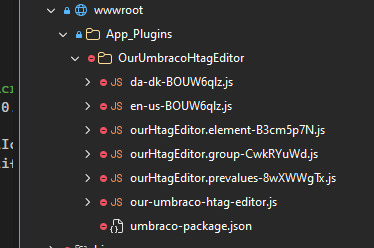
And as ever there are more than one way to skin a cat.. eg you can have it all in json manifests and js files in the wwwroot\app_plugins folder..
Next step up is vite building lit typescript files.. your manifest can move to cs code..
and then there is a package that could be inline files, or a razor class library with staticwebassets…
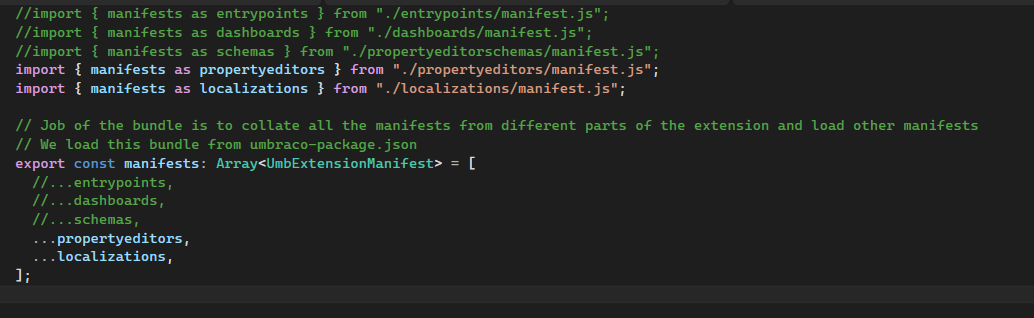
and your requirements could become a dashboard, with custom property editors etc… so then you might want to follow the opinionated-starter to have manifest bundles and modular comoponents that are all built togetther when the package is published..
Probably not making it any easier..
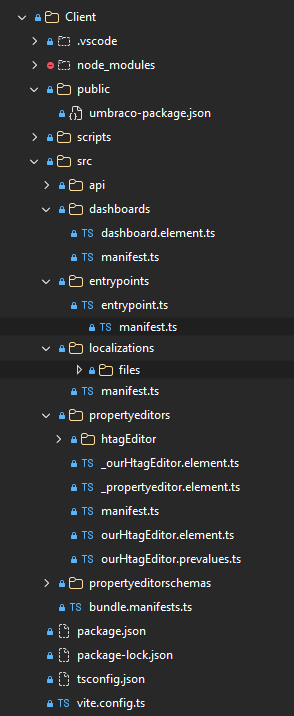
But in terms of the opionated-starter, once you have your development environment created from that template.. it;s the client/src folder..
and as it’s a razor class library once built those are automagically seen in your test site as it has a dependancy on the package project..
If you need api controllers for you package to fetch data etc.. then there are examples int he Contollers folder, and remember to add a composer if you need…
Thanks again for this, it has really helped me figure out the file mapping. I know undesrtand the client/public/umbraco-package.json is the same “app_plugins” json file talked about in the Umbraco docs. And I now understand that all the other stuff lives in the src folder as you talked about. I have succesfully made a new Umbraco Section and got it to show in the backoffice. With the understanding of the file structure I can now drive into the code and start work on my package. Apprecaite the explaination.

 welcome to the fun side of Umbraco