Hi all,
I’ve been trying to create a simple extension that hides a property, just like the example in the documentation. Except: I want to write it in vanilla JavaScript.
I managed to get most of it working myself. I started off with an umbraco-package.json:
{
“$schema”: “../../umbraco-package-schema.json”,
“name”: “Project.Backoffice”,
“version”: “1.0.0”,
“extensions”: [
{
“type”: “workspaceContext”,
“alias”: “Project.Backoffice.WorkspaceContext”,
“name”: “Project Backoffice Workspace context”,
“api”: “/App_Plugins/Project.Backoffice/workspace-context.js”,
“conditions”: [
{
“alias”: “Umb.Condition.WorkspaceAlias”,
“match”: “Umb.Workspace.Document”
}
]
}
]
}
And a worspace context file:
import { UmbControllerBase } from “@umbraco-cms/backoffice/class-api”;
import { UMB_DOCUMENT_WORKSPACE_CONTEXT } from “@umbraco-cms/backoffice/document”;

export class MyDocumentPropertyPermissionWorkspaceContext extends UmbControllerBase {
constructor(host) {
super(host);

    // Consume the document workspace context
    this.consumeContext(
        UMB_DOCUMENT_WORKSPACE_CONTEXT,
        (context) => {
            console.log(context);

            this.observe(context?.structure.propertyStructureByAlias('headerImage'), (property) => {
                console.log(property);

                // Create a guard rule:
                const rule = {
                    unique: 'hideHeaderImage',
                    permitted: false,
                    message: "The property is not writable because of my custom restriction.",
                    propertyType: {
                        unique: property.unique
                    }
                }
                // Add the rule to the write guard
                context.propertyWriteGuard.addRule(rule)
            });
        }
    );
}

}

export { MyDocumentPropertyPermissionWorkspaceContext as api };
The first console.log works fine and returns a context. However, I get an error within the observer:
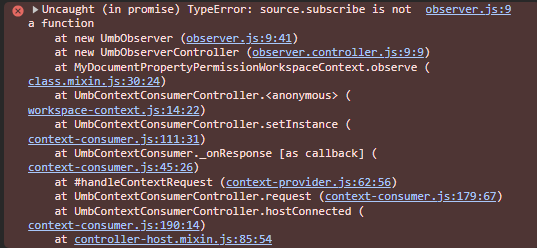
I’m using Umbraco 17.1.0. Has anyone tried this before? Bonus points if you know how to fetch all the properties of a certain tab of the current page. 
Cheers,
Richard