Hi @darrenhunterEmerald ,
I created a quick setup with your code (Fix added) and tested on Umbraco 17. It’s working as expected. Please check the below setup:
File: App_Plugins/OLS/umbraco-package.json
{
  "name": "OLS.Import.Package",
  "version": "1.0.0",
  "extensions": [
    {
      "type": "dashboard",
      "alias": "ols.dashboard.import",
      "name": "OLS File Import",
      "element": "/App_Plugins/OLS/ols-extension.js",
      "weight": 100,
      "meta": {
        "label": "OLS Import",
        "pathname": "ols-import"
      },
      "conditions": [
        {
          "alias": "Umb.Condition.SectionAlias",
          "match": "Umb.Section.Content"
        }
      ]
    }
  ]
}
File: App_Plugins/OLS/ols-extension.js
import { UmbElementMixin } from "@umbraco-cms/backoffice/element-api";
import { UMB_AUTH_CONTEXT } from '@umbraco-cms/backoffice/auth';

var _authentication;

const template = document.createElement("template");
template.innerHTML = `
  <style>
    :host {
      padding: 20px;
      display: block;
      box-sizing: border-box;
    }
  </style>

  <uui-box style="height:400px;Width:auto;">
    <h1>OLS File Import</h1>
    <form id="ols-form">
      <uui-input-file id="upload" name="input-file" multiple></uui-input-file>
      <uui-button style="margin-top: 16px" type="submit" look="primary" label="Submit" id="formSubmit"></uui-button>
    </form>
  </uui-box>
`;

export default class MyDashboardElement extends UmbElementMixin(HTMLElement) {
    constructor() {
        super();
        this.attachShadow({ mode: "open" });
        this.shadowRoot.appendChild(template.content.cloneNode(true));

        this.shadowRoot
            .getElementById("ols-form")
            .addEventListener("submit", this.onClick.bind(this));

        this.consumeContext(UMB_AUTH_CONTEXT, (_auth) => {
            if (_auth) {
                _authentication = _auth;
            } else {
                console.log("Auth context is missing");
            }
        });
    }

    onClick = (e) => {
        e.preventDefault();

        const fileUploader = this.shadowRoot.getElementById("upload");
        const files = fileUploader.value;

        if (!files || files.length === 0) {
            console.log("No files selected to upload.");
            return;
        }

        const formData = new FormData();

        files.forEach(file => {
            formData.append("files", file);
        });

        this.saveData(formData);
    };

    async saveData(formDataPayload) {
        const url = "/umbraco/management/api/v1/ols/import";
        const TOKEN = await _authentication?.getLatestToken();

        const response = await fetch(url, {
            method: 'POST',
            credentials: 'include',
            headers: {
                'Authorization': 'Bearer ' + TOKEN
            },
            body: formDataPayload
        });

        if (!response.ok) {
            console.log("Upload failed with status:", response.status);
        } else {
            console.log("File uploaded successfully!");
        }
    }
}

customElements.define("ols-extension", MyDashboardElement);
File: Controllers/OLSController.cs
using Microsoft.AspNetCore.Mvc;
using Umbraco.Cms.Api.Common.Attributes;
using Umbraco.Cms.Api.Management.Controllers;
using Umbraco.Cms.Api.Management.Routing;
using Microsoft.AspNetCore.Hosting;
using System.IO;
using System.Linq;

namespace MyUmbracoProjecttestSQL11.Controllers
{
    [VersionedApiBackOfficeRoute("ols/import")]
    [ApiExplorerSettings(GroupName = "OLS")]
    [MapToApi("ols-api")]
    public class OLSController : ManagementApiControllerBase
    {
        private readonly IWebHostEnvironment _webHostEnvironment;

        public OLSController(IWebHostEnvironment webHostEnvironment)
        {
            _webHostEnvironment = webHostEnvironment;
        }

        [HttpPost]
        public IActionResult UpdateAddressRecords()
        {
            if (!Request.Form.Files.Any())
            {
                return BadRequest("No files received.");
            }

            var rootPath = _webHostEnvironment.ContentRootPath;
            var targetDirectory = Path.Combine(rootPath, "ols_csv_files");

            if (!Directory.Exists(targetDirectory))
            {
                Directory.CreateDirectory(targetDirectory);
            }

            foreach (var formFile in Request.Form.Files)
            {
                if (formFile.Length > 0)
                {
                    string safeFileName = Path.GetFileName(formFile.FileName);
                    string targetFilePath = Path.Combine(targetDirectory, safeFileName);

                    using (FileStream stream = new FileStream(targetFilePath, FileMode.Create))
                    {
                        formFile.CopyTo(stream);
                    }
                }
            }

            return Ok("Files uploaded successfully");
        }
    }
}
How to Test
-
Build and run your Umbraco 17 project.
-
Log in to the backoffice.
-
Navigate to the Content section.
-
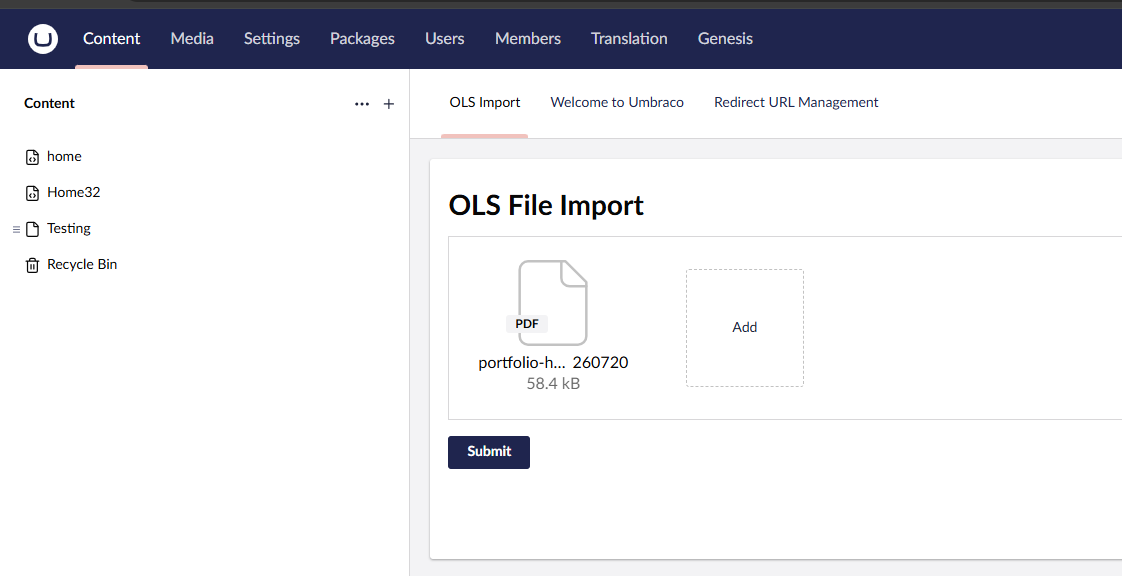
You will see a new tab labeled “OLS Import” at the top of the dashboard area.
-
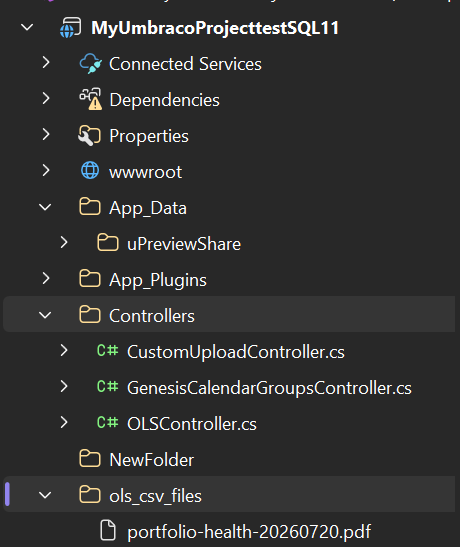
Select a CSV file and hit submit. Check your browser console for the “File uploaded successfully!” message, and check the root
ols_csv_filesfolder in your project directory to verify the file was saved.
Please try it out!
Here’s some info on what was wrong on the code which you pasted:
In the JavaScript:
- As @Luuk has mentioned, You are setting content-type to
application/x-www-form-urlencoded. For files, you must leave the Content-Type blank so the browser can automatically setmultipart/form-dataand generate the required boundary string. This is why your C# controller was receiving garbage data. - Missing File Data: Standard
FormData(formElement)doesn’t automatically pull files out of custom web components like<uui-input-file>. You had to manually grab the files from the element’s.valueproperty and append them to theFormDataobject. - The Credentials Location:
credentials: 'include'was placed inside theheadersobject. The fetch API expects it at the root level of the configuration object.
In the C# controller:
- Security Risk: You passed
formFile.FileNamedirectly into theFileStream. If a malicious filename contained../../../, it could overwrite server files outside your target directory. You neededPath.GetFileName()to sanitize it. - Path Building: You mixed string concatenation with
Path.Combine(Path.Combine(rootPath + "\\ols_csv_files\\", filename)), which defeats the purpose of the method. - Return Type: Returning
JsonResult("OK")doesn’t send the proper HTTP status codes back to the fetch API. Swapping toIActionResultallows you to return properOk()orBadRequest()responses.
Hope it helps!
Regards,
Shekhar