Upload CSV file Issue

I am trying to upload a CSV file for a custom section of one of our site. I am trying to convert code that used to use AJAX to use Fetch.

But I am not seeing the file at the other side (C# control)

Here is my code can some one advise what I am doing wrong.

import { UmbElementMixin } from "@umbraco-cms/backoffice/element-api";
import { UMB_NOTIFICATION_CONTEXT } from "@umbraco-cms/backoffice/notification";
import { UMB_AUTH_CONTEXT } from '@umbraco-cms/backoffice/auth';
import { UMB_DOCUMENT_WORKSPACE_CONTEXT } from '@umbraco-cms/backoffice/document';
import { UmbPaginationManager } from '@umbraco-cms/backoffice/utils';
import { UUIPaginationEvent } from '@umbraco-cms/backoffice/external/uui';

var _authentication;

const template = document.createElement("template");
template.innerHTML = `
	  <style>
	    :host {
	      padding: 20px;
	      display: block;
	      box-sizing: border-box;
	    }
	  </style>
	
	  <uui-box style="height:400px;Width:auto;">
	    <h1>OLS File Import</h1>
		<form id="ols-form">
		  <uui-input-file id="upload" name="input-file" multiple></uui-input-file>
		  <uui-button style="margin-top: 16px" type="submit" look="primary" label="Submit" id="formSubmit"></uui-button>
		</form>
	  </uui-box>
	`;

export default class MyDashboardElement extends UmbElementMixin(HTMLElement) {
	/** @type {import('@umbraco-cms/backoffice/notification').UmbNotificationContext} */
	#notificationContext;

	constructor() {
		super();
		this.attachShadow({ mode: "open" });
		this.shadowRoot.appendChild(template.content.cloneNode(true));

		this.shadowRoot
			.getElementById("ols-form")
			.addEventListener("submit", this.onClick.bind(this));


		this.consumeContext(UMB_AUTH_CONTEXT, (_auth) => {
			if (_auth) {
				_authentication = _auth;
			} else {
				console.log("The document workspace context is gone, I will make sure my code disassembles properly.")
			}
		});

	}

	onClick = (e) => {
		e.preventDefault();
		const formElement = e.target;
		const formData = new FormData(formElement);
		console.log(formData);
		const data = formData.getAll('input-file');
		saveData(formData);

	};
	

}

async function saveData(d) {

	var data = d;
	console.log('Files', data);

	var url = "/umbraco/management/api/v1/ols/import";
	
	const TOKEN = await _authentication?.getLatestToken();
	const response = await fetch(url, {
		method: 'POST',
		headers: {
			'Content-Type': 'application/x-www-form-urlencoded',
			'Authorization': 'Bearer ' + TOKEN,
			'credentials': 'include'

		},
		body:data

		
	});
	console.log(response);

	if (!response.ok) {
		console.log(response.status);
	} else {
		console.log("OK!");
	}
}


customElements.define("ols-extension", MyDashboardElement);


sing Microsoft.AspNetCore.Mvc;
using Umbraco.Cms.Api.Common.Attributes;
using Umbraco.Cms.Api.Management.Controllers;
using Umbraco.Cms.Api.Management.Routing;
using Umbraco.Cms.Core.Models;
using UmbracoCMS.App_Code.Models;

namespace UmbracoCMS.App_Code.Controllers
{
    [VersionedApiBackOfficeRoute("ols/import")]
    [ApiExplorerSettings(GroupName = "OLS")]
    [MapToApi("ols-api")]
    public class OLSController : ManagementApiControllerBase
    {
        private readonly IWebHostEnvironment _webHostEnvironment;

        public OLSController(
            IWebHostEnvironment webHostEnvironment
            ) {
            _webHostEnvironment = webHostEnvironment;
        }


        [HttpPost]
        public JsonResult updateAddressRecords()
        {
            var formCollection = Request.Form;
            var rootPath = _webHostEnvironment.ContentRootPath;

            if (!System.IO.Directory.Exists(rootPath + "\\ols_csv_files"))
            {
                System.IO.Directory.CreateDirectory(rootPath + "\\ols_csv_files");
            }

            List<custom_CheckPropertyDetails_Result> lst = new List<custom_CheckPropertyDetails_Result>();

            IFormFileCollection files = Request.Form.Files;

            foreach (IFormFile formFile in files)
            {
                if (formFile.Length > 0)
                {

                    string filename = formFile.FileName;

                    using (FileStream stream = new FileStream(Path.Combine(rootPath + "\\ols_csv_files\\", filename), FileMode.Create))
                    {
                        formFile.CopyTo(stream);

                    }


                }

            }


            return new JsonResult("OK");
        }
    }
}

I was expecting to get a file I can save to the file system, and then process that file. 

I am either seeing nothing or grabage.

Can some point me in the correct direction.

Thanks

The issue is that you’re manually setting Content-Type: application/x-www-form-urlencoded while sending a FormData object. I’ll create an example, one moment :slight_smile:

This is an example from a project I was doing. It uses the file upload element, which I highly recommend:

import { css, customElement, html, state } from '@umbraco-cms/backoffice/external/lit';
import { UmbLitElement } from '@umbraco-cms/backoffice/lit-element';
import { UMB_AUTH_CONTEXT } from '@umbraco-cms/backoffice/auth';

@customElement('my-csv-upload')
export class MyCsvUploadElement extends UmbLitElement {
  @state() private _file: File | null = null;

  #auth?: typeof UMB_AUTH_CONTEXT.TYPE;

  constructor() {
    super();
    // Grab the backoffice auth context so we can attach a valid bearer token.
    this.consumeContext(UMB_AUTH_CONTEXT, (auth) => (this.#auth = auth));
  }

  #onFileChange(event: Event) {
    const files = (event as CustomEvent).detail?.files as File[] | undefined;
    this._file = files?.[0] ?? null;
  }

  async #upload() {
    if (!this._file) return;

    // 1) Put the file in a FormData under a key ('file') that matches the
    //    [FromForm] parameter name on the controller.
    const formData = new FormData();
    formData.append('file', this._file);

    const token = await this.#auth?.getLatestToken();

    const response = await fetch(
      '/umbraco/management/api/v1/my/import-csv',
      {
        method: 'POST',
        body: formData,
        headers: {
          Accept: 'application/json',
          ...(token ? { Authorization: `Bearer ${token}` } : {}),

          // â›” DO NOT set 'Content-Type' here.
          // With a FormData body the browser sets it automatically to
          // 'multipart/form-data; boundary=...'. Setting it manually strips
          // the boundary, and the file never reaches IFormFile on the server.
        },
      }
    );

    console.log(response.status, await response.json());
  }

  override render() {
    return html`
      <uui-file-dropzone accept=".csv" @change=${this.#onFileChange}></uui-file-dropzone>
      <uui-button look="primary" label="Upload" @click=${this.#upload}></uui-button>
    `;
  }
}
using Asp.Versioning;
using Microsoft.AspNetCore.Authorization;
using Microsoft.AspNetCore.Http;
using Microsoft.AspNetCore.Mvc;
using Umbraco.Cms.Api.Management.Controllers;
using Umbraco.Cms.Api.Management.Routing;
using Umbraco.Cms.Web.Common.Authorization;

namespace MyProject;

[ApiController]
[ApiVersion("1.0")]
[VersionedApiBackOfficeRoute("my")] // -> /umbraco/management/api/v1/my
[Authorize(Policy = AuthorizationPolicies.BackOfficeAccess)]
public class MyCsvController : ManagementApiControllerBase
{
    [HttpPost("import-csv")]
    [Consumes("multipart/form-data")]            // this endpoint expects a file upload
    [ProducesResponseType(StatusCodes.Status200OK)]
    [ProducesResponseType(StatusCodes.Status400BadRequest)]
    public async Task<IActionResult> ImportCsv(
        [FromForm] IFormFile? file,              // name MUST match formData.append('file', ...)
        CancellationToken cancellationToken)
    {
        if (file is null || file.Length == 0)
            return BadRequest("No file uploaded.");

        if (!Path.GetExtension(file.FileName).Equals(".csv", StringComparison.OrdinalIgnoreCase))
            return BadRequest("Only .csv files are allowed.");

        // Read the uploaded CSV straight from the request stream.
        using var reader = new StreamReader(file.OpenReadStream());
        var content = await reader.ReadToEndAsync(cancellationToken);

        // ... parse `content` (e.g. with CsvHelper) and persist the rows ...

        return Ok(new { fileName = file.FileName, length = file.Length });
    }
}

This is an example of an CSV file upload we use for an import.

Hi @darrenhunterEmerald ,

I created a quick setup with your code (Fix added) and tested on Umbraco 17. It’s working as expected. Please check the below setup:

File: App_Plugins/OLS/umbraco-package.json

{
  "name": "OLS.Import.Package",
  "version": "1.0.0",
  "extensions": [
    {
      "type": "dashboard",
      "alias": "ols.dashboard.import",
      "name": "OLS File Import",
      "element": "/App_Plugins/OLS/ols-extension.js",
      "weight": 100,
      "meta": {
        "label": "OLS Import",
        "pathname": "ols-import"
      },
      "conditions": [
        {
          "alias": "Umb.Condition.SectionAlias",
          "match": "Umb.Section.Content"
        }
      ]
    }
  ]
}

File: App_Plugins/OLS/ols-extension.js

import { UmbElementMixin } from "@umbraco-cms/backoffice/element-api";
import { UMB_AUTH_CONTEXT } from '@umbraco-cms/backoffice/auth';

var _authentication;

const template = document.createElement("template");
template.innerHTML = `
  <style>
    :host {
      padding: 20px;
      display: block;
      box-sizing: border-box;
    }
  </style>

  <uui-box style="height:400px;Width:auto;">
    <h1>OLS File Import</h1>
    <form id="ols-form">
      <uui-input-file id="upload" name="input-file" multiple></uui-input-file>
      <uui-button style="margin-top: 16px" type="submit" look="primary" label="Submit" id="formSubmit"></uui-button>
    </form>
  </uui-box>
`;

export default class MyDashboardElement extends UmbElementMixin(HTMLElement) {
    constructor() {
        super();
        this.attachShadow({ mode: "open" });
        this.shadowRoot.appendChild(template.content.cloneNode(true));

        this.shadowRoot
            .getElementById("ols-form")
            .addEventListener("submit", this.onClick.bind(this));

        this.consumeContext(UMB_AUTH_CONTEXT, (_auth) => {
            if (_auth) {
                _authentication = _auth;
            } else {
                console.log("Auth context is missing");
            }
        });
    }

    onClick = (e) => {
        e.preventDefault();
        
        const fileUploader = this.shadowRoot.getElementById("upload");
        const files = fileUploader.value; 
        
        if (!files || files.length === 0) {
            console.log("No files selected to upload.");
            return;
        }

        const formData = new FormData();
        
        files.forEach(file => {
            formData.append("files", file); 
        });

        this.saveData(formData);
    };
    
    async saveData(formDataPayload) {
        const url = "/umbraco/management/api/v1/ols/import";
        const TOKEN = await _authentication?.getLatestToken();
        
        const response = await fetch(url, {
            method: 'POST',
            credentials: 'include',
            headers: {
                'Authorization': 'Bearer ' + TOKEN
            },
            body: formDataPayload
        });

        if (!response.ok) {
            console.log("Upload failed with status:", response.status);
        } else {
            console.log("File uploaded successfully!");
        }
    }
}

customElements.define("ols-extension", MyDashboardElement);

File: Controllers/OLSController.cs

using Microsoft.AspNetCore.Mvc;
using Umbraco.Cms.Api.Common.Attributes;
using Umbraco.Cms.Api.Management.Controllers;
using Umbraco.Cms.Api.Management.Routing;
using Microsoft.AspNetCore.Hosting;
using System.IO;
using System.Linq;

namespace MyUmbracoProjecttestSQL11.Controllers
{
    [VersionedApiBackOfficeRoute("ols/import")]
    [ApiExplorerSettings(GroupName = "OLS")]
    [MapToApi("ols-api")]
    public class OLSController : ManagementApiControllerBase
    {
        private readonly IWebHostEnvironment _webHostEnvironment;

        public OLSController(IWebHostEnvironment webHostEnvironment)
        {
            _webHostEnvironment = webHostEnvironment;
        }

        [HttpPost]
        public IActionResult UpdateAddressRecords()
        {
            if (!Request.Form.Files.Any())
            {
                return BadRequest("No files received.");
            }

            var rootPath = _webHostEnvironment.ContentRootPath;
            var targetDirectory = Path.Combine(rootPath, "ols_csv_files");

            if (!Directory.Exists(targetDirectory))
            {
                Directory.CreateDirectory(targetDirectory);
            }

            foreach (var formFile in Request.Form.Files)
            {
                if (formFile.Length > 0)
                {
                    string safeFileName = Path.GetFileName(formFile.FileName);
                    string targetFilePath = Path.Combine(targetDirectory, safeFileName);

                    using (FileStream stream = new FileStream(targetFilePath, FileMode.Create))
                    {
                        formFile.CopyTo(stream);
                    }
                }
            }

            return Ok("Files uploaded successfully");
        }
    }
}

How to Test

  1. Build and run your Umbraco 17 project.

  2. Log in to the backoffice.

  3. Navigate to the Content section.

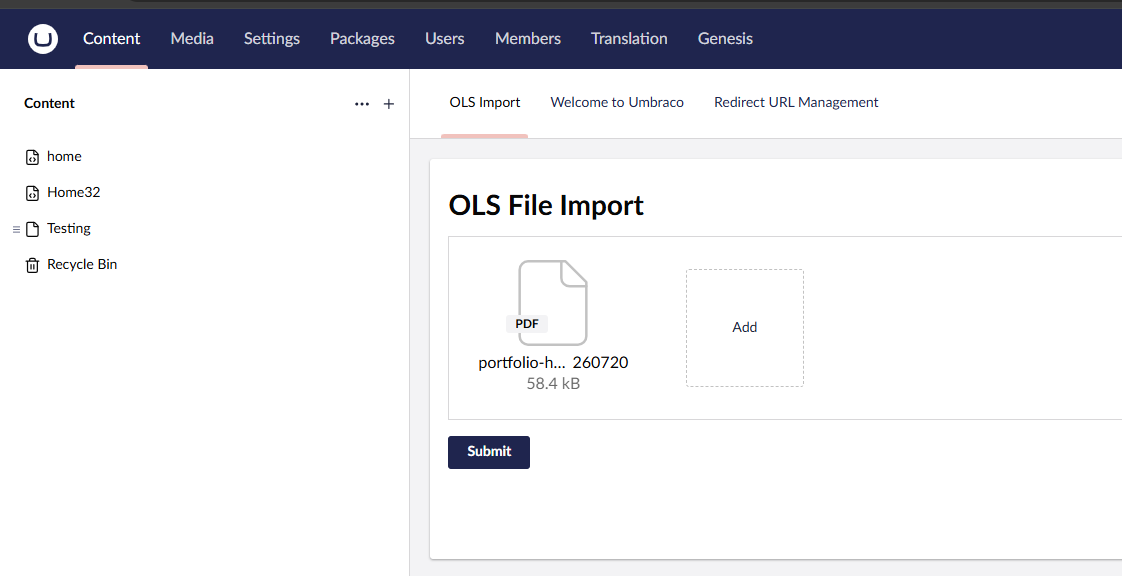
  4. You will see a new tab labeled “OLS Import” at the top of the dashboard area.

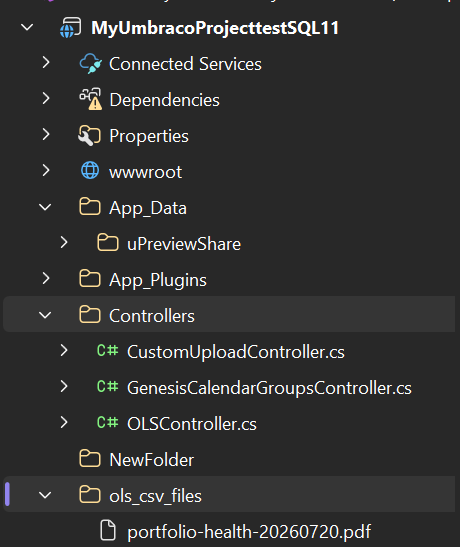
  5. Select a CSV file and hit submit. Check your browser console for the “File uploaded successfully!” message, and check the root ols_csv_files folder in your project directory to verify the file was saved.

Please try it out!

Here’s some info on what was wrong on the code which you pasted:

In the JavaScript:

  • As @Luuk has mentioned, You are setting content-type to application/x-www-form-urlencoded. For files, you must leave the Content-Type blank so the browser can automatically set multipart/form-data and generate the required boundary string. This is why your C# controller was receiving garbage data.
  • Missing File Data: Standard FormData(formElement) doesn’t automatically pull files out of custom web components like <uui-input-file>. You had to manually grab the files from the element’s .value property and append them to the FormData object.
  • The Credentials Location: credentials: 'include' was placed inside the headers object. The fetch API expects it at the root level of the configuration object.

In the C# controller:

  • Security Risk: You passed formFile.FileName directly into the FileStream. If a malicious filename contained ../../../, it could overwrite server files outside your target directory. You needed Path.GetFileName() to sanitize it.
  • Path Building: You mixed string concatenation with Path.Combine (Path.Combine(rootPath + "\\ols_csv_files\\", filename)), which defeats the purpose of the method.
  • Return Type: Returning JsonResult("OK") doesn’t send the proper HTTP status codes back to the fetch API. Swapping to IActionResult allows you to return proper Ok() or BadRequest() responses.

Hope it helps!

Regards,
Shekhar

Sily Question, how would I clear the uploaded files from the uui-input-file after upload done. I have disabled the submit button, but I also like to clear the file list as well.

I been playing with different bits of Javascript doing form resets ect, and trying to clear the uui-input-file but nothing seems to work.

Hi @darrenhunterEmerald ,

Please try this JavaScript once. I have added the code for the input reset after submission:
File: App_Plugins/OLS/ols-extension.js

import { UmbElementMixin } from "@umbraco-cms/backoffice/element-api";
import { UMB_AUTH_CONTEXT } from '@umbraco-cms/backoffice/auth';

var _authentication;
const template = document.createElement("template");
template.innerHTML = `
  <style>
    :host {
      padding: 20px;
      display: block;
      box-sizing: border-box;
    }
  </style>

  <uui-box style="height:400px;Width:auto;">
    <h1>OLS File Import</h1>
    <form id="ols-form">
      <!-- The uploader element we will be replacing -->
      <uui-input-file id="upload" name="input-file" multiple></uui-input-file>
      <uui-button style="margin-top: 16px" type="submit" look="primary" label="Submit" id="formSubmit"></uui-button>
    </form>
  </uui-box>
`;

export default class MyDashboardElement extends UmbElementMixin(HTMLElement) {
    constructor() {
        super();
        this.attachShadow({ mode: "open" });
        this.shadowRoot.appendChild(template.content.cloneNode(true));

        this.shadowRoot
            .getElementById("ols-form")
            .addEventListener("submit", this.onClick.bind(this));

        this.consumeContext(UMB_AUTH_CONTEXT, (_auth) => {
            if (_auth) {
                _authentication = _auth;
            } else {
                console.log("Auth context is missing");
            }
        });
    }

    onClick = (e) => {
        e.preventDefault();

        const fileUploader = this.shadowRoot.getElementById("upload");
        const files = fileUploader.value;

        if (!files || files.length === 0) {
            console.log("No files selected to upload.");
            return;
        }

        const formData = new FormData();

        files.forEach(file => {
            formData.append("files", file);
        });

        this.saveData(formData);
    };

    async saveData(formDataPayload) {
        const url = "/umbraco/management/api/v1/ols/import";
        const TOKEN = await _authentication?.getLatestToken();

        const fileUploader = this.shadowRoot.getElementById("upload");
        const submitButton = this.shadowRoot.getElementById("formSubmit");

        submitButton.state = 'waiting';

        try {
            const response = await fetch(url, {
                method: 'POST',
                credentials: 'include',
                headers: {
                    'Authorization': 'Bearer ' + TOKEN
                },
                body: formDataPayload
            });

            if (!response.ok) {
                console.log("Upload failed with status:", response.status);
                submitButton.state = 'failed';
            } else {
                console.log("File uploaded successfully!");
                submitButton.state = 'success';

                // THE SAFE VANILLA JS FIX:
                // Use the DOM parser to replace the component. 
                // This completely bypasses the strict `createElement` constructor restriction.
                fileUploader.outerHTML = '<uui-input-file id="upload" name="input-file" multiple></uui-input-file>';
            }
        } catch (error) {
            console.error("Upload error:", error);
            submitButton.state = 'failed';
        } finally {
            setTimeout(() => {
                submitButton.state = '';
            }, 2500);
        }
    }
}

customElements.define("ols-extension", MyDashboardElement);