Upgrade 13.5.2 -> 17.1.0

I’m trying to upgrade Upgrade 13.5.2 → 17.1.0.

I have taken a copy of the code, upgraded the nuget packages, made various adjustments to get to the point of getting things to compile and running as a clean install.

I’ve then made a copy of our production database and updated the db settings to point at this copy.

On startup, I get the following message, saying the current version is 17.0.0, not 13.5.2 as I had expected:

Detected current version 17.0.0 ({CC47C751-A81B-489A-A2BC-0240245DB687}), which needs to be upgraded to 17.1.0+2832436 ({1CE2E78B-E736-45D8-97A2-CE3EF2F31BCD}). To compare versions and read a report of changes between versions, use the View Report button below

When I click to perform the upgrade, I get (after a short while):

The database failed to upgrade. ERROR: The database configuration failed with the following message: ‘DF_umbracoAccess_createDate’ is not a constraint. Could not drop constraint. See previous errors. Please check log file for additional information (can be found in ‘LoggingSettings.Directory’)

Should I have done something prior to shifting to the copy of the 13.5.2 db?

Best regards.
Think the advice is always update to the latest minor.. so 13.13.0 first…
But still might not solve the issue, but worth a shot.

I absolutely agree. Make sure have updated every package to the latest Umbraco 13 release to make sure you are at the leastest and greates with the most issues solved. This way you are in the best position for a successful upgrade. Yes, technically, you should be able to update directlly from 13.5.2, but in my experience, that’s just not simply always the case.

I’ve done the upgrade to 13.13.0, which didn’t seem to trigger a db update (I certainly wasn’t prompted for one). I confirmed in the UI that I was looking at 13.13.0.

When I then run the v17 version, I notice in the console output that several tables are altered/created on startup - before I get to the Upgrade screen.

I also see the warning “Microsoft.Data.SqlClient.SqlException (0x80131904): Invalid column name ‘performingUserKey’. Invalid column name ‘affectedUserKey’.” - unsure if this was before or after I logged in and was passed to the upgrade screen.

The upgrade screen looks as before, with reference to v17.0.0.

When I click upgrade, I end up with the same error message, e.g. “‘DF_umbracoAccess_createDate’ is not a constraint. Could not drop constraint.”

What’s the next step?

Umbraco-CMS/src/Umbraco.Infrastructure/Migrations/Upgrade/UmbracoPlan.cs at main · umbraco/Umbraco-CMS

Here’s the migration plan…

In your original message, To<V_13_5_0.ChangeRedirectUrlToNvarcharMax>("{CC47C751-A81B-489A-A2BC-0240245DB687}"); the key is correct there for the last DB migration in 13.x and you are correct there isn’t any DB changes post 13.5.0 (though you don’t specifically get prompted in the upgrade process if there is a DB Change) – ps the message stating 17.0.0 is your current version is wrong..

Still just fetches the upgrader Major version.. with a TODO in the codebase
Umbraco-CMS/src/Umbraco.Core/Factories/UpgradeSettingsFactory.cs at main · umbraco/Umbraco-CMS

I’ve had a look in a v13 DB and I definately have a DF_umbracoAccess_createDate Contraint..


I can see it’s also present in a v12 and a v11 db I have.

So not sure why the v13 DB you are updating indicates it’s missing? Perhaps check for it’s existence in you clean v13 backup? It may well be a red-herring?

Can you try to make the upgrade to the latest Umbraco 17 version instead of 17.0.0, just in case. I think there were some fixes for migrations in 17.1.0. So skip 17.0.0 all together.

I am in the loop of upgrading multiple sites from 13.5.2 to 17.0.2. Everytime i do something like this (giong from one LTS to another) i can never realy get it working by just going directly to the latest version - I always end up doing it in two parts. So perhaps this wil work for you.

This is the current guide i have for Upgrading from version 13.5.2 to 17.0.2.
NOTE: If you are using other packages from Umbraco, try and find as close version to the Umbraco.CMS package as possible.

Upgrade to 16 as the first step

  1. First validate that you don’t have any nested content data somewhere in your solution. Use the following DB query for finding data that will cause problems in the upgrade (normalle gives a json error). SELECT DISTINCT n.* FROM umbracoPropertyData pd JOIN umbracoContentVersion cv ON cv.id = pd.versionId JOIN umbracoNode n ON n.id = cv.nodeId WHERE LTRIM(pd.textValue) LIKE '[[]%' -- fanger JSON arrays med whitespace AND pd.textValue LIKE '%"ncContentTypeAlias"%' ORDER BY n.id;
  2. If you found some old nested content data, either migrate it to block list correctly or remove it (sometimes most of the data is in the trash bin).
  3. Open you Umbraco solution locally
  4. Remove the /obj, /bin, /umbraco/data/TEMP, /Umbraco/logs and /uSync folder (this just clears all data from your solution before doing the upgrade).
  5. Set the TargetFramework to .net 9
  6. Update you nugetpackages to the following versions
    6.1 Umbraco.cms → 16.1.1
    6.2 Umbraco.Forms → 16.1.0
    6.3 If you want to keep TinyMCE you must install the TinyMCE.Umbraco 16.1.1 NOW!
  7. Check your solution for any custom code, that might need to be updated or changed.
  8. Run the upgrade with attended → UpgradeUnattended: false (this help me for some reason).

Note: If you experience an error saying “Parameter key1 is missing” or somthing similar, you just need to run the upgrade again.

Upgrade to 17.

  1. Set you TargetFramework to .NET 10
  2. Update you umbraco nuget packages to the following
    2.1 Umbraco.CMS → 17.0.2
    2.2 Umbraco.Forms → 17.03
  3. Run the upgrade

This seemed to be the rigth path for our solution, that was first started af an Umbraco 7 project, and since then has been updated to the latest LTS.

I’ve recently gone through this pain too and posted a question which might also be useful for you.

Using Umbraco Deploy on Premise to Migrate from U13 → U17 - Umbraco community forum

First, a big thank you to all of those that took time out to reply to this.

After a few false starts, I did manage the direct upgrade from 13.5.2 to 17.1.0 after messing around a bit with the database.

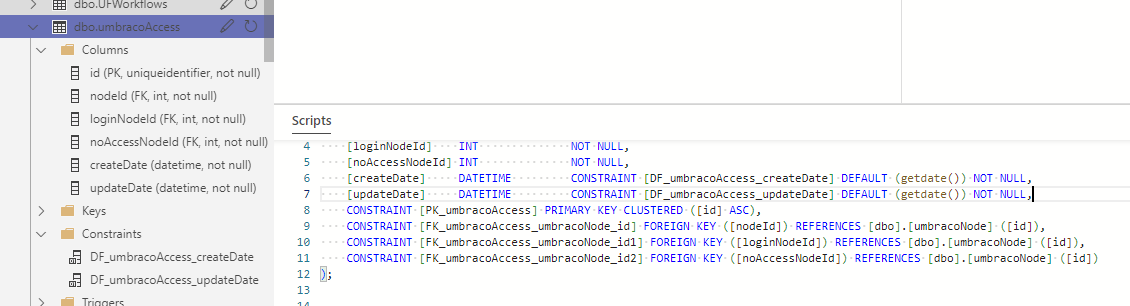
As the original error message stated, a constraint had gone missing. Several, in fact. More to the point, the constraints were there, but at some point in history they had lost their defined names and been created with what looks like system-generated ones.

For anyone coming by in the future, I had to run the following script before the upgrade (remember to back up your db before attempting this):

exec sp_rename 'DF__umbracoAc__creat__4D4A6ED8', 'DF_umbracoAccess_createDate', 'OBJECT'; 
exec sp_rename 'DF__umbracoAc__updat__4E3E9311', 'DF_umbracoAccess_updateDate', 'OBJECT'; 
exec sp_rename 'DF__umbracoAc__creat__5026DB83', 'DF_umbracoAccessRule_createDate', 'OBJECT'; 
exec sp_rename 'DF__umbracoAc__updat__4F32B74A',  DF_umbracoAccessRule_updateDate', 'OBJECT'; 
exec sp_rename 'DF__umbracoEx__creat__56D3D912', 'DF_umbracoExternalLogin_createDate', 'OBJECT';
exec sp_rename 'DF__umbracoLo__Dates__5B988E2F', 'DF_umbracoLog_Datestamp', 'OBJECT';
exec sp_rename 'DF__umbracoNo__creat__5D80D6A1', 'DF_umbracoNode_createDate', 'OBJECT';
exec sp_rename 'DF__umbracoRe__datet__5F691F13', 'DF_umbracoRelation_datetime', 'OBJECT';
exec sp_rename 'DF__umbracoSe__regis__61516785', 'DF_umbracoServer_registeredDate', 'OBJECT'

Once that had run, the db upgrade step appears to run smoothly (after ignoring the strange “you are upgrading from v. 17.0.0” message).

Once again, thank you @mistyn8, @Luuk , @Steffen_HK and @OwainWilliams

1 Like