Hi,
We run a local staging instance of our Umbraco website on a IIS webserver. Up until Umbraco 17 this has worked fine.
After i upgraded our website to Umbraco 17 i can’t start our website on IIS anymore.
.NET 10 hosting bundle is installed and running (we have other .NET 10 web apps running on this IIS server).
When i start umbraco it fails with a “HTTP Error 500.30 - ASP.NET Core app failed to start”
If i look in the event log it fails with a “System.IO.FileNotFoundException” for BloomFilter.dll:
Application: w3wp.exe
CoreCLR Version: 10.0.326.7603
.NET Version: 10.0.3
Description: The process was terminated due to an unhandled exception.
Exception Info: System.IO.FileNotFoundException: Could not load file or assembly 'BloomFilter, Version=2.5.2.0, Culture=neutral, PublicKeyToken=576e0622f1b9661e'. The system cannot find the file specified.
File name: 'BloomFilter, Version=2.5.2.0, Culture=neutral, PublicKeyToken=576e0622f1b9661e'
   at System.Reflection.RuntimeAssembly.InternalLoad(AssemblyName assemblyName, StackCrawlMark& stackMark, AssemblyLoadContext assemblyLoadContext, RuntimeAssembly requestingAssembly, Boolean throwOnFileNotFound)
   at System.Reflection.Assembly.Load(AssemblyName assemblyRef)
   at Umbraco.Cms.Core.Composing.ReferenceResolver.ResolveAssemblies()
   at Umbraco.Cms.Core.Composing.FindAssembliesWithReferencesTo.Find()
   at Umbraco.Cms.Core.Composing.DefaultUmbracoAssemblyProvider.get_Assemblies()
   at Umbraco.Cms.Core.Composing.TypeFinder.GetAllAssemblies()
   at Umbraco.Cms.Core.Composing.TypeFinder.GetFilteredAssemblies(IEnumerable`1 excludeFromResults, String[] exclusionFilter)
   at Umbraco.Cms.Core.Composing.TypeFinder.get_AssembliesToScan()
   at Umbraco.Cms.Core.Composing.TypeLoader.get_AssembliesToScan()
   at Umbraco.Cms.Core.Composing.TypeLoader.<>c__DisplayClass13_0`1.<GetTypes>b__1()
   at Umbraco.Cms.Core.Composing.TypeLoader.GetTypesInternalLocked(Type baseType, Type attributeType, Func`1 finder, String action, Boolean cache)
   at Umbraco.Cms.Core.Composing.TypeLoader.GetTypesInternal(Type baseType, Type attributeType, Func`1 finder, String action, Boolean cache)
   at Umbraco.Cms.Core.Composing.TypeLoader.GetTypes[T](Boolean cache, IEnumerable`1 specificAssemblies)
   at Umbraco.Cms.Core.DependencyInjection.UmbracoBuilderExtensions.AddAllCoreCollectionBuilders(IUmbracoBuilder builder)
   at Umbraco.Cms.Core.DependencyInjection.UmbracoBuilder.AddCoreServices()
   at Umbraco.Cms.Core.DependencyInjection.UmbracoBuilder..ctor(IServiceCollection services, IConfiguration config, TypeLoader typeLoader, ILoggerFactory loggerFactory, IProfiler profiler, AppCaches appCaches)
   at Umbraco.Extensions.UmbracoBuilderExtensions.AddUmbraco(IServiceCollection services, IWebHostEnvironment webHostEnvironment, IConfiguration config)
   at Umbraco.Extensions.WebApplicationBuilderExtensions.CreateUmbracoBuilder(WebApplicationBuilder builder)
   at Program.<Main>$(String[] args) in C:\Users\<redacted>\<redacted>\Visual Studio\<redacted>\Program.cs:line 36
   at Program.<Main>(String[] args)
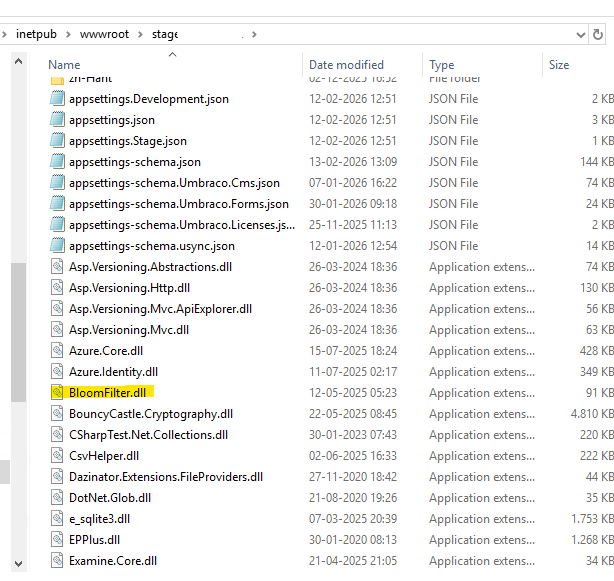
If i then look in the root folder for the website, the BloomFilter.dll is right there:
I can run the website just fine on my development PC.