In Umbraco Workflow (v17.0.2), how can we hide the content apps (“Versions” + “Workflow”) for specific doctypes? I cannot find this in the documentation anywhere, perhaps I am blind 
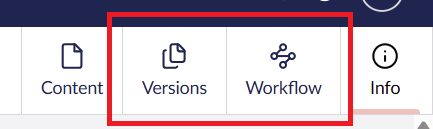
Workspace views are - like everything else - an extension in Umbraco. You can add conditions to existing extensions. I have an example here:
In this example, I’m using a custom condition, but you can ofcourse also use existing conditions in Umbraco.
1 Like
Thanks @Luuk ! I recently used conditions in a content app (workspace view) of our own, I wasn’t aware we can add conditions to built-in ones too and that this is now “the way” to do it. I was hoping Workflow just exposed some simple config / UI option for this, but this will work I suppose. Thanks again!
For future visitors, this was the smallest solution for my problem in vanilla JS. Based on Luuk’s sample above. Register as an backofficeEntryPoint. Update SHOW_ON_DOCUMENT_TYPES for your use case. This will show the Umbraco Workspace content apps (“Versions” and “Workflow”) only on these doctypes.
import { UMB_WORKSPACE_CONTENT_TYPE_ALIAS_CONDITION_ALIAS } from "@umbraco-cms/backoffice/content-type";
import { UMB_WORKSPACE_CONDITION_ALIAS } from "@umbraco-cms/backoffice/workspace";

const WORKSPACE_VIEWS = [
    // Versions
    "Workflow.AlternateVersions.WorkspaceView.Document",

    // Workflow
    "Workflow.WorkspaceView.Document"
];

const SHOW_ON_DOCUMENT_TYPES = [
    "homepage", "contentpage", "newsArticle", "searchPage"
];

export const onInit = (_, extensionRegistry) => {
    for (const workspaceView of WORKSPACE_VIEWS) {
        extensionRegistry.appendConditions(workspaceView, [{
            alias: UMB_WORKSPACE_CONDITION_ALIAS,
            match: "Umb.Workspace.Document",
        }, {
            alias: UMB_WORKSPACE_CONTENT_TYPE_ALIAS_CONDITION_ALIAS,
            oneOf: SHOW_ON_DOCUMENT_TYPES,
        }])
    }
}
This topic was automatically closed 30 days after the last reply. New replies are no longer allowed.