The blogs that I used to publish on umbraco’s website were posing no issues but suddenly, every blog that I publish isn’t appearing on the website. It’s a drag and drop cms so I haven’t done any custom scripting or anything for blog. It is as is.
After a few days, it will appear on the google search but not on the website.
I have checked if it’s under the correct parent page. I have tried publishing several new ones, refreshed cache but nothing works.
The fact that it does appear in the Google search kind of suggest the page exists on the website and is available in the sitemap. Can you op[en the sitemap page and see if that url works.
Also could also be a stylesheet thing that the content is invisible while available, do you get an error on the page, if so which ? If not if you right click and View Source can you see if the page text appear in the source ? Then it might be a matter of tweaking with the styles.
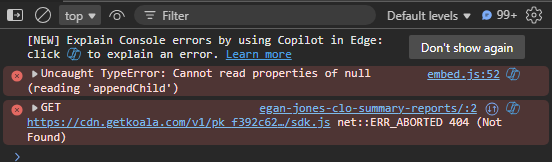
Ok, the first error indicates that a script (embed.js) has issues with adding something to the page, so this could have something todo with the issue.
The second one relates to a getkoala script not being fond, think this is an analysis tool so this has a lessor risk of being the issue.
2 things I woul try, since there are client side things going wrng maybe smething has updated but your browser still holds old information in the cache. Pressing control-F5 (Windows) or run site in incognito mode might give a better result.
The in the CMS you have a Info tab on the upper right corner from there you can click on the url of the page. Does this give an error or an empty page? In case of an empty page, right click and View Source to see if the page contains the actual text or is actually empty. In case text is there in View Source mode it might be styling causing the issue.