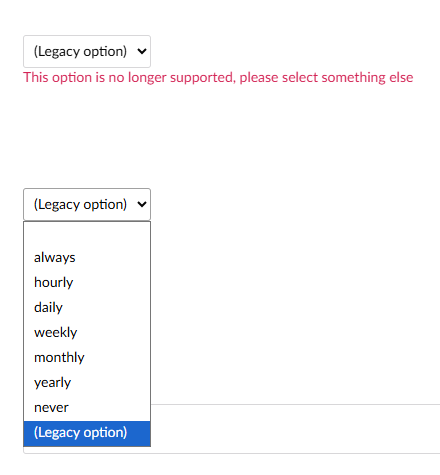
Tested a v13 → v16 upgrade. The pages all failed to publish on upgrade and it’s because each page has a couple of dropdowns which are optional. Most pages this value hasn’t been set by the user which is fine in v13 - you just get a blank dropdown.
In v16 it seems to be mandatory - this isn’t great IMHO - at the very least there should still be a setting on this so that you can enable / disable a not set dropdown. Have a lot of logic that allows dropdowns to be optional (just like you can leave a text field blank)
Only workaround I can think of at the moment is to create my own property data type… urgh.
Can’t see an issue in the issue tracker for this so I’m going to create it.
I didn’t fix it but Umbraco core team have fixed this issue in v16.3 
I may have marked this as fixed too soon.
Now when I upgrade the “legacy option” is still highlighted in red- for editors this means trawling through tabs and block lists trying to find which property, which worked fine in v13, is now not allowing them to publish an existing content node.
The Blank default option is in the list so can be selected but I believe the migration should be setting this not whatever is forcing the (Legacy option)
Looking at the raw DB - looks like
is stored in earlier versions where as this blank is not stored at all (so no row in [umbracoPropertyData] for this property types if drop down is empty).
For my migration testing I guess I can just delete all instances of [““] in the tables but it would be a smoother upgrade if the dropdowns can either handle the old empty or they are deleted as part of the migration?