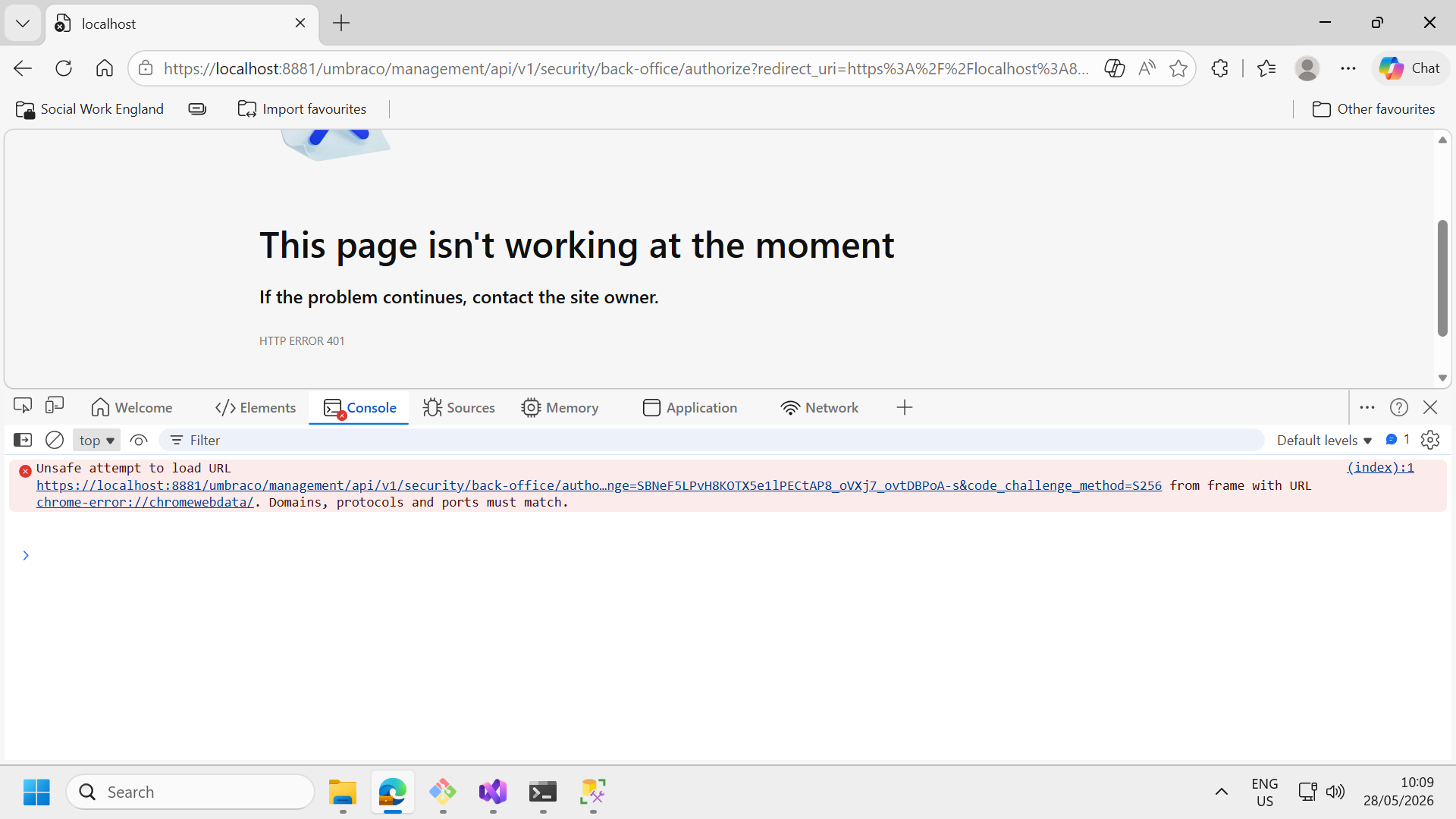
I am trying to upgrade our project from U 13.13.1 to U 14.3.2, but application returning 401 error. I have share few details and attached screenshot below.
These are the few serilogs details:
[INF] Umbraco is in “Upgrade” mode, so uSync will not run this time.
2026-05-28 10:04:09.404 +05:30 [INF] The request URI matched a server endpoint: “Authorization”.
2026-05-28 10:04:09.428 +05:30 [INF] The authorization request was successfully extracted: {
“redirect_uri”: “https://localhost:8881/umbraco/oauth_complete”,
“client_id”: “umbraco-back-office”,
“response_type”: “code”,
“state”: “kutzaaXgOvEd”,
“scope”: “offline_access”,
“prompt”: “consent”,
“access_type”: “offline”,
“code_challenge”: “SBNeF5LPvH8KOTX5swe1lPECtAP8_oVXj7_ovtDBPoA-s”,
“code_challenge_method”: “S256”
}.
2026-05-28 10:04:09.795 +05:30 [INF] The authorization request was successfully validated.
Why are you upgrading to Umbraco 13? You can upgrade from Umbraco 13 > 17 directly. I think there were also some errors in the migration of earlier versions. I would highly recommend upgrading to 17.
You will need to using something like uSync Migrations to migrate Nested Content to block list. Likewise, if you have any Grid Layout this will need to be migrated to Block Grid and any RTE macros will need to be converted to RTE blocks. You will also need to update any obsolete data types in the backoffice and switch to newer supported versions. Once you have done this, your upgrade path to v17 should be smoother. You may still have custom backoffice code that needs converting from Angular to Web Components but you can do that once you are on v17.
As @luuk said, you can go directly from v13 to v17, you should not need to go through the intermediate STS versions.
Or if you feel like helping me out, I’m building a package that you just install and press ‘convert’ on and it should convert the nested content to block list. It’s loosly based on AutoBlockList. It’s currently in beta. The idea is that you do the conversion BEFORE upgrading past Umbraco 13. It’s in beta, so it needs some love, but the migration part is ready, I just need more testing.
There is a version of uSync Migrations for v13 but it is a pre-release and there was never a final release. You will need to tick the pre-releases box on NuGet to see it. Install this on a v13 project and do a full export of schema and content, then run a migration and import the result of the migration. This will migrate Nested Content to Block List and Grid Layout to Block List. You may need to perform extra migration work depending on your requirements and the complexity of your content.
Once you have migrated your data, you can then upgrade beyond v13.
I tried both uSync migration and AutoBlockList, but data is not loading. uSync / AutoBlockList failed to convert Nested Content JSON → Block List JSON correctly.
I tried [Umbraco.Community.LegacyFeatureConverter 13.0.0-beta.4] but it’s not working.
Is there any other tools we can use, or do we need to create script for it?
I think you’ve got two options left if that hasn’t worked for you:
Use AI, such as Claude Code to convert the data in the exported uSync files from Nested Content to Block List. You would need to write a prompt explaining what and how to do the conversion but it may be able to convert the XML files that you can then re-import.
Write your own migration code which loops through your content using the IContentService, detecting the Nested Content properties that need migrating. Read each Nested Content JSON data and convert it to the required Block List JSON structure and re-publish the content.
What do you mean by that they are all not working? Do you get errors? I find it hard to believe that no options works. There is a possibility that you have corrupt or invalid data in the database ofcourse. But without more information, that’s really hard to debug remotely.
Thank you @justin-nevitech , we created custom migration code and converted all required properties. Fixed all issue and application working fine.
One last issue we are facing related backoffice home node, It’s not loading. Except home node all others child node working fine. We checked logs file but no error available related it.
If we save Home document type then it’s started working but if we reload page then again loading issue came. I tried to delete few doc type section, some time it’s working sometime not.
Hi @Luuk , we were getting issue related block list. I installed new blank U17 site and created block list and compared with my updated site block list. Both Json structure was different.
I agree, we might had corrupte or invalid data in the database. But now I only have one home node loading issue. Which I mentioned detailed in @justin-nevitech chat thread, rest all fixed and application working.
Have you checked both the Umbraco logs and the console in your bowser for any errors? If you create another new home node, does this load without any issues? If so, there must be something data related in your existing home node that is problematic. You will need to rule things out one at a time until you find the problem.
It sounds like you may have some data corruption issues from your migration.
As @Luuk says, it’s quite hard to debug this remotely without seeing more.
Hi @justin-nevitech Ajeet and My self working together. We have verified the Umbraco /logs , serilogs folder (With Verbose logs) and console logs in browser no issues reported. We have verified the api in network tab, no request pending or no 401, 500 or 400 error s reported .We have 80+ properties (combination of 6 compositions and property groups). We tried to create 80+ properties in brand new application its working fine . when we try to create brand new document type in existing application its stucks .
Is there any limitation or configuration on number of properties or any timeout configuration
Note: I have verified the html elements but no elements rendered apart from loading symbol . @Ajeetkmr154
I’m not aware of any limits but I have seen slow performance on the back office when documents have lots of properties in v17 - specifically we had issues using multiple sliders.
If you can narrow down the issue it may be best to log an issue on the Umbraco issue tracker if you’ve ruled out any custom or third-party properties being the culprit.
Obviously take a backup first, but can you remove a property one at a time and see if the problem goes away?
We have 108 properties (combination of 6 compositions and property groups).
Below 60 properties, it started working.
Notice few more scenario - 1) Some time even with 50 properties it is not working.
2) With same 50 properties, we have one document type with empty properties. When I deleted empty properties document type then home node stated loading.
Also, we haven’t any duplicate properties in home node.
If they are all properties using data types provided by Umbraco core and not custom or third-party data types and you can re-produce this, then I would raise it as an issue with Umbraco on the issue tracker:
If you are able to consolidate or move properties on the home page elsewhere (i.e. create a Settings node), that may help for now.
Hi @justin-nevitech , We upgraded our application from U13 to U17. Then we did all conversion like, Nested content to block list, Media picker to Media picker3 and so on, with our custom migration code. Is it reason for home node loading issue?