I’m trying to implement a custom extension for the new RTE (Tiptap). This is how my manifest:
{
  "type": "tiptapToolbarExtension",
  "kind": "button",
  "alias": "Tiptap.Toolbar.SoftHyphen",
  "name": "Soft Hyphen",
  "api": "/App_Plugins/CustomExtensions/softHyphenTiptap.js",
  "meta": {
    "alias": "softHyphen",
    "icon": "icon-brush",
    "label": "Soft Hyphen"
  }
}
This is my extension:
import { UmbTiptapToolbarElementApiBase } from '@umbraco-cms/backoffice/tiptap';
import type { Editor } from '@umbraco-cms/backoffice/external/tiptap';

export default class KwSoftHyphenTiptapExtensionApi extends UmbTiptapToolbarElementApiBase {
    override execute(editor?: Editor) {
        editor?.commands.insertContent("­")
    }
}
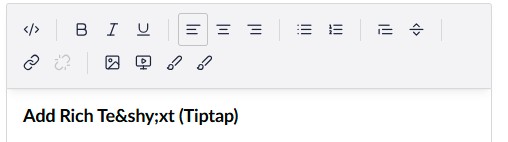
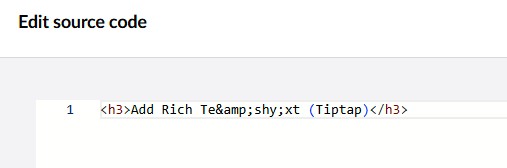
The extension inserts to the selected place, but the & symbol has been encoded.
View:
The source code:
The same happens if you use some HTML such as < mark >, but an example from their support page with < h1 > tag works.
I’m not sure if there is a list of allowed characters.
How to prevent encoding?
This is a companion discussion topic for the original entry at https://our.umbraco.com/forum/115111-umbraco-tiptap-rte-insert-custom-content