Maybe I am going insane or missed something. This post is to just see if anyone else experienced the same issue.
We are working on a v13 to v17 upgrade and working on getting our packages across. However somehow our Azure Web app is reporting Umbraco at 17.2.0 in the back office? It should be 17.1.0 based on csproj.
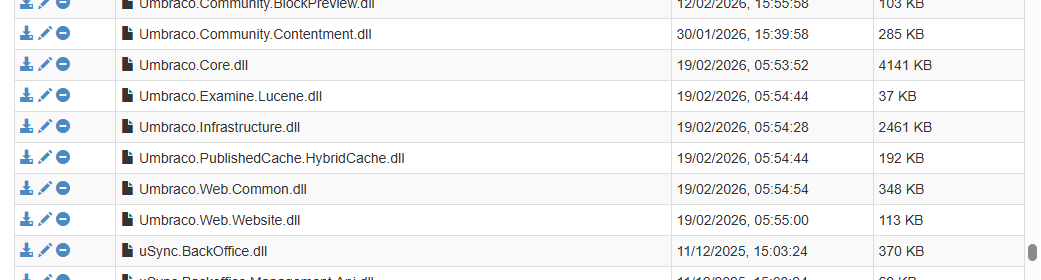
Looking at the DLLs the date time show them changing at 5am on the 19th? We haven’t made any deployments at this time.
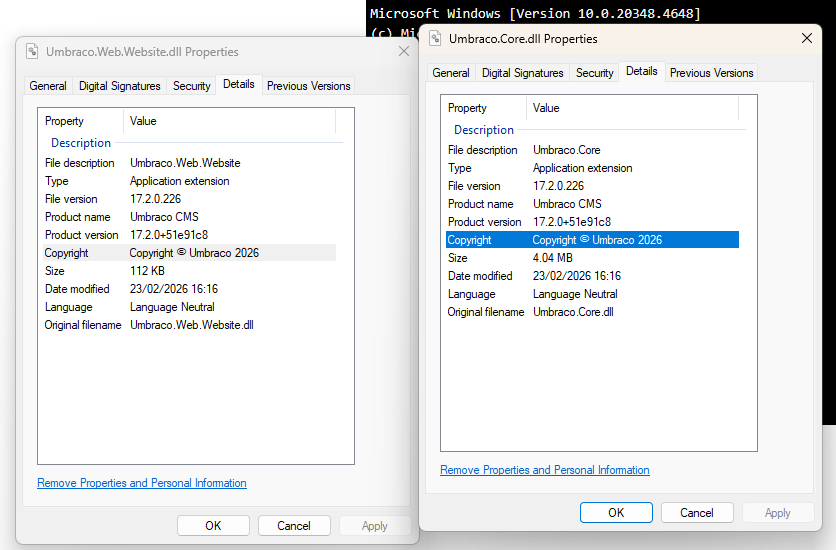
I downloaded the dlls to check the properties and they show as 17.2.0? Not sure how this is possible if we haven’t made an upgrade ourselves. Can Umbraco self download DLLs?
So I’ve started using the Umbraco Extension and followed the tutorial linked above. I’m using this with a project that we’re updating from v13 to v17. We started this when 17.1.0 was out and used this to update our Umbraco backoffice.
Everything was fine until suddenly we started getting errors from our database and couldn’t log in as we we’re being prompted with an upgrade message. It turned out that our 17.1.0 database had been updated to 17.2.0 even though none of the development team had updated to 17.2.0! After some digging around we noticed that the Umbraco Extentions project has its dependencies for Umbraco set to * rather than a specific number. I can only assume the reason for this is so that no matter when someone is using the extension’s template, it will work with the latest version of Umbraco. However, the problem with this is that when someone builds their project either locally or via a deployment, it’s going to download the latest version as instructed by the Extensions project and when Umbraco runs, it’s going to update the db to the latest version.
Is this intended? Not evey project is going to be immediately updated to the latest and greatest version of Umbraco when it comes out! The linked tutorial doesn’t seem to warn that this could happen and you’re not prompted to specify a version when running the dotnet set up. You can however set a version if you add it via Visual Studio. Seem to me that having the dotnet run like this seems a risky approach that could inadvertedly start upgrading instances when not required?
That said, even it was there before, I guess you both started around 17.0.0 or 17.1.0 so wouldn’t have really noticed this problem before as you were already on the latest version
Simon is my colleague, I think its safe to assume this was the cause, as I can’t think of any other method a newer version of Umbraco could sneak in like this.
Yes that’s right, so we had a project in 17.1.0 and then one of our development team ran the project after the 17.2.0 release came out and it looks like it’s pulled down 17.2.0 via the Extention’s project. No other references in the project to 17.2.0, so pretty certain this is the culprit.
I think there is also an additional knock on, in that * when resolved at the pack stage will set the lower boundary to 17.2.1 (currently) when the nuget package is created.
And that is probably by design to avoid what is occurring here? (you have this as a project in your solution and not a nuget package)
Also there is the thought that the template is only a starting point, once you have the project set up you can tailor to your own needs… eg >=17.0.0 <20.999 ([17.0.0,20.999)) is also a reasonable if you expect your extension project/nuget package to work up until the next LTS..
Or you might be a developer who ties package/project versions to specific umbraco versions??
Also your project/package might have a specific dependency on a minor.. so you’d need to set that lower boundary as required?
I don’t think there is a default that fits all here? (but the issue with project vs package and resolution of * is not what’s intended)
Another thought.. if you set unattended install then you can have it upgrade silently for you.. so some might actually want/leverage this functionality ! (though would break at v21 with the .net framework change )
I was just upgrading a v13 prep project to v17.0 last night and much to my surprise when I first loaded it up the Backoffice was telling me it was on 17.2! I was so confused haha! All the nuget packages and everything still said 17.0 and I didn’t know what to do but just carry on and get them to latest minor version officially.
Glad to see I wasn’t just crazy or did something bizarre xD I thought I’d just mention it here that this seems to have effected the 17.0’s getting pulled down fresh too.



 )
)