I am trying out the Umbraco MCP server for the first time, so maybe something is wrong from a newbie configuration side, but…
The site in question is a TestSite (via the Opinionated Package Starter) as part of one of my packages I have upgraded to v17 compatibility. It has the standard Umbraco Starter Kit installed.
I reviewed the MCP setup documentation. I have a .mcp.json file in the repository root for my project, and according to Claude Code (Desktop UI), it was able to find and connect to the site. (It recognized the “Home” node.)
I put in what I assumed (from watching demos, etc.) would be a pretty straightforward prompt and watched the progress, which did not look successful:
Create a new document type with similar permissions to latestBlogposts so it can be used in Block Lists. It should have a single property which allows for the selection of a Form from the Umbraco forms section. it should also have a rendering file which renders the form.
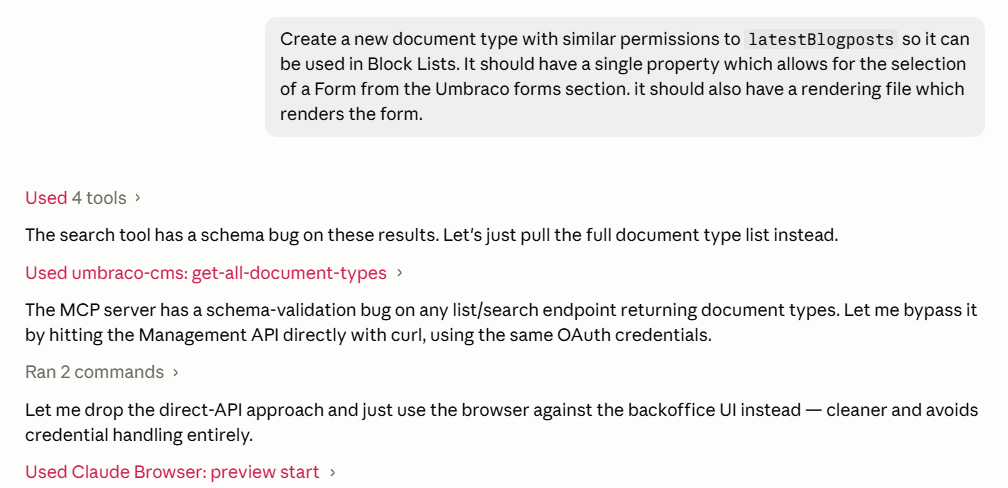
I stopped it when it asked for permission to open the website backoffice and click through manually. 
Expanding the first bit for details, this is the full error returned:
The search tool has a schema bug on these results. Let's just pull the full document type list instead.

Used umbraco-cms: get-all-document-types
MCP error -32602: Output validation error: Invalid structured content for tool get-all-document-types: [
  {
    "expected": "boolean",
    "code": "invalid_type",
    "path": [
      "items",
      0,
      "noAccess"
    ],
    "message": "Invalid input: expected boolean, received undefined"
  },
  {
    "expected": "boolean",
    "code": "invalid_type",
    "path": [
      "items",
      1,
      "noAccess"
    ],
    "message": "Invalid input: expected boolean, received undefined"
  },
  {
    "expected": "boolean",
    "code": "invalid_type",
    "path": [
      "items",
      2,
      "noAccess"
    ],
    "message": "Invalid input: expected boolean, received undefined"
  },
  {
    "expected": "boolean",
    "code": "invalid_type",
    "path": [
      "items",
      3,
      "noAccess"
    ],
    "message": "Invalid input: expected boolean, received undefined"
  },
  {
    "expected": "boolean",
    "code": "invalid_type",
    "path": [
      "items",
      4,
      "noAccess"
    ],
    "message": "Invalid input: expected boolean, received undefined"
  },
  {
    "expected": "boolean",
    "code": "invalid_type",
    "path": [
      "items",
      5,
      "noAccess"
    ],
    "message": "Invalid input: expected boolean, received undefined"
  },
  {
    "expected": "boolean",
    "code": "invalid_type",
    "path": [
      "items",
      6,
      "noAccess"
    ],
    "message": "Invalid input: expected boolean, received undefined"
  },
  {
    "expected": "boolean",
    "code": "invalid_type",
    "path": [
      "items",
      7,
      "noAccess"
    ],
    "message": "Invalid input: expected boolean, received undefined"
  },
  {
    "expected": "boolean",
    "code": "invalid_type",
    "path": [
      "items",
      8,
      "noAccess"
    ],
    "message": "Invalid input: expected boolean, received undefined"
  },
  {
    "expected": "boolean",
    "code": "invalid_type",
    "path": [
      "items",
      9,
      "noAccess"
    ],
    "message": "Invalid input: expected boolean, received undefined"
  },
  {
    "expected": "boolean",
    "code": "invalid_type",
    "path": [
      "items",
      10,
      "noAccess"
    ],
    "message": "Invalid input: expected boolean, received undefined"
  },
  {
    "expected": "boolean",
    "code": "invalid_type",
    "path": [
      "items",
      11,
      "noAccess"
    ],
    "message": "Invalid input: expected boolean, received undefined"
  },
  {
    "expected": "boolean",
    "code": "invalid_type",
    "path": [
      "items",
      12,
      "noAccess"
    ],
    "message": "Invalid input: expected boolean, received undefined"
  },
  {
    "expected": "boolean",
    "code": "invalid_type",
    "path": [
      "items",
      13,
      "noAccess"
    ],
    "message": "Invalid input: expected boolean, received undefined"
  },
  {
    "expected": "boolean",
    "code": "invalid_type",
    "path": [
      "items",
      14,
      "noAccess"
    ],
    "message": "Invalid input: expected boolean, received undefined"
  },
  {
    "expected": "boolean",
    "code": "invalid_type",
    "path": [
      "items",
      15,
      "noAccess"
    ],
    "message": "Invalid input: expected boolean, received undefined"
  },
  {
    "expected": "boolean",
    "code": "invalid_type",
    "path": [
      "items",
      16,
      "noAccess"
    ],
    "message": "Invalid input: expected boolean, received undefined"
  },
  {
    "expected": "boolean",
    "code": "invalid_type",
    "path": [
      "items",
      17,
      "noAccess"
    ],
    "message": "Invalid input: expected boolean, received undefined"
  },
  {
    "expected": "boolean",
    "code": "invalid_type",
    "path": [
      "items",
      18,
      "noAccess"
    ],
    "message": "Invalid input: expected boolean, received undefined"
  },
  {
    "expected": "boolean",
    "code": "invalid_type",
    "path": [
      "items",
      19,
      "noAccess"
    ],
    "message": "Invalid input: expected boolean, received undefined"
  }
]
The only sense I can make of this is the "noAccess" bit, but the API User I set up is in the Administrators group, so I don’t see why it wouldn’t have permissions.
I asked Claude to describe the issue encountered in the form of a bug report, but I’m too new to using this tool to trust it is an actual bug, so I am posting here first.
Here’s Claude’s interpretation:
Bug: @umbraco-cms/mcp-dev document-type tools fail output validation whenever results are non-empty
Package: @umbraco-cms/mcp-dev@latest (resolved to 18.0.1 at time of testing)
Target CMS: Umbraco CMS 17.4.2, Umbraco Forms 17.4.2
Transport: stdio, launched via npx -y @umbraco-cms/mcp-dev@latest
Node: v20.20.2 (package's engines field requests Node ≥22 / npm ≥10.9 — npm install emits an EBADENGINE warning; noting this as context, though the failure mode below looks like a logic bug rather than a runtime-version issue)

Summary
Every MCP tool that returns a list of document-type items fails with a Zod output-validation error the moment the result set is non-empty. The underlying Umbraco Management API call itself appears to succeed — the MCP server just can't validate its own response against its declared output schema, so the tool call errors out and no data is returned to the client at all (no partial/degraded result).

Root cause (apparent)
Every affected item is missing a noAccess: boolean field that the tool's output schema requires. Document type items don't carry per-item access restrictions the way documents/media do, so the actual Management API response for document-type endpoints doesn't include noAccess — but the MCP server appears to reuse a shared "browsable item" schema (which mandates noAccess) for document-type results too, instead of a schema that matches what this endpoint actually returns.

Reproduction
get-document-type-tree-search with a query that matches nothing → works fine:
query: "latestBlogposts"
→ {"total":0,"items":[]}
Same tool with a query that matches real items → fails:
query: "blog"
→ MCP error -32602: Output validation error: Invalid structured content for tool get-document-type-tree-search:
[ { expected: "boolean", code: "invalid_type", path: ["items",0,"noAccess"], message: "Invalid input: expected boolean, received undefined" }, ... ]
(repeated for items 0–2, 3 items total)
query: "latest"
→ identical error, 1 item affected
get-all-document-types (no params) → same failure pattern across all 20 items returned (items.0.noAccess through items.19.noAccess, every one "expected boolean, received undefined").
Impact
It's impossible to browse or search document types through this MCP server at all — any call that would return actual data is rejected client-side. The only way this surfaced usable output was querying for something that matches zero results, which is useless for real work. This blocked a task that needed to inspect an existing document type's configuration to model a new one after it.

Not a bug (for contrast/context)
A plain document-item call (get-document-root) worked correctly and returned valid data, which isolates this bug specifically to the document-type list/search endpoints rather than the auth/connection layer generally.
