@thenexus00 Great insider information…
But no wonder it’s so confusing.. if nothing is aligned or the real intentions re legacy made clear.
Even the migration doc says…
“Your existing reCAPTCHA integration continues to work without requiring code changes. You can retain the same web page instrumentation and backend calls.”
The migration doc does say that. It was always just a means for them to not die. Everyone will have seen the extra little message added to the recaptcha graphics though on sites using legacy. Again, poorly worded but it was always just a means for them to work in the new API home only. I am sure there will be some form of notification this year that legacy ones will have to be changed. They normally announce such things around June, Jully for August or following year.
Thanks Rick.
This will be the only way eventually.
We annoyingly have some key associations with google with a few of their departments with various clients we manage so their Ads and marketing teams constantly call us (Which can be annoying).
They keep reaching out on re-captcha as well now.
This is the paths to get the two variations which is a bit of a mess which I discussed with them.
Going from google search:
If you search “google recpatcha”
Your first link is here:
If you click “Get Started” You are taken here:
If you then click “Get started” you are taken here:
Now, here while it mentions “Google cloud Platform” you can still make the older style reCapthca keys and on the next screen you are given the old school keys.
The other root is through the google cloud console which is lead to via different search results or doc links or if you use it for other things and then go to reCaptcha:
The SAME KEY you just made the old school will present with Integration using the new enterprise method. Edit or creation here will take steps to ensure things like credit card is on the account etc as with you cloud based API and is in the new method.
So if you make the key the old way but navigate to google cloud you will get information to integrate it in the new way. It is only that splash screen with legacy keys you would see the V3 details in the other format.
So it really is messy.. But again… “Add reCAPTCHA to your site” is supposed to only be the enterprise method.
Anyone still going to https://www.google.com/recaptcha - Apparently they will give no notice to this just not working. I have been pointing out they should be updating their documentation then but who knows when this would also change.
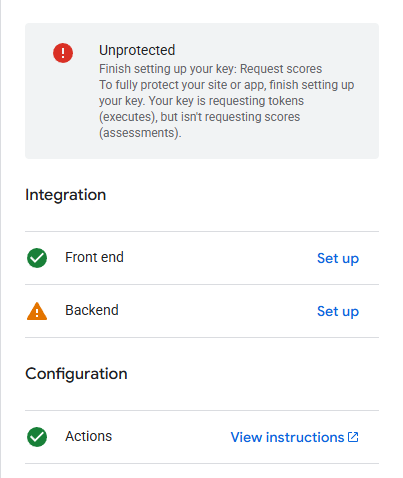
Now I get an error message in Google Cloud (see image) saying “Unprotected”. When I use AI, I get this explanation:
The Problem
The Google reCAPTCHA console is telling you that:
Tokens are being created — your forms are generating reCAPTCHA tokens correctly on the frontend
Assessments are NOT being created — the backend is not calling the siteverify/assessment API to validate those tokens