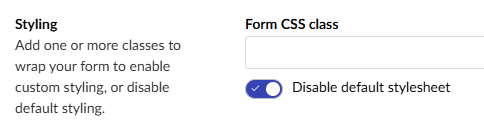
Umbraco Forms Disable Default Stylesheet

I have a simple Umbraco 17 site

I don’t want to use the default Umbraco forms CSS file.

I found this documentation which leads me to believe that if I want to turn off the default forms CSS it’s as easy as setting this in the app settings:

  "Umbraco": {
    "Forms": {
      "FormDesign": {
        "Defaults": {
          "DisableStylesheet": true
        }
      }
    }
  },

But it doesn’t seem to work.

I am still seeing the default forms theme being rendered

<link href="/App_Plugins/UmbracoForms/assets/themes/default/style.min.css?v=17.0.2" rel="stylesheet">

Please can you help?

Kind regards

Paul Seal

I managed to do it from within Umbraco, by selecting this, but I would like to get it working with the app settings too.

Is it maybe to do with this setting as well ?

DefaultTheme

I noticed this as well in Umbraco Forms for Umbraco 16, where the setting didn’t toggle the setting for newly created forms as in Umbraco 13.

Pretty sure it’s a bug.

I don’t think so. It’s not supposed to be, anyway.

Yeah, I think it is a bug too.

At least there is a workaround per form.

Kind regards

Paul

If Forms are touching this feature, then it would also be great to have not just a default setting for creation of forms, but also a blanket disable stylesheets across all forms even if one is set? (removes the option from the form settings so that form creators can’t mess with branding settings that the developer wants to be mandatory) :wink: