Dang just a little late..
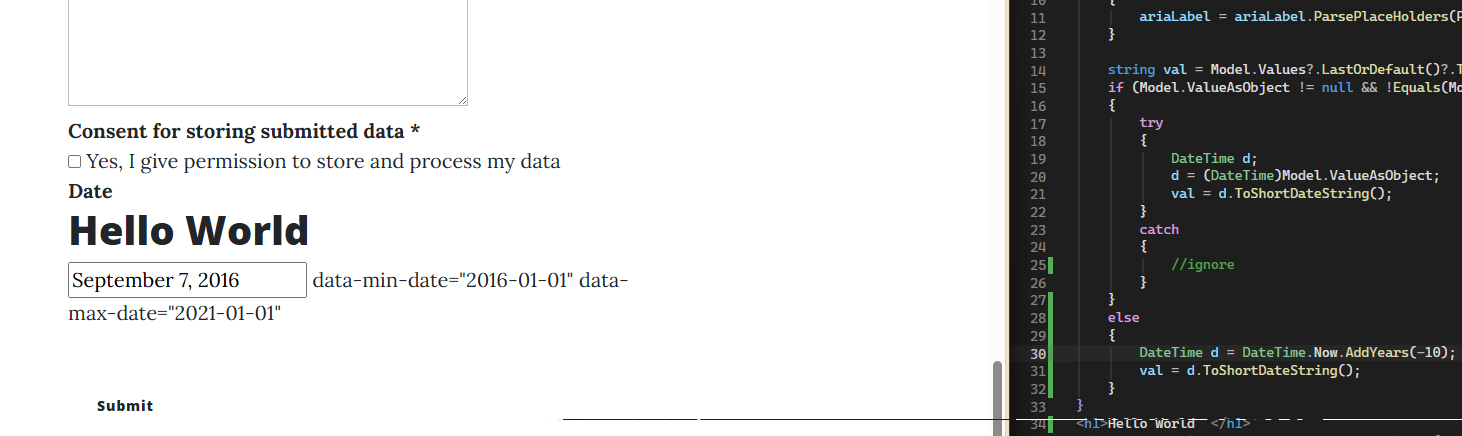
same val override… though prob needs to be generic, like set to maxdate if available…
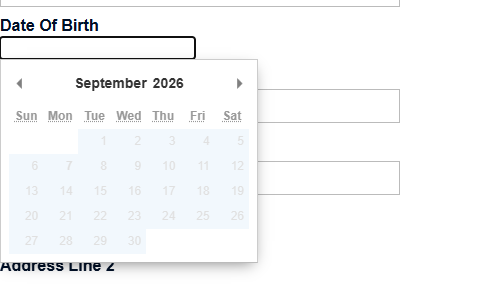
but much nicer to pick a selected date..
so with that in mind.. prob nicer to override the actual pickaday implementation.. so that you aren’t forced to set a value in the field..
\Views\Partials\Forms\Themes\myTheme\DatePicker.cshtml
@using System.Globalization
@using Microsoft.Extensions.Options
@using Umbraco.Forms.Core.Configuration
@using Umbraco.Forms.Web

@inject IOptionsSnapshot<DatePickerSettings> Configuration

@{
    int datePickerYearRange = Configuration.Value.DatePickerYearRange;
    string datePickerFormat = Configuration.Value.DatePickerFormat;
    if (string.IsNullOrWhiteSpace(datePickerFormat))
    {
        datePickerFormat = Umbraco.Forms.Core.Constants.Formats.DefaultDatePickerFormat;
    }

    Html.AddFormThemeCssFile("~/App_Plugins/UmbracoForms/assets/pikaday/pikaday.min.css");
    Html.AddFormThemeScriptFile("~/App_Plugins/UmbracoForms/assets/moment/min/moment-with-locales.min.js");
    Html.AddFormThemeScriptFile("~/App_Plugins/UmbracoForms/assets/pikaday/pikaday.min.js");
    Html.AddFormThemeScriptFile("~/App_Plugins/UmbracoForms/assets/datepicker.init.min.js");

    //only render the script block below one time per page
    var alreadyRendered = Context.Items.ContainsKey("__formDatePickerRendered");
    Context.Items["__formDatePickerRendered"] = true;
}

@if (!alreadyRendered)
{
    <h1>HelloWorld.....</h1>
    <div id="umbraco-forms-date-picker-config"
         class="umbraco-forms-hidden"
         data-name="@CultureInfo.CurrentUICulture.Name"
         data-year-range="@datePickerYearRange"
         data-format="@datePickerFormat"
         data-previous-month="<<"
         data-next-month=">>"
         data-months="@string.Join(",", CultureInfo.CurrentCulture.DateTimeFormat.MonthNames)"
         data-weekdays="@string.Join(",", CultureInfo.CurrentCulture.DateTimeFormat.DayNames)"
         data-weekdays-short="@string.Join(",", CultureInfo.CurrentCulture.DateTimeFormat.AbbreviatedDayNames)"></div>
}
adding data-default-date as you mentioned though you’d also have to replace the assets/datepicker.init.min.js
as doesn’t appear to have default-date support beyond field.value.. or able to set use and don’t select.
defaultDate: defaultDateValue,
setDefaultDate: false // Keeps the input empty on load, but opens the calendar at the defaultDate view
App_Plugins/UmbracoForms/assets/datepicker.init.js
(function () {

  //execute init() on document ready
  if (document.readyState === "complete" || (document.readyState !== "loading" && !document.documentElement.doScroll)) {
    listen();
  } else {
    document.addEventListener("DOMContentLoaded", listen);
  }

  function listen() {

    // Inline script setting umbracoFormsLocale was removed in 8.11/9.3, and replaced by a config element.
    // So if we have that, use it, otherwise fall-back to legacy method.
    var configElement = document.getElementById("umbraco-forms-date-picker-config");
    if (configElement) {
      var umbracoFormsLocaleFromConfig = {
        name: configElement.dataset.name,
        datePickerYearRange: configElement.dataset.yearRange,
        locales: {
          previousMonth: configElement.dataset.previousMonth,
          nextMonth: configElement.dataset.nextMonth,
          months: configElement.dataset.months.split(','),
          weekdays: configElement.dataset.weekdays.split(','),
          weekdaysShort: configElement.dataset.weekdaysShort.split(',')
        },
        format: configElement.dataset.format ?? "LL"
      };
      init({ umbracoFormsLocale: umbracoFormsLocaleFromConfig });
    } else {
      if (typeof umbracoFormsLocale === "undefined") {
        //this will occur if this js file is loaded before the inline scripts, in which case
        //we'll listen for the inline scripts to execute a custom event.
        document.addEventListener("umbracoFormsLocaleLoaded", init);
      }
      else {
        init({ umbracoFormsLocale: umbracoFormsLocale });
      }
    }
  }

  function init(e) {

    if (typeof moment === "undefined") {
      throw "moment lib has not been loaded";
    }

    moment.locale(e.umbracoFormsLocale.name);

    var datePickerFields = document.getElementsByClassName('datepickerfield');
    for (var i = 0; i < datePickerFields.length; i++) {
      var field = datePickerFields[i];

      var options = {
        field: field,
        yearRange: e.umbracoFormsLocale.datePickerYearRange,
        //ariaLabel: ariaLabel,
        i18n: e.umbracoFormsLocale.locales,
        format: e.umbracoFormsLocale.format,
        onSelect: function (date) {
          setShadow(this, date);
          var evt = document.createEvent("HTMLEvents");
          evt.initEvent("input", false, true);
          this._o.field.dispatchEvent(evt);
        },
        minDate: new Date(field.dataset.minDate || '1753-01-01T00:00:00'), //Min value of datetime in SQL Server CE
        maxDate: field.dataset.maxDate ? new Date(field.dataset.maxDate) : undefined,
        defaultDate: new Date(field.value),
        setDefaultDate: true
      };

      // If we've set an aria-label on the field already, use it so we don't have it overwritten by the Pikaday default.
      var ariaLabel = field.getAttribute("aria-label");
      if (ariaLabel) {
        options["ariaLabel"] = ariaLabel;
      }

      new Pikaday(options);
    }

    function setShadow(pickaday, date) {
      var id = pickaday._o.field.id + "_1";
      var value = moment(date).format('YYYY-MM-DD');
      var field = document.getElementById(id);
      field.value = value;
    }
  }
})();
PS
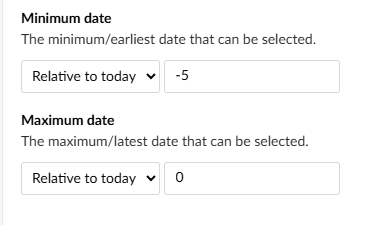
latest min/max have relative option.. which I presume is relative to today.
so that should allow for your age limit..
eg max set to -7665 should be need to be 21… though again has issues with leap years.. so might be better to role your own.