Umbraco Forms 13: Add Custom RenderType and EditType controllers

I’d like to add a datetime picker field type to Umbraco Forms, with appropriate view and edit formatting in the back office.

Using the RenderView and EditView properties on the field type definition allows me to specify the HTML views, but to have things formatted nicely I would need to add Angular controllers to the Umbraco Forms script.

Is there a way to do this?

DateTimePicker.cs

using Umbraco.Forms.Core;
using Umbraco.Forms.Core.Enums;

namespace Site.Infrastructure.Forms.Fields
{
	public class DateTimePicker : FieldType
	{
		public DateTimePicker()
		{
			Id = new Guid("96dea277-049b-4e64-a4fa-dc03066eb3ad");
			Name = "Datetime";
			Description = "Render a datetime picker.";
			Icon = "icon-time";
			DataType = FieldDataType.DateTime;
			SupportsRegex = false;
			RenderView = "datetime";
			EditView = "datetime";
			FieldTypeViewName = "FieldType.DateTimePicker.cshtml";
		}
	}
}

EditTypes/datetime.html:

<div ng-controller="UmbracoForms.EditTypes.DateController as vm">
	<input type="datetime-local" ng-model="vm.value" style="width: 400px" ng-change="vm.change()" ng-keydown="detail.validationMessages = []">
	<div class="umb-validation-label" ng-repeat="validationMessage in detail.validationMessages">{{validationMessage}}</div>
</div>

RenderTypes/datetime.html

<div ng-controller="UmbracoForms.RenderTypes.DateController">
	<div ng-show="field">{{formatDate(field) | date:'d MMM y h:mm a'}}</div>
</div>

This is a companion discussion topic for the original entry at https://our.umbraco.com/forum/114267-umbraco-forms-13-add-custom-rendertype-and-edittype-controllers

I think you can more or less manage it with what you have there.

Thanks for telling me the value is called field though, that isn’t in the docs.

Just in case someone discovers this while trying to add a custom RenderType for Umbraco Forms. I found the built in features in this area incredibly limiting and difficult to work with. In my case, the field was a JSON object which I wanted to format nicely. I ended up adding my own JavaScript and doing it this way:
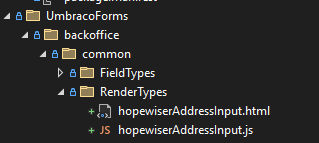
Where hopewiserAddressInput.html:

<script src="/App_Plugins/UmbracoForms/backoffice/common/RenderTypes/hopewiserAddressInput.js"></script>

<div id="hai-field">
    <input type="hidden" value="{{field}}" />
    <table></table>
    <!--<h1>field | json: {{ field[Label1] }}</h1>
    <h1>$scope.parsed = JSON.parse(field.toString()): {{ $scope.parsed = JSON.parse(field.toString()) }}</h1>
    <h1>$scope.parsed2 = field | json: {{ $scope.parsed2 = field | json }}</h1>
    <h1>$scope.parsed2.Label1: {{ $scope.parsed2.Label1 }}</h1>
    <h1>{{field}}.replace(':', '<br />'){{ field.toString().replace(':', '<br />') }}</h1>
    <ul>
        <li ng-repeat="(key, val) in $scope.parsed track by $index">
            <strong>{{ key }}:</strong>
            <span>{{ val }}</span>
        </li>
    </ul>
    <div ng-value="field">
        <span>{{model.Label1}}</span>
    </div>
    <umb-code-snippet language="'JSON'">
        {{ field | json }}
    </umb-code-snippet>-->
</div>

and hopewiserAddressInput.js:

setTimeout(function () {
    var wrapper = document.getElementById('hai-field');

    var inputVal = wrapper.querySelector('input[type="hidden"]').value;
    var target = wrapper.querySelector('table');

    var inputJSON = JSON.parse(inputVal);

    for (var key of Object.keys(inputJSON)) {
        target.innerHTML += '<tr><td>' + key + "</td> <td>" + inputJSON[key] + '</td><tr/>';
    }

}, 1000);

I found this easier than trying to use angular.

The setTimeout is necessary to allow angular to populate the field.

This also semi answers the original question, of how to add custom js.

I’ve left in my failed attempts to use angular so noone else wastes their time like I did.

Finally, I had to explicitly specify the location of hopewiserAddressInput.html in the FieldType:

    public override string RenderView => "~/App_Plugins/UmbracoForms/backoffice/Common/RenderTypes/hopewiserAddressInput.html";