I’m looking for a solution to Highlight the examine result.
I’ve already checked some solutions:
But there are inconsistencies between the last Examine version and Lucene.Net.Contrib. The last Examine version uses the last Lucene version 4.8.0-beta00016, but Lucene.Net.Contrib uses the Lucene version 3.0.3 so if I try to call GetBestFragments I get the following exception:
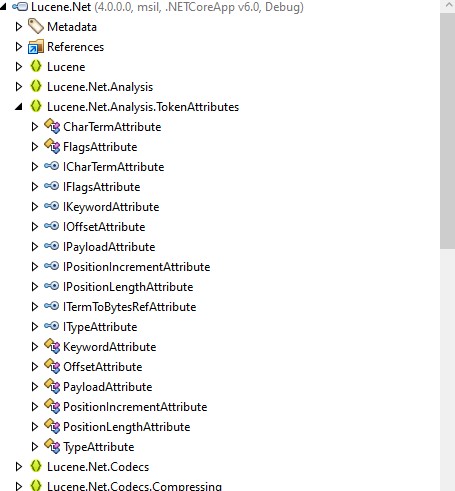
‘Could not load type ‘Lucene.Net.Analysis.Tokenattributes.ITermAttribute’ from assembly ‘Lucene.Net, Version=4.0.0.0, Culture=neutral, PublicKeyToken=85089178b9ac3181’.’
I’ve checked the Locene DLL and there is no required attribute:
My code:
public static string GetHighlight(string IndexField, IndexReader reader, string searchQuery, string highlightField)
        {
            string hightlightText = string.Empty;

            var formatter = new SimpleHTMLFormatter("<span class=\"umbSearchHighlight\">", "</span>");

            var highlighter = new Highlighter(formatter, FragmentScorer(searchQuery, highlightField, reader));
            var tokenStream = new StandardAnalyzer(LuceneInfo.CurrentVersion).GetTokenStream(highlightField, new StringReader(IndexField));
            string tmp = highlighter.GetBestFragments(tokenStream, IndexField, 3, "...");
            if (tmp.Length > 0)
                hightlightText = tmp + "...";
            return hightlightText;
        }
Searach function:
    _examineManager.TryGetIndex(UmbracoConstants.UmbracoIndexes.ExternalIndexName, out IIndex externalIndex);
if (externalIndex.Searcher is LuceneSearcher luceneSearcher)
                {
                    var highlight = ExamineHelper.GetHighlight(
                    "nodeName",
                    luceneSearcher.GetSearchContext().GetSearcher().IndexSearcher.IndexReader,
                    $"nodeName:term",
                    "nodeName"
                    );
                }
This is a companion discussion topic for the original entry at https://our.umbraco.com/forum/113406-umbraco-examine-highlight-result