I’m using Umbraco 17.4.2, with Umbraco Commerce 17.1.5.
I’ve noticed if I’m logging in as a backend user with “NL” or “nl-NL” as UI language, almost all Commerce labels aren’t translated. And they aren’t in English, I just get the “label-aliasses” so to speak.
On the Commerce-section for example, the “sidebar app title” is “#ucEntities_stores”.
If I expand the store node, I get items like:
ucEntities_orders
ucEntities_carts
ucEntities_discounts
…
The same goes for the Sidebar App in the Settings section.
Title: #ucEntities_stores
Menuitems underneath the store-node:
ucEntities_locations
ucEntities_orderStatusses
…
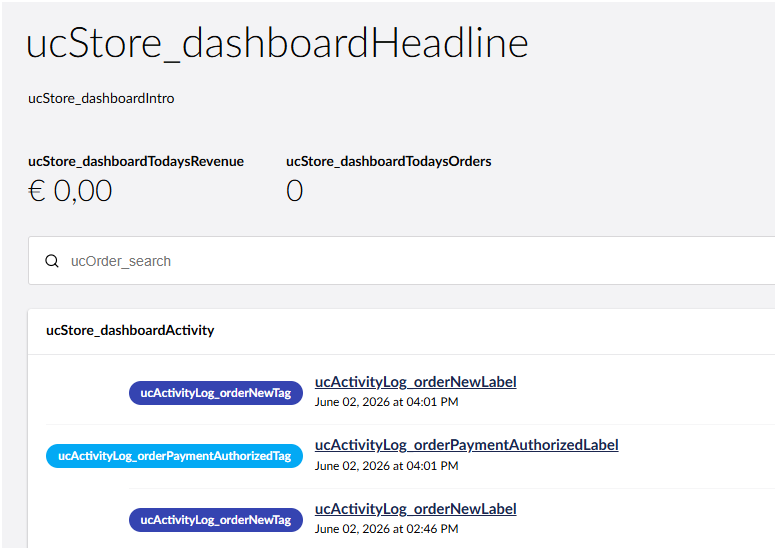
Also, on the Commerce Dashboard, I get the following:
It looks like they have not translated the back-office into other languages for Umbraco Commerce, in which case I would suggest you raise it as an issue here:
That said, I would expect it to fall back to the English versions if no translations are found, so I don’t know if that is an Umbraco bug or not?
You could add your own translated strings, but given this is a paid product I would raise the issue first and see what HQ say as you would need to provide translations for all labels used in the Umbraco Commerce backoffice (which may or may not be a trivial task!).
Thanks, I will raise an issue. I was just wondering if it was something I’d done wrong, and would hate to create an issue that isn’t an issue at all
I had the same problem with the Jumoo Translation Manager. Kevin (of Jumoo) told me how to create my own extension to create a temporary work-around until he had updates the extension.
It did the exact same thing, so I guess the ‘not falling back to english’ might be an umbraco bug. Or at least an oversight.