Umbraco Commerce Custom Discount Label v17

I am currently upgrading a site from 13 to 17 and having a problem with how to update the label view for my custom Discount Reward Provider.

In v13 I had this that worked, a very simple setup.

An attribute that set the LabelView

[DiscountRewardProvider("CQTDiscountReward", "Portal Discount Reward", LabelView = "\\App_Plugins\\CqtBO\\labelViews\\CQTDiscountReward.html")]
public class PortalDiscountRewardProvider : DiscountRewardProviderBase<PortalDiscountRewardProviderSettings>

And in the html file there was one line
Order {{ model.priceType | ucSplitCamelCase }} Discount

One attribute and one formatting line. This is what it looks like.

image

Now I am in the v17 world and having difficulty understanding the weirdness to do with Localization and imports and extensions and stuff. No problem with the actual C# code itself but having difficulty making it display properly in the BO.

The docs at Discount Rules / Rewards is sorta helpful but don’t understand the last section about localisation.
It says “it is neceserray to provide localizable labels.” (sic) but it doesn’t say where these labels and keys are to be placed.

My provider is now defined with this

[DiscountRewardProvider("CQTDiscountReward",
                        Label = "Portal Discount Reward", 
                        Description ="A reward that adjusts the order amount",
                        ViewUiAlias = "My.PropertyEditorUi.CqtDiscountRewardProviderLabel")]

with settings

[DiscountRewardProviderSetting(Key = "priceType",
                               Label = "Price Type",
                               Description = "The price that will be affected by this reward/fee. \n SubtotalPrice will be used regardless of this setting."
                               )]    
public OrderPriceType PriceType { get; set; } = OrderPriceType.SubtotalPrice;

and this works in that the picker modal in the BO shows this just fine. ( go to Commerce store mgt→Discounts→my discount. Select Add Reward and I can see my custom type with the right name of Portal Discount Reward and description)
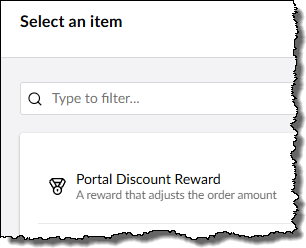
Where I am having trouble is how the selected reward and settings are displayed.

In the Discount property editor, the name is blank when it should show ‘Order {priceType} Discount’

and when edited, the single setting for Price Type shows the label value as the description.
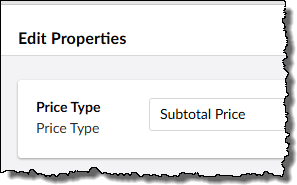
Things I have tried

Created an umbraco-package.json file with an extension in the collection

"extensions": [
  {
    "type": "propertyEditorUi",
    "alias": "My.PropertyEditorUi.CqtDiscountRewardProviderLabel",
    "name": "Portal Discount Reward Label",
    "element": "/App_Plugins/CqtBO/CQTDiscountRewardProviderLabel.element.js"
  }

Created the *.element.js file with code that is copied from the U doc page and modified for my rule. Essentially the same.

Amazingly this is accepted and loaded by the BO when the whole thing runs.

However.

Nothing is displayed and the browser is throwing a nasty ‘SyntaxError: Invalid or unexpected token’ on the line for @customElement.

import { customElement, html, property, when } from "@umbraco-cms/backoffice/external/lit";
import { UmbLitElement } from "@umbraco-cms/backoffice/lit-element";

@customElement('uc-cqt-portal-discount-reward-provider-label')
export class UcCqtPortalDiscountRewardProviderLabelElement extends UmbLitElement {

	@property()
	value?: Record<string, unknown>;

	render() {
		return when(this.value, () => html`
		Order Discount
		`)
	}
}

export default UcCqtPortalDiscountRewardProviderLabelElement;

declare global {
	interface HTMLElementTagNameMap {
		'uc-cqt-portal-discount-reward-provider-label': UcCqtPortalDiscountRewardProviderLabelElement;
	}
}

So am at a loss here. No syntax errors in the js code itself which is a simple as I can get it. I took out the use of this.value just in case but it didnt help

I gather it might(??) be something to do with Localization but I don’t know where to do that.
I am not a FE dev so this is all rather mysterious.

Could anyone assist me please.

Thanks.

@ajatnow Very great detailed information. Based on the code you’ve posted, it would really help if you could confirm the points below, as that should make it easier to narrow down and debug the issue further.

  1. verify that the settings model(PortalDiscountRewardProviderSettings) is correctly injected into the reward provider and available to the backoffice UI, as outlined in the documentation.erify that the settings model is correctly injected into the reward provider and available to the backoffice UI, as outlined in the documentation.
  2. Verify that the ViewUiAlias defined on the reward provider exactly matches the propertyEditorUi extension alias defined in umbraco-package.json.
  3. Verify the label UI is implemented using compiled TypeScript or plain JavaScript without decorators. The main issue here is that in Umbraco 17 the backoffice uses Lit, and decorators like @customElement are only supported in TypeScript, not plain JavaScript. If using TypeScript, verify that the .ts file is compiled and the generated JavaScript is served to the backoffice.

At this point, it would be best to refer to the official Umbraco Commerce documentation for further debugging, as it covers the recommended approach in detail.

Discount Rules / Rewards | Commerce | Umbraco Documentation

Additionally, if you’re new to TypeScript, you can refer to the custom property editor documentation to get a better understanding of how all of this can be customized.

Creating a Property Editor | CMS | Umbraco Documentation

Happy Day!!! :slight_smile:

Thanks for the suggestions Asha,

You have given me a hint with point 3. It does seem that I have Typescript code in the element.js file. I would rather not go into the complexity of creating a whole Vite project just for this simple need if I can get away with it.

I have managed to make this code work - with a great deal of head scratching.

import { html, property, when } from "@umbraco-cms/backoffice/external/lit";
import { UmbLitElement } from "@umbraco-cms/backoffice/lit-element";

export class UcCqtPortalDiscountRewardProviderLabelElement extends UmbLitElement {

	static properties = {value: { type: Object } };

	render() {
		return when(this.value, () => 
				html`Order Discount applied to ${this.value.priceType}`)
	}
}
customElements.define("uc-cqt-portal-discount-reward-provider-label", UcCqtPortalDiscountRewardProviderLabelElement);

I had to modify the manifest element thus:

"extensions": [
  {
    "type": "propertyEditorUi",
    "alias": "My.PropertyEditorUi.CqtDiscountRewardProviderLabel",
    "name": "Portal Discount Reward Label",
    "element": "/App_Plugins/CqtBO/CQTDiscountRewardProviderLabel.element.js",
    "elementName": "uc-cqt-portal-discount-reward-provider-label",
    "meta": {
      "label": "Portal Discount Reward Label",
      "icon": "icon-label",
      "group": "CqtBO"
    }
  }

This now gives me a label closer to what I used to have. The value object does not seem to include anything more than the single property for name which is not very UI friendly but is still readable.

image

Now I just have to tackle the discount provider settings display when editing.

I do wish there were more examples out in the world to assist with this transition but I could find only 1 single document that was anything like what I needed, outside of the U docs themselves (which are mostly TS related so not really helpful).

And exchanging two lines of code for 12 does not seem very efficient but them’s the breaks.

Anyway, thanks for setting me down the right path.

1 Like

To provide a bit more information to anyone who may be going through the same learning as I am, here are a few more details on how I solved my problem.

An important piece of the solution was to NOT utilise the attribute properties for Label and Description for the DiscountRewardProvider definition. My provider attributes now consist only of the name/alias and the ViewUIAlias.

[DiscountRewardProvider("CQTDiscountReward",
                        ViewUiAlias = "My.PropertyEditorUi.CqtDiscountRewardProviderLabel")]
public class PortalDiscountRewardProvider

As well for the Settings the attribute now only contains the name/alias.

 [DiscountRewardProviderSetting(Key = "priceType")]    
 public OrderPriceType PriceType

Now all the labels and descriptions that are displayed in the UI come only from the new whizbang localisation file that is now referenced in the umbraco-package.json file.

My extensions collection now has two entries, one for the propertyEditorUi, as detailed earlier, and now one for the labelling.

"extensions": [
  {
    "type": "propertyEditorUi",
    "alias": "My.PropertyEditorUi.CqtDiscountRewardProviderLabel",
    "name": "Portal Discount Reward Label",
    "element": "/App_Plugins/CqtBO/CQTDiscountRewardProviderLabel.element.js",
    "elementName": "uc-cqt-portal-discount-reward-provider-label",
    "meta": {
      "label": "Portal Discount Reward Label",
      "icon": "icon-label",
      "group": "CqtBO"
    }
  },
  {
    "type": "localization",
    "alias": "Portal.Commerce.Providers.Localization.En",
    "weight": -100,
    "name": "English",
    "meta": {
      "culture": "en"
    },
    "js": "/App_Plugins/CqtBO/lang/en.js"
  }
]

And my en.js file has all my labels and descriptions (here is a snippet)

ucDiscountRewardProviders: {
    'cQTDiscountRewardLabel': 'Portal Discount Reward',
    'cQTDiscountRewardDescription': 'A reward that adjusts the order amount',
    'cQTDiscountRewardSettingsPriceTypeLabel': 'Price Type',
    'cQTDiscountRewardSettingsPriceTypeDescription': 'The price that will be affected by this reward/fee. \n SubtotalPrice will be used regardless of this setting.',
......
}

A useful trick here was to reference the en.js file but not include the key/value pairs.

Then when the site ran it displayed the key it was looking for. I then added the key and the value to eventually get it to show what I wanted.

So with all these various pieces in place, I am finally back to having the desired labels and descriptions and functionality that the old version had.

Not so easy to learn how to do this. All the info is actually there in the U Docs but it is a bit disjointed and lacking a single complete example. I seem to learn best by following an example so tracking down a good one took a bit of time.

Onward and upward now.

1 Like

This topic was automatically closed 30 days after the last reply. New replies are no longer allowed.
