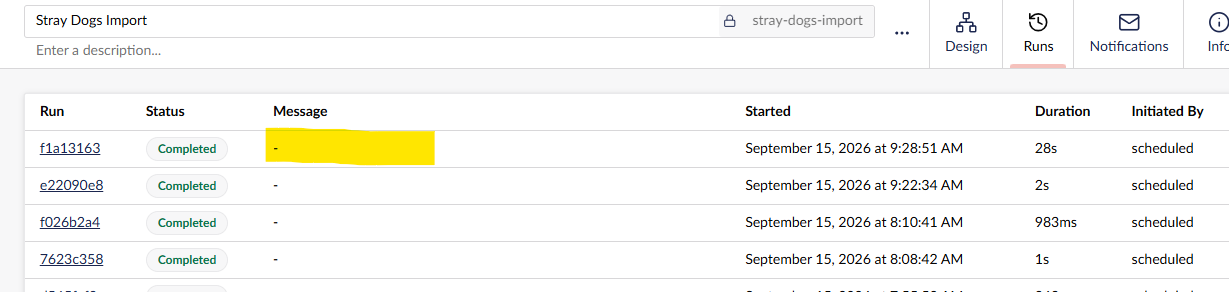
Is it possible to pass back a message on action completion that will surface in the run history message column as per the attached screenshot, or is this reserved for the Automate system messages? It would provide an easy way to see at a glance if my custom action imported any content, without having to drill down into anything.
I’ve implemented the following class where StrayDogsOutput contains a property called Message, I use that to pass back a message describing the number of items imported, but I don’t see the message anywhere.
public sealed class StrayDogsAction : ActionBase<StrayDogsSettings, StrayDogsOutput>
e.g.
 return Success(new StrayDogsOutput
 {
     Message = $"{dogs.foundDogRecords.Count} dogs imported"
 });
I’d like the message to show in the yellow area if that is possible?
Hi @Gavin5656
According to AI, it is for errors:
Had a dig through the source and it’s reserved, but there’s something relevant in flight.
In runs-table.element.ts the Message column value is item.error, falling back to a dash when that’s empty. AutomationRun and AutomationRunListItem only carry an Error string, and the response model exposes the same, so that column is failure text and nothing else. ActionResult gives you Success, SuccessWithOutcome, Failed, Skipped(reason), WaitForInput and Sleep, and the only free-text fields on it are the exception on a failure and Reason on a skip. Neither reaches the runs list on a successful run.
Your StrayDogsOutput.Message isn’t lost though. It goes into the step’s Output panel in the run detail view and is bindable downstream, the engine just doesn’t treat the property name as special.
The bit worth following: issue #72 asks for more detail in the runs view, and PR #164 against it adds user-facing per-step logging that shows in the runs view, with MinimumLogLevel and MaxLogEntriesPerStep settings and log methods on the action context. Both still open. That’s pretty much what you’re after, so it’d be worth commenting there with your use case, and maybe asking whether a run-level summary message could go in alongside it.
In the meantime, a Log Message step after your action bound to ${ steps..message } at least gets the count into the log viewer, and ICmsAction will write an audit log entry if the action changes content.
Justin