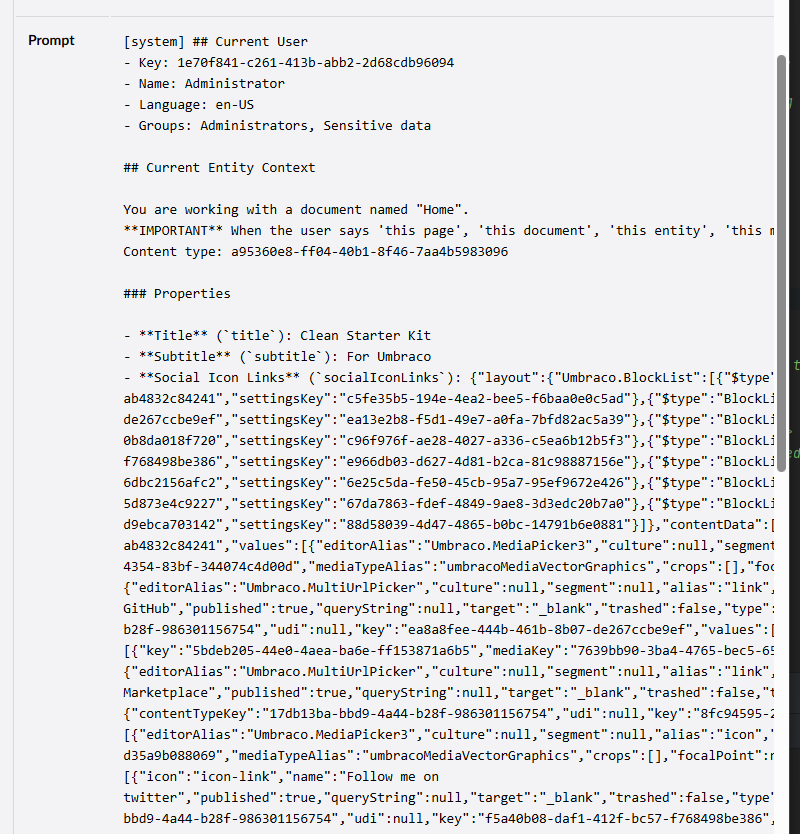
I have been playing around with building some custom AIToolclasses for Umbraco.AI, and Umbraco.Prompt.(Copilot?). and i am stuggling to get some information passed to the tool. specifically the ContentKey for the current content item.
So as an example i have some input for my tool.
public record uSyncPublishToolInput
{
	[property: Description("The unique Id for the current document.")]
	public Guid ContentKey { get; set; }

	[property: Description("The name of the server to publish to.")]
	public string Server { get; init; } = string.Empty;
}
I have tried a couple of different wording on this, and in the description of the actual tool.
it looks like i am getting either the guid of the ContentType or some other random one, but not the guid of the content item.
- If i change this to ContentName i do get the name of the current content item,
- if i change it to ContentId i get ‘0’
the genral phrasing from the prompt works. e.g “publish the current page to the live” server gives me the server arg of “live” and if i ask for name i get the name of the page.
tool currently looks lie this.
[AITool("publish_to_server", "Publishes a content item to the specified server.")]
public class uSyncPublishTool : AIToolBase<uSyncPublishToolInput>
{
    /// service injection and constructor.

	public override string Description =>
		"Publishes a content item to the specified server." +
		"The ContentKey is the unique key value of the current content item, stored in the 'key' field of the item." +
		"The server is the alias of the server the item will be published to.";

    protected override async Task<object> ExecuteAsync(uSyncPublishToolInput args, CancellationToken cancellationToken = default)
	{
        /// ... do work here. but args.ContentKey never is the key.
    }
}
Any tips on what i could call the property / amend the descriptions to get more chance of getting the content key (or anything i can use to reliably find the content). ?