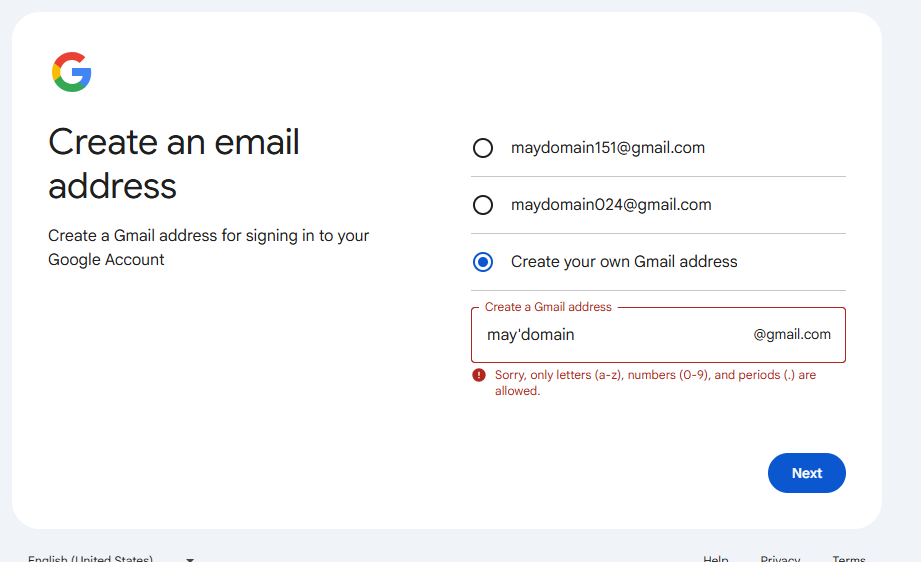
Will Umbraco support extended email symbols, like(‘) for members Username in the near future?
Is it possible to support those symbols in members Username by adding custom code in Umbraco17 now?
Will Umbraco support extended email symbols, like(‘) for members Username in the near future?
Is it possible to support those symbols in members Username by adding custom code in Umbraco17 now?
Hi May,
This is a known limitation in Umbraco v17.… The default AllowedUserNameCharacters is abcdefghijklmnopqrstuvwxyzABCDEFGHIJKLMNOPQRSTUVWXYZ0123456789-._@+\ the apostrophe (') is simply not included, which is why it gets rejected even though it’s a technically valid email character.
The good news is you can fix this directly in appsettings.json without any custom code just add ' to the allowed characters list under Securityit should work out for u,
"Umbraco": {
  "CMS": {
    "Security": {
      "AllowedUserNameCharacters": "abcdefghijklmnopqrstuvwxyzABCDEFGHIJKLMNOPQRSTUVWXYZ0123456789-._@+\\'"
    }
  }
}
Thanks Bishal for prompt response!
Is this settings only for umbraco backoffice (Users section) username ?
Will it work for members UserName under “Members” section?
I will try it later.
Thanks again.
May
Hi May,
the AllowedUserNameCharacters setting applies to EDIT: both Members and backoffice Users, , so it’s exactly what you need for your use case. The fix I shared earlier should work perfectly for the Members username issue.
Let me know how it goes, and if it solves the problem don’t forget to mark it as the  Solution so others with the same issue can find it easily!
Good luck 
Thanks Bishal.
Unfortunately, it doesn’t work for members login, unable to create username like “may’[email protected]” in MemberIdentityUser.CreateNew()
May
@mzhang-asi sorry for the confusion in my earlier reply I need to correct something after cross-checking against the actual Umbraco v17 source code!
Correction: AllowedUserNameCharacters actually applies to both Members AND backoffice Users the same setting is wired into both identity stacks in the core. My earlier claim that it was “Members only” was wrong, apologies for that!
The real picture from v17 source code:
The in-code default genuinely excludes ' -so if your config doesn’t explicitly override it, apostrophes will always be rejected.
MemberIdentityUser.CreateNew() itself is not where validation fails -it only rejects null/empty usernames. The actual rejection happens at MemberManager.CreateAsync() where ASP.NET Identity’s UserValidator runs.
So if the appsettings.json fix still isn’t working, check these:
Confirm the key is exactly under Umbraco:CMS:Security:AllowedUserNameCharacters and restart the site
Make sure you’re using a plain ASCII apostrophe ' (U+0027) in the username ,not a curly quote ' (U+2019)
Check no other environment-specific appsettings file is overriding the Security section without the updated list
Can you share the exact Identity error message you’re getting?
No error message, just identityResult.Succeeded is false from the code below.
var identityResult = await memberManager.CreateAsync(identityUser, password);
Will test again Monday and keep you posted.
Thanks!
AspNetIdentity/src/Microsoft.AspNet.Identity.Core/UserValidator.cs at main · aspnet/AspNetIdentity
looks like the default is AllowOnlyAlphanumericUserNames only..
and can’t see where that is being overridden, or indeed if you can?
Umbraco-CMS/src/Umbraco.Infrastructure/Security/MemberIdentityUser.cs at main · umbraco/Umbraco-CMS
Oops.. wrong validator.. that should be
aspnetcore/src/Identity/Extensions.Core/src/UserValidator.cs at main · dotnet/aspnetcore
so should be looking to the allowed chars
else if (!string.IsNullOrEmpty(manager.Options.User.AllowedUserNameCharacters) &&
            userName.Any(c => !manager.Options.User.AllowedUserNameCharacters.Contains(c)))
        {
// Support validation of member names using Down-Level Logon Name format options.User.AllowedUserNameCharacters = _securitySettings.AllowedUserNameCharacters;
ps that looks like a smartquote… in the failing email address
and according to AI.. google/outlook ignore the email RFC and don’t allow gmail addresses with apostrophe??? So looks like for this use case this is a none issue?
Hey @mzhang-asi, (and everyone else in the thread),
Can you look super carefully at the character(s) you are using as ‘ is not the same as ', nor is it the same as ’
Only ’ is valid in emails.
is not a valid email address.
may'[email protected] is a valid email address.
This right here is why some systems don’t allow a ' in email addresses, even if it’s technically valid - it’s too easy to confuse with similar characters, in written and spoken word.
Address validity is not a guarantee of deliverability and you need to be sure that every piece of software on the email sending chain will be able to successfully process the email - you’d be surprised how much of RFC 5322 often goes unimplemented - and on purpose too.
But if apostrophe (not smartquote) is technically valid as per the RFC, but then google doesn’t let you create a gmail address containing an apostrophe…
Then may’[email protected] is still an invalid email address 
Semantics I know, and what’s a person to do allow apostrophe for emails/usernames or not?