HTDL-Andrew
October 17, 2025, 9:57am
1
I’ve already seen the same question in extending Umbraco 16 with Umbraco Flavoured Markup, however, I’m not up to speed with web components and the solution used in the threads. I also have a ‘isBlockVisible’ toggle in all my block settings which I used to display in Umbraco 13 to the user in the label using:
{{$index}}. {{title}} {{$settings.isBlockVisible ==‘0’ ? ‘[HIDDEN]’ : ‘’}}
My question is can you do this in UFM now in Umbraco 17 BETA directly in the label? If not will it be in the final release?
I’m currently using:
{umbValue: title | fallback : N/A}
but really need to display to the user that the block has been hidden in a simple straightforward solution.
Thanks
jacob
October 17, 2025, 11:25am
2
Without having your setup locally, it isn’t easy to test, but you could try something like this:
${ $index + 1 }. {=title} ${ $settings.isBlockVisible == "0" ? "[HIDDEN]" : "" }
That’s a mix of UFM ({ expression }) and UFMJS (${ expression })
{= property }: UFM, shorthand for {umbValue}
${ property }: UFMJS, javascript-like expressions such as math and booleans
HTDL-Andrew
October 17, 2025, 11:48am
3
Thank you so much Jacob, the settings expression works . The index I get not a number, NaN, but the main thing is being able to show to the user that the block has been hidden. ATB A
jacob
October 17, 2025, 11:50am
4
Oh yeah, my bad around $index. It is a feature targeting 16.4, which is out soon:
opened 03:30AM - 13 Oct 25 UTC
closed 06:46AM - 14 Oct 25 UTC
type/bug
affected/v16
release/16.4.0
### Which Umbraco version are you using?
16.2.0
### Bug summary
A loved featu… re of the Block List in V13 was the ability to include the position / index of the block within the label.
We would use this to create labels like "Slide 1", "Slide 2" – or mostly as a fallback "Item 1" when the regular label had no value.
Since the introduction of UFM this has disappeared 😞
### Specifics
A little look through the new block label rendering code shows the index isn't being passed down into `umb-block-*-entry` and therefore not to the block view either.
As far as I can tell this means there is no way to find the position of a block, custom view or otherwise
### Steps to reproduce
N/A
### Expected result / actual result
It would be awesome if we could continue to render the block position in block views / labels.
I'm not fussy about the syntax, but previously the block editors injected "special" $ prefixed props for this type of thing – which I can imagine could be used in UFM Expressions like so: `${title || 'Item ' + $index}`
HTDL-Andrew
October 17, 2025, 12:08pm
5
I using Umbraco 17 Beta, so hopefully by the RC1 or release it will be added? A
jacob
October 17, 2025, 12:55pm
6
Yes, should be available in the first RC.
HTDL-Andrew
December 15, 2025, 1:15pm
7
jacob:
${ $index + 1 }.
The index property works now in Umb 17.0.2 so my blocks have the following code to show the index, title or fallback as well as if in the settings the block is set to visible or not.
${ $index + 1 }. {umbValue: paragraphTitle| fallback: Paragraph} ${ $settings.isBlockVisible == “0” ? “[HIDDEN]” : “[VISIBLE]” }
Many thanks for helping me to find this solution.
This works for me using ${ $index + 1 } which is great…however:
I now get:
when I edit the block. I therefore can only assume $index is an empty or null string when it is being populated in the slide out panel.
Is there something I haven’t added?
steve
June 30, 2026, 3:14pm
9
I’m seeing this too, I guess it might be tricky in the edit panel to know the index number of itself in the block list / grid, have been using this sort of setup:
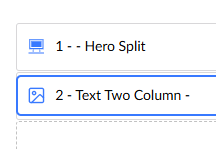
${ $index >= 0 ? ($index + 1) + ' - ' : '' }Text Two Column
To at least lose the NaN
To note, the $index in the modal workspace headline has been fixed for the next minor (17.6, 18.1, RC 23rd July, final 6th Aug).
v17/dev ← v17/bugfix/21154-fix-index-in-block-label
merged 11:15AM - 28 May 26 UTC
## Description
Block label expressions referencing `$index` (e.g. `${ $index … + 1 }`) rendered `NaN` in the workspace detail overlay because `UmbBlockWorkspaceContext` built its UFM value object without `$index` — only the inline list/grid elements supplied it. There was a pre-existing `TODO` at the relevant spot acknowledging the gap.
`#renderLabel` in `block-workspace.context.ts` now resolves the index from the block-entries layout array (existing blocks) or `originData.index` (new blocks created via the catalogue), and exposes it as `$index` on the UFM value object.
In that way we render the index as a number for new and existing blocks.
Fixes #21154
<img width="1466" height="862" alt="image" src="https://github.com/user-attachments/assets/243d417f-96ad-4de1-abd7-0c015c5ee5c0" />
## Testing
- On a document type, configure a Block List with an element label `${ $index + 1 }. Test Block`.
- Add three blocks. Inline labels read `1. …`, `2. …`, `3. …`.
- Click the second block to open the detail overlay — header reads `Edit 2. …` (previously `Edit NaN. …`).
- Use the block catalogue to insert at position 4 — the new overlay reads `Add 4. …`.