We are encountering an issue when saving content in Umbraco 13.13.0
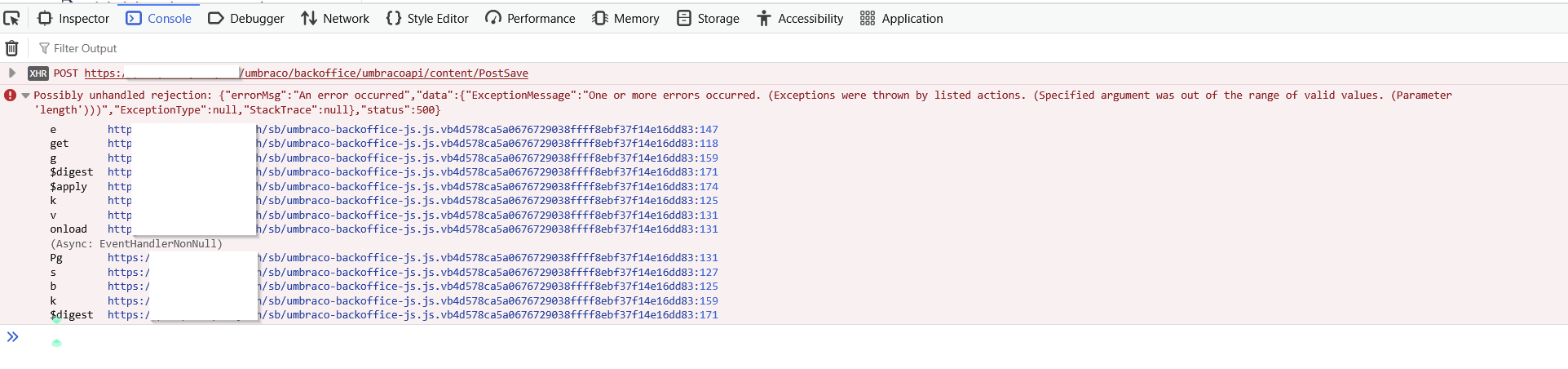
When attempting to save a page in the backoffice, the request fails with a 500 error, and the backoffice shows the following error in the browser console:
Possibly unhandled rejection: {"errorMsg":"An error occurred","data":{"ExceptionMessage":"One or more errors occurred. (Exceptions were thrown by listed actions. (Specified argument was out of the range of valid values. (Parameter 'length')))","ExceptionType":null,"StackTrace":null},"status":500}

POST
https://xxx.com/umbraco/backoffice/umbracoapi/content/PostSave
[HTTP/1.1 500 Internal Server Error 5889ms]
What’s odd is that we previously fixed the issue by clearing the entire Umbraco cache and restarting the application via IIS, which temporarily resolved the problem. However, two days later the exact same error appeared again when saving content
The page really has a lot of blocks in a block grid and quite a few blocks within each other. That’s the difference with the others, and is it a problem in terms of size/weight in a process?
I have only encountered this error on this page so far.
Also worth mentioning, nothing relevant appears in /umbraco/logs
Has anyone run into something similar in Umbraco 13 or seen this kind of length exception during the save pipeline?
This morning, I deleted the NuCache cache folder and increased the “BTreeBlockSize” property to 16384
I don’t know if this is related, I’m no expert in this area, but for now the page is reloading. Can anyone shed some light on this for me? How do I know what size to set if this is related?
Thanks in advance!
Interesting issue. Before concluding that it’s related to the NuCache block size, it might help to gather a bit more detail.
A few things that could help narrow it down:
1. Full stack trace
The backoffice error usually hides the full exception. You could try temporarily enabling debug mode in appsettings.json:
"Umbraco": {
  "Hosting": {
    "Debug": true
  }
}
Then attempt to save the page again and check if the server logs show the full stack trace.
2. Serialized content size
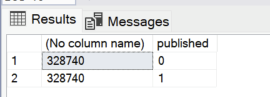
Since the page contains a heavily nested block grid, it might be useful to see how large the serialized content actually is. You could run a query like this:
SELECT LEN(data), published
FROM cmsContentNu
WHERE nodeId = <your_page_nodeId>
This gives an idea of how large the stored content payload is and whether it might be approaching NuCache storage limits.
After increasing it to 16384, were you able to save the page multiple times successfully, or did it only work once?
The fact that it only happens on a page with a large number of nested blocks, and that clearing the cache temporarily resolves it, does make NuCache a possible suspect. But the full stack trace would help
An error occurred

One or more errors occurred. (Exceptions were thrown by listed actions. (Specified argument was out of the range of valid values. (Parameter 'length')))

Détails de l'exception

 System.AggregateException, System.Private.CoreLib, Version=8.0.0.0, Culture=neutral, PublicKeyToken=7cec85d7bea7798e: One or more errors occurred. (Exceptions were thrown by listed actions. (Specified argument was out of the range of valid values. (Parameter 'length')))


System.AggregateException: One or more errors occurred. (Exceptions were thrown by listed actions. (Specified argument was out of the range of valid values. (Parameter 'length')))
 ---> System.AggregateException: Exceptions were thrown by listed actions. (Specified argument was out of the range of valid values. (Parameter 'length'))
 ---> System.ArgumentOutOfRangeException: Specified argument was out of the range of valid values. (Parameter 'length')
   at CSharpTest.Net.IO.TransactedCompoundFile.Write(UInt32 handle, Byte[] bytes, Int32 offset, Int32 length)
   at CSharpTest.Net.Storage.BTreeFileStoreV2.Update[T](IStorageHandle handleIn, ISerializer`1 serializer, T node)
   at CSharpTest.Net.Collections.BPlusTree`2.StorageCache.OnItemRemoved(KeyValuePair`2 item)
   at CSharpTest.Net.Collections.LurchTable`2.TryDequeue(Predicate`1 predicate, KeyValuePair`2& value)
   at CSharpTest.Net.Collections.LurchTable`2.TryDequeue(KeyValuePair`2& value)
   at CSharpTest.Net.Collections.BPlusTree`2.StorageCache.Flush()
   at CSharpTest.Net.Collections.BPlusTree`2.StorageCache.Commit()
   at CSharpTest.Net.Collections.BPlusTree`2.CommitChanges(Boolean requiresLock)
   at CSharpTest.Net.Collections.BPlusTree`2.Commit()
   at Umbraco.Cms.Infrastructure.PublishedCache.ContentStore.Release(WriteLockInfo lockInfo, Boolean commit)
   at Umbraco.Cms.Infrastructure.PublishedCache.ContentStore.ScopedWriteLock.Release(Boolean completed)
   at Umbraco.Cms.Core.Scoping.ScopeContextualBase.<>c__2`1.<Get>b__2_1(Boolean completed, T item)
   at Umbraco.Cms.Core.Scoping.ScopeContext.EnlistedObject`1.Execute(Boolean completed)
   at Umbraco.Cms.Core.Scoping.ScopeContext.ScopeExit(Boolean completed)
   --- End of inner exception stack trace ---
   at Umbraco.Cms.Core.Scoping.ScopeContext.ScopeExit(Boolean completed)
   at Umbraco.Cms.Infrastructure.Scoping.Scope.<>c__DisplayClass56_0.<RobustExit>g__HandleScopeContext|0()
   at Umbraco.Cms.Infrastructure.Scoping.Scope.TryFinally(Action[] actions)
   --- End of inner exception stack trace ---
   at Umbraco.Cms.Infrastructure.Scoping.Scope.TryFinally(Action[] actions)
   at Umbraco.Cms.Infrastructure.Scoping.Scope.Dispose()
   at Umbraco.Cms.Infrastructure.Services.CacheInstructionService.ProcessInstructions(CacheRefresherCollection cacheRefreshers, ServerRole serverRole, CancellationToken cancellationToken, String localIdentity, DateTime lastPruned, Int32 lastId)
   at Umbraco.Cms.Infrastructure.Sync.DatabaseServerMessenger.Sync()
   at Umbraco.Cms.Infrastructure.BackgroundJobs.Jobs.ServerRegistration.InstructionProcessJob.RunJobAsync()
The save worked several times, I was able to edit content and save it up again. It’s working for now, but I don’t know if the error will come back in a while.
It looks like the save worked multiple times and the current LEN(data) values for your node are quite small (118 / 86), which means this particular page is well below the typical BTreeBlockSize limit.
A few points to keep in mind:
Sporadic errors like the one you saw often happen if a node larger than the block size was previously saved, or if the NuCache files got corrupted. Clearing /App_Data/NuCache temporarily fixes it, which aligns with your experience.
Monitoring node sizes is a good preventive measure. You can run smth like this:
SELECT nodeId, LEN(data) AS DataLength
FROM cmsContentNu
ORDER BY DataLength DESC;
This helps identify any nodes approaching or exceeding the default BTreeBlockSize (~8192).
Increasing BTreeBlockSize (e.g., to 16384) is safe if you have very large nested Block Grids, but don’t make it too high to avoid potential write performance issues.
Deeply nested blocks can sometimes trigger this error even if total LEN(data) is small because the BPlusTree structure creates multiple intermediate nodes.
For now, since the saves are working, it seems the issue is resolved temporarily. Keep an eye on very large or deeply nested pages and consider increasing BTreeBlockSize only if you hit this again.