Trying to get a custom UFM filter working

So, I’m trying to create an extension for the UFM labels, to retrieve the “Name” of an Umbraco Commerce Entity. In this case a ‘country’.

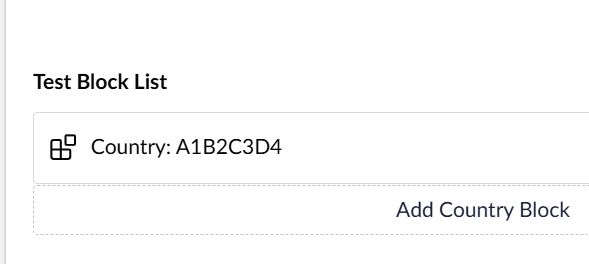
I have a block-list where you select a country per block. I want the name of that country to show up in the blocklist. So I started with the UFM label: Country: {=country}. This works, but it returns the GUID of the country.

So I asked Claude Chat for assistance, and after a couple of tries I ended up with the following files:

umbraco-package.json

{
	"name": "Commerce Country Name UFM",
	"extensions": [
		{
			"type": "ufmComponent",
			"alias": "My.Commerce.CountryName",
			"name": "Commerce Country Name",
			"api": "/App_Plugins/commerceCountryName/commerce-country-name.component.js",
			"meta": {
				"alias": "commerceCountryName"
			}
		},
		{
			"type": "bundle",
			"alias": "My.Commerce.CountryName.Bundle",
			"name": "Commerce Country Name Bundle",
			"js": "/App_Plugins/commerceCountryName/commerce-country-name.element.js"
		}
	]
}

commerce-country-name.component.js

import { UmbUfmComponentBase } from '@umbraco-cms/backoffice/ufm';
import './commerce-country-name.element.js';

export class CommerceCountryNameApi extends UmbUfmComponentBase {
    async render(token) {
        const alias = token.text?.trim();
        return `<commerce-country-name property-alias="${alias}"></commerce-country-name>`;
    }
}

export { CommerceCountryNameApi as api };

commerce-country-name.element.js

import { UmbLitElement } from '@umbraco-cms/backoffice/lit-element';
import { html } from '@umbraco-cms/backoffice/external/lit';
import { UMB_BLOCK_ENTRY_CONTEXT } from '@umbraco-cms/backoffice/block';

class CommerceCountryNameElement extends UmbLitElement {
    static properties = {
        propertyAlias: { type: String, attribute: 'property-alias' },
        _countryName: { type: String, state: true },
    };

    constructor() {
        super();
        this.propertyAlias = '';
        this._countryName = '';
        console.log('constructor hit');
    }

    async connectedCallback() {
        console.log('callback');
        super.connectedCallback();

        // Haal de GUID op via de block entry context
        this.consumeContext(UMB_BLOCK_ENTRY_CONTEXT, async (context) => {
            if (!context) return;

            const content = context.content;
            const guid = content?.getValueByAlias(this.propertyAlias);

            console.log('Country GUID:', guid);

            if (guid) {
                await this._fetchCountryName(guid);
            }
        });
    }

    async _fetchCountryName(guid) {
        console.log('get');
        try {
            const response = await fetch(
                `/umbraco/commerce/storefront/api/v1/country/${guid}`,
                { credentials: 'include' }
            );

            if (response.ok) {
                const data = await response.json();
                this._countryName = data.name ?? guid;
            } else {
                this._countryName = guid;
            }
        } catch {
            this._countryName = guid;
        }
    }

    render() {
        return html`${this._countryName}`;
    }
}

customElements.define('commerce-country-name', CommerceCountryNameElement);

The label in my blocklist now reads Country: [object Promise]
And I don’t see the console.log() lines I put in the Callback or Constructor.

I haven’t got any experience with extension development in U17 other than modifying a file here or there. So it might be something super simple. But I don’t know why the element’s constructor isn’t called. And Claude is comming up with solutions that only confuse me more, and don’t work either :slight_smile:

Any help is appreciated!

hi @cryothic

Your render() method is async, so it always returns a Promise instead of the string that’s the [object Promise] you’re seeing. Since the element tag never actually makes it into the DOM, it never upgrades, which is also why you don’t get the constructor/connectedCallback logs.

Drop the async:

render(token) {
    const alias = token.text?.trim();
    return `<commerce-country-name property-alias="${alias}"></commerce-country-name>`;
}

Should work after that, the async lookup already happens inside the element’s own connectedCallback.

Hi @cryothic ,

As @BishalTimalsina12 mentioned that async needs to be removed and there’s one other small change needed on the code which I have added below. Please paste this and try it out:

commerce-country-name.component.js

import { UmbUfmComponentBase } from '@umbraco-cms/backoffice/ufm';
import './commerce-country-name.element.js';

export class CommerceCountryNameApi extends UmbUfmComponentBase {
    render(token) {
        const propertyAlias = (token.value || token.text)?.trim();
        return `<umb-commerce-country-name property-alias="${propertyAlias}"></umb-commerce-country-name>`;
    }
}

export { CommerceCountryNameApi as api };

commerce-country-name.element.js

import { UmbLitElement } from '@umbraco-cms/backoffice/lit-element';
import { html } from '@umbraco-cms/backoffice/external/lit';
import { UMB_BLOCK_ENTRY_CONTEXT } from '@umbraco-cms/backoffice/block';

class CommerceCountryNameElement extends UmbLitElement {
    static properties = {
        propertyAlias: { type: String, attribute: 'property-alias' },
        _countryName: { type: String, state: true }
    };

    constructor() {
        super();
        this.propertyAlias = '';
        this._countryName = 'Loading...';
        this._currentGuid = null;
    }

    connectedCallback() {
        super.connectedCallback();

        this.consumeContext(UMB_BLOCK_ENTRY_CONTEXT, async (context) => {
            if (!context) return;

            const contentObservable = await context.contentValues();

            this.observe(contentObservable, (contentData) => {
                if (!contentData) return;

                let guid = null;

                // Safely extract the value regardless of how U17 shapes the data object
                if (Array.isArray(contentData)) {
                    const property = contentData.find(v => v.alias === this.propertyAlias);
                    guid = property ? property.value : null;
                } else if (contentData.values && Array.isArray(contentData.values)) {
                    const property = contentData.values.find(v => v.alias === this.propertyAlias);
                    guid = property ? property.value : null;
                } else {
                    guid = contentData[this.propertyAlias];
                }

                if (guid && guid !== this._currentGuid) {
                    this._currentGuid = guid;
                    this._fetchCountryName(guid);
                } else if (!guid) {
                    this._countryName = 'No country selected';
                }
            }, 'observeCountryContent');
        });
    }

    async _fetchCountryName(guid) {
        this._countryName = 'Fetching...';

        try {
            const response = await fetch(`/umbraco/commerce/storefront/api/v1/country/${guid}`, { credentials: 'include' });

            if (response.ok) {
                const data = await response.json();
                this._countryName = data.name ?? guid;
            } else {
                this._countryName = guid;
            }
        } catch {
            this._countryName = guid;
        }
    }

    render() {
        return html`<span>${this._countryName}</span>`;
    }
}

customElements.define('umb-commerce-country-name', CommerceCountryNameElement);

I have also tested this with a simple setup to just print the field data as label and it worked:

Regards,
Shekhar

Thanks for your answers

@BishalTimalsina12
If I remove the async in the Render() it returns an empty result.

@ShekharTarare
It returns the GUID. It seems response.ok' is false. If I call the API url itself ( https://*******.local/umbraco/commerce/storefront/api/v1/country/38275d50-beb3-4d7c-8354-019ce1381efb ) I get the message The Umbraco Commerce Storefront API is not enabled`

So I guess I need to open up the Storefront API and the ContentDelivery API to get this to work. Might be simpler to create a custom controller to return the Countryname :slight_smile:

But theextension itself seems to work. Thank you both so much!

@cryothic ,

That explains the issue because the code has a safety net, if it fails to find the data, it just prints the GUID.
Also, building a custom, backoffice-authenticated controller is the cleanest, safest, and simplest way to handle this. It keeps the data completely locked down to logged-in editors.

Regards,
Shekhar

Yes, I created a custom backoffice controller. Works like a charm.
Thanks for the help!