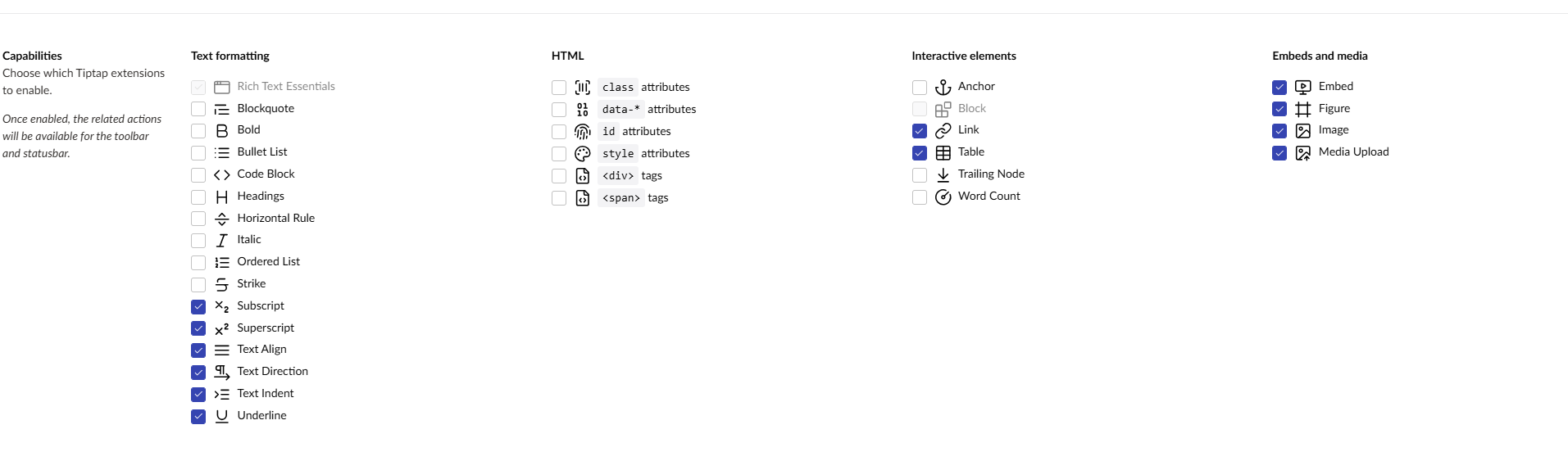
I’ve upgraded to Umbraco 16.3.2 and all of a sudden I’m getting this error when trying to use custom styles in tiptap:
style-menu.tiptap-toolbar-api.ts:15 Uncaught TypeError: e.toggleHeading is not a function
    at Object.command (style-menu.tiptap-toolbar-api.ts:15:30)
    at r.execute (style-menu.tiptap-toolbar-api.ts:60:9)
    at Object.execute (tiptap-toolbar-menu.element.ts:105:29)
    at p.y (cascading-menu-popover.element.ts:56:8)
    at p.<anonymous> (cascading-menu-popover.element.ts:103:29)
I’ve created my style menu by following this guide: Style Menu | Umbraco CMS and I’m certain that it worked just fine on Umbraco 16.2.
Did something happened in the last version of Umbraco?
Hi @AlexanderWagner82, can you check the data-type configuration for the Tiptap RTE please? Are all of the capabilities/extensions enabled?
If they aren’t, then I’m slightly concerned that something has messed up with the database migration. (In v16.3.0, there was a migration to enable all of the new Tiptap extensions by default).
Also, are you on Umbraco Cloud? As @Nik mentioned a similar issue recently.
@AlexanderWagner82 In Umbraco 16.3, some new config options were introduced on RTE’s. As @leekelleher mentioned we had the same issue (although the js error was ever so slightly different)
We found that the new config options needed to be toggled on for the Style Menu to work correctly again. These options, for some reason, were not toggled on automatically for existing RTE configurations.
My working theory is that the migration ran, but the UDA files (for Umbraco Deploy) were not updated and so when it was deployed it imported them and overrode the migrated config.
try toggling them all on and see if it fixes your RTE’s