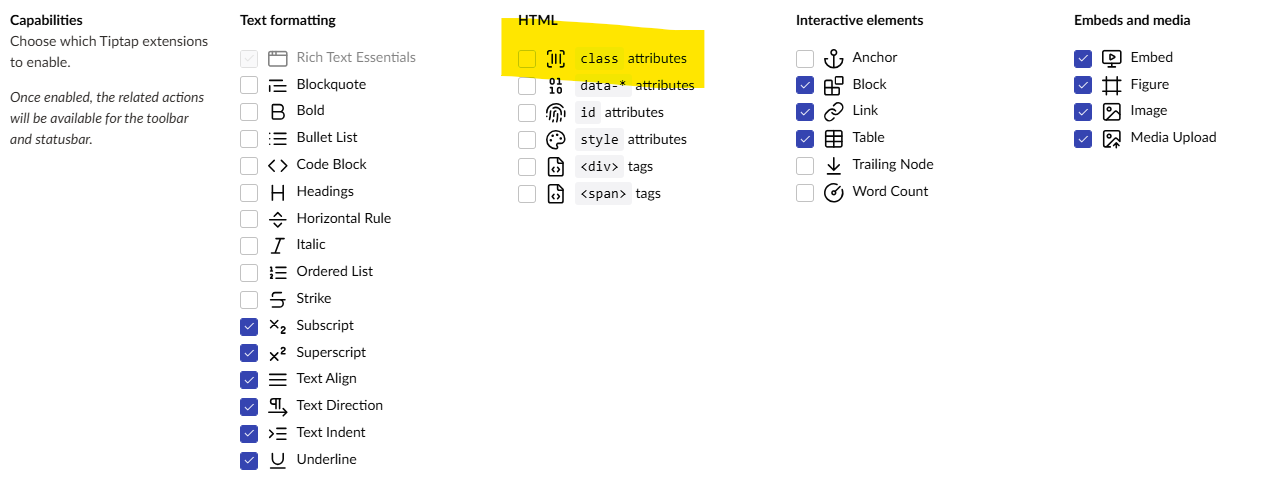
We’re having an issue where TipTap is stripping out CSS classes from code we are adding in Source Code mode.
We are using DaisyUI/Tailwind on this project, and when adding the Steps component directly in the RTE, it strips out the css classes from the element.
Unfortunately that did not work, it still strips the classes from the
items. I’ll have a play around from the setting in your other post, maybe there is something we can find in there. It’s not just for
item, it seems to mess up the HTML quite badly in other components. Seems too excessive for individual elements overrides and need a ”do not mess with the markup” setting….
@jammykam did you get a workaround for this issue? This is a show stopper for us and really we have started losing confidence in Umbraco. Why was Tiptap even selected as a replacement of TinyMCE, and why not a credible rich text editor. We have those attributes set as default (the ones @glombek mentioned) and still getting our html chopped off.
I dont know what the considerations are, but licenses are usually a problem. Umbraco is open source and the license of a RTE must allow it to be shipped with Umbraco. Thats the whole reason why TinyMCE needed to go anyway. So I dont know if there are better alternatives, but it’s not that easy. You can put TinyMCE back in with a package if you need to.
This involves both trust and training your content editors, but you can enable blocks in the TipTap editor and use them strategically to maintain clean and intact HTML.
– Create a new content type for source code. Make it an element type. Assign a code editor property or simply a text area.
– Enable blocks in your TipTap RTE. Allow your source code block.
(Use the Contentment package to add a big red alert in your source code content type, warning of the danger/risk of using this field.)
I’m fairly new to Umbraco. Experiencing this as well. TipTap on 16.3.3 is still modifying my well-formed HTML . The checkboxes @glombek posted were already turned on by default. 16.3 was an improvement from before, but not a fix.
The ProWorks TinyMCE package works 100% perfectly for me, however. Is going going back to TinyMCE using a package the only known solution for this right now?
That’s an interesting project. It all depends on the ecosystem. TinyMCE has many plugins (paid and free) that people were using. If a project like that ports some of that over – or even incorporates them in the editor – then it could be interesting to follow.
One other aspect of TinyMCE, that does not get mentioned, is that they did not officially support ShadowDOM, so certain elements are/were not usable. Not sure about that support in the later GPL2+ versions.
this looks very promising. I believe that the only difference between HugeRTE and TinyMCE is the licensing? And having HugeRTE package installed in our Umbraco deployment would allow us to build website using Umbraco and publish it to production environment? I am trying to understand how the introduction of HugeRTE help us.
Secondly, I am also trying to understand, if Umbraco will continue to use TipTap. If yes, then we will continue to use Blocks as explained by @markadrake . If no, then we will keep working on TinyMCE or better, HugeRTE.
As our project is in early stages of development, we have the flexibility to go either way. Worst, we may want to reconsider our choice of CMS.
Umbraco will keep using Tiptap and see where that takes us. If you believe there is a bug in stripping off HTML, even though you have verified that the capabilities are enabled, then it sounds like an issue and definitely something we’d like to take a look at. In that case, you should go ahead and report your findings over on the issue tracker: GitHub · Where software is built
Any package/extension can add any rich text editor that it wants to the Backoffice, so you could go ahead and implement HugeRTE, if you’d like. Or you can install TinyMCE through the TinyMCE.Umbraco package.
thanks for your reply. I will open a new issue today.
I have a quick question:
Will there be any tradeoffs or limitations in using TinyMCE now with future updates of Umbraco? Considering Umbraco is all up for TipTap, will there be a situation where we will have no other option but to move to TipTap, and discontinue using TinyMCE or HugeRTE?
The TinyMCE package is entirely supported by a third-party (called ProWorks, which, to be fair, is backed by Tiny, Inc. themselves), so that comes with a certain risk. They have, however, been very reliable, and we have a great relationship with them to try and make the best editing experience possible in Umbraco.