I’m using Umbraco 16, which uses Tiptap as the Rich Text Editor.
When I insert a table and manually add a <thead> element in the HTML view, it disappears after saving the content.
For example, I add the following HTML in the editor:
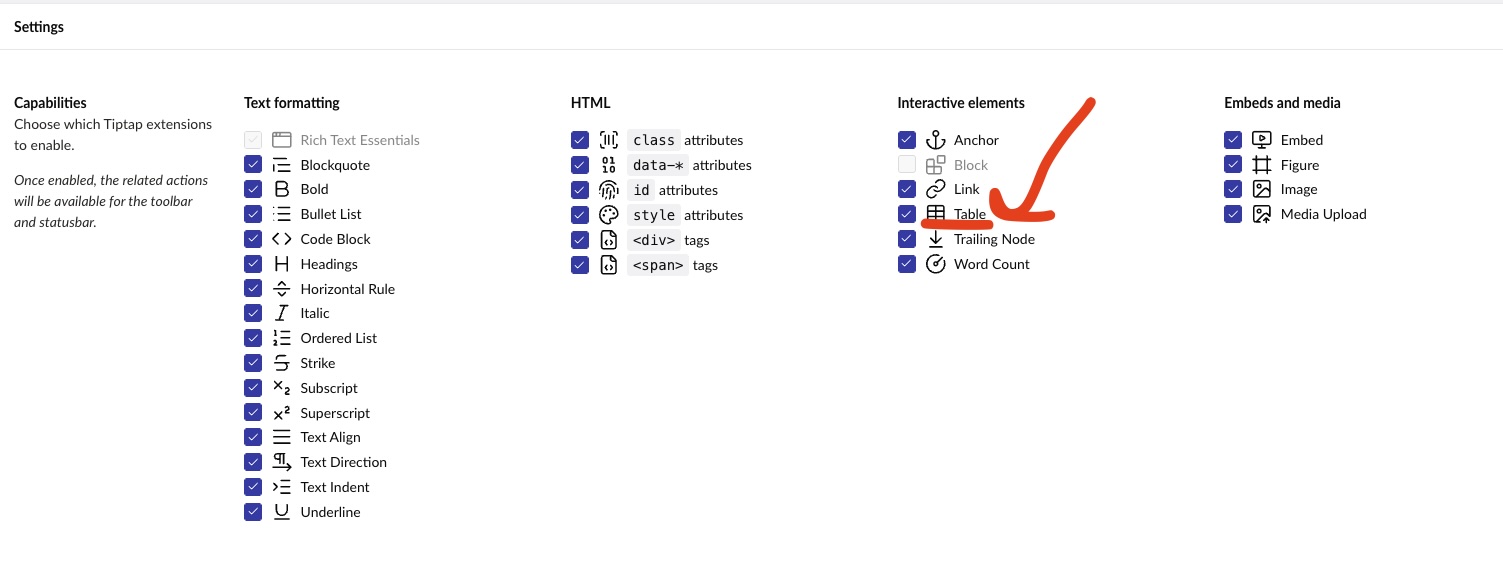
Check that you have enabled the “Table” extension under Capabilities. If you have, then it sounds like a bug in Umbraco which should be reported over on the issue tracker: https://github.com/umbraco/Umbraco-CMS/issues
There seem to be quite a few stripping or unwanted manipulation of generated html type issues with tiptap on the forum .. for my sanity is this a paradigm shift from Tinymce, eg enabling tables there was more showing the table buttons in the toolbar, but not then having TinyMce respect table as an allowed tag.
eg you can still drop tables into the source code and they wouldn’t be stripped..
Whereas now we need to consider tiptap capabilites as both toolbar and html allowed schema as mutually dependant?
This is – for better or worse – how Tiptap works. It is a structured editor based on a schema, which is ideal to use for JSON output, which is its default mode.
It will not allow even a single element out of place that is not defined in its schema, which is where “capabilities” come in. They add the appropriate extensions to the editor, extending its schema.
For the most part, this means you will get clean, maintainable HTML.
But for those who’d like to have unrestricted HTML editing, TinyMCE is likely the only viable option on the market. It is well-supported in Umbraco 16 and presumably Umbraco 17 as well:
TinyMCE did (does) actually require 2 settings - “commands” for displaying the editor-buttons and validElements for specifying the allowed tags (and their conditions), it’s just that by default Umbraco allowed all the tags involved used with table-HTML.
But they aren’t bound in the same way as tiptap.. eg I can remove the table button from the toolbar in TinyMCE to dissuade its use, but still use table in the html source editor for the more tech savy html editor and it doesn’t get stripped with TinyMce.
With tiptap the paradigm shift is that capabilities seemed mutual, eg no table button, no table html allowed?
I’m not sure if I’m following correctly, but my understanding of TipTap (as opposed to Umbraco’s implementation of it) is that it’s somewhat analogous to TinyMCE, in that Node extensions are not necessarily bound to individual command buttons, but yes, are bound to how they are activated by specific buttons e.g. If I recall correctly, the standard Table command can activate Table, Table-Cell, Table-Header, and Table-Row node-extensions. Of course, this implies that Umbraco (or a developer) creates and implements such an extension to support the required HTML Nodes.
edit: for clarity, I don’t recall that extensions necessarily requires the use of a control button (I can’t imagine a paragraph requiring it) but if it is, then you need to specify the details within the extension.
That is true, but also still a possibility to setup with Umbraco and Tiptap: You can enable the capability called “Table” and remove the Table button from the menu still, if you don’t want editors to use it.
The parallel to TinyMCE would be the allowed elements configuration, which in Umbraco was hidden in the appsettings.json file. With Tiptap, we have pulled that into the data type configuration UI instead, you could say.
I think the point in question is whether or not enabling the “Table” capability (presumably a Tiptap extension) should be expected to provide support of the extended elements, as (from memory) by default TipTap only supports table, tbody, tr, td, th - as other elements such as thead and tfoot are not considered to be required.
You may be right, looking at the TableKit extension, they do not seem to support <thead /> nor <tfoot />. I’m sure we could add support for that, if you’d go ahead and create an issue over on the issue tracker clearly explaining what is missing from Tiptap (or what gets stripped away): GitHub · Where software is built
As per above - I believe that this is because the default Tiptap Table extension (that Umbraco presumably deploys) does not support THEAD or TFOOT (and possibly even COLGROUP and COL).
This can be addressed via a customised extension, and perhaps this is something for the OP to request via the GitHub process.