Slow start/debug on Umbraco 17 with Visual Studio Insider 2026

Hi,

Is there any option I can unuse/use for speed up the startup of the project?
Feels like it does a “fresh” startup every time I will debug my code, index generate and so on. I have Models Mode: SourceCodeManual and using AddRazorRuntimeCompilation() from the backoffice package.

Hi Adam

i “maybe” think this should be removed? builder.Services.AddRazorRuntimeCompilation(); by adding this ur telling it to

Ignore the optimized precompiled pipeline and watch all Razor files manuallly.

Umbraco 17 runs on modern aspnet core (minimal hosting, updated pipeline, tighter integration). The runtime is already optimized for:

  • Precompiled Razor views

  • Smarter rebuild detection

  • Faster incremental compilation

maybe not but , did u notice differences running the prokject from terminal?

image

I did clock my startup now and it´s like 4sec. Build is like 3,30min.

And I did see that I can use Hot Relod when I save files instead of the package Umbraco.Cms.DevelopmentMode.Backoffice.

I got the same time in the terminal and VS and no speed boost after I uninstalled the package.

What´s your startup time?

Hey Adam,

Just to clarify looking at your screenshot, your actual Umbraco startup is only ~4.7 seconds which is totally normal. The 00:00:04.7763432 in the log is hh:mm:ss format, so that’s 4 seconds, not 4 minutes.

The 4 min you mentioned is likely you clocking the whole experience in Visual Studio which includes build time (~1:30 min) + waiting + app startup. So Umbraco itself isn’t the problem, it’s the VS build time that’s eating your time.

In my experience, the build times in VS2026 are horrible. It has something to do with Windows defender. Even when you exclude the usual processes and folders, it’s still much slower than VS2022. It you disable real time protection in Windows defender, it will dramatically speed that up. I haven’t found a good solution for this yet.

Yeah, it´s feels like I need to have it this way for awhile until we have a better fix for it.

Real time protection didn´t do much on my startup but I am still using Umbraco.Cms.DevelopmentMode.Backoffice and I don´t wanna remove that since then I can´t code properly :slight_smile:

I will try to remove some code that are unnecessary for this project it might speed up some at least, lesser razor code and models. Thanks Umbracians!

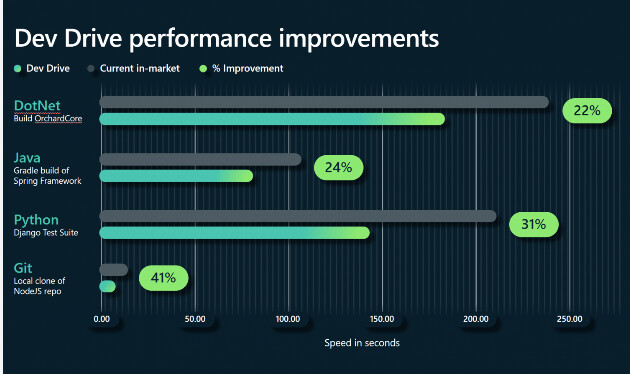
If you are on windows 11, are you using Dev Drive?

Dev Drive: Performance, Security and Control for Developers - Windows Developer Blog

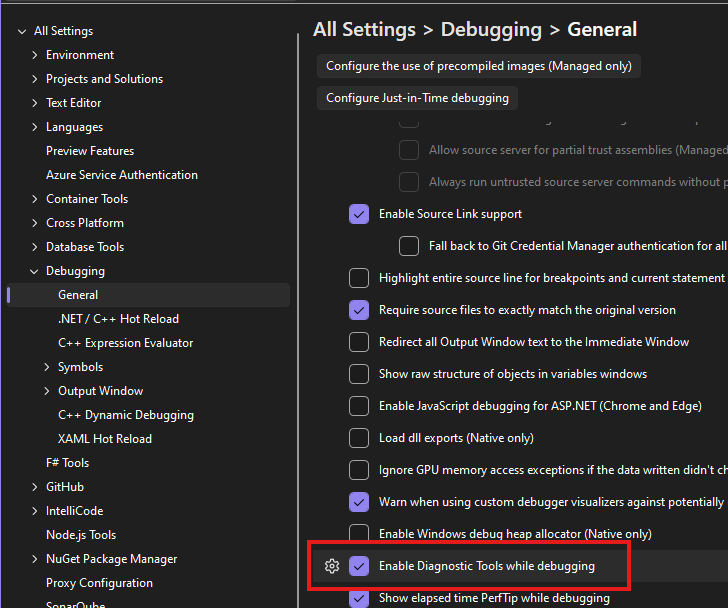
You can also turn off diagnostic logging in VS2026, seems to improved things a little.


and play with build and run settings.. (parallel builds should default, but you can play with max if you have lots of projects in your solution)

1 Like

Amazing tip!

Didn´t know there was a Dev Drive. I will test that out, I might free up some hardrive space before.

Meantime I can test the logging also.

Thank´s for your input!

1 Like

I did change “ModelsMode”: “SourceCodeManual” to “ModelsMode”: “SourceCodeAuto”

Then it starts really fast again :smiley:

2 Likes

This topic was automatically closed 30 days after the last reply. New replies are no longer allowed.