I have a custom property editor similar to color picker in core here except I just want to set set string value instead of an object: Umbraco-CMS/src/Umbraco.Web.UI.Client/src/packages/property-editors/color-picker/property-editor-ui-color-picker.element.ts at fc60b5b5ffa1db5f9f1ee786f65ad33c9f44f4e3 · umbraco/Umbraco-CMS · GitHub
So I have something like the following:
import { css, html, customElement, property, repeat, state, nothing } from '@umbraco-cms/backoffice/external/lit';
import { UmbLitElement } from '@umbraco-cms/backoffice/lit-element';
import type {
	UmbPropertyEditorConfigCollection,
	UmbPropertyEditorUiElement,
} from '@umbraco-cms/backoffice/property-editor';
import { UmbChangeEvent } from '@umbraco-cms/backoffice/event';
import type { McbMultiValuesDetails } from '../../components';

/**
 * @element mcb-property-editor-ui-button-picker
 */
@customElement('mcb-property-editor-ui-button-picker')
export class McbPropertyEditorUIButtonPickerElement extends UmbLitElement implements UmbPropertyEditorUiElement {
	#defaultShowIcons = false;

	@property({ type: String })
	public set value(value: McbMultiValuesDetails | undefined) {
		this.#value = value?.value ?? undefined;
		console.log("set value", value, this.#value);
	}
	public get value(): string | undefined {
		console.log("get value", this.#value);
		return this.#value;
	}
	#value?: string | undefined;

	/**
	 * Sets the input to readonly mode, meaning value cannot be changed but still able to read and select its content.
	 * @type {boolean}
	 * @attr
	 * @default false
	 */
	@property({ type: Boolean, reflect: true })
	readonly = false;

	@state()
	private _showIcons = this.#defaultShowIcons;

	@state()
	private _items: Array<McbMultiValuesDetails> = [];

	public set config(config: UmbPropertyEditorConfigCollection | undefined) {
		if (!config) return;

		this._showIcons = config?.getValueByAlias<boolean>('showIcons') ?? this.#defaultShowIcons;

		this._items = config?.getValueByAlias<Array<McbMultiValuesDetails>>('buttons') ?? [];
	}

	async #selectItem(details: McbMultiValuesDetails) {
		const value = details.value;
		console.log("select", details);
		this.value = this._items.find((item) => item.value === value);
		console.log("value", this.value);
		this.dispatchEvent(new UmbChangeEvent());
	}

	override render() {
		return html`${this.#value}
			${repeat(
				this._items,
				(item) => item.value,
				(item) => html`
					<uui-button
						type="button"
						label=${item.label ?? item.value}
						look=${item.value === this.#value ? 'primary' : 'secondary'}
						@click=${() => this.#selectItem(item)}>
						${!this._showIcons
						? html`<uui-icon slot="icon" name=${item.icon}></uui-icon>`
						: nothing}
						${item.label ?? item.value}
					</uui-button>
				`,
			)}
		`;
	}

	static override styles = [
		css`
			:host {
				display: flex;
				flex-wrap: wrap;
				gap: 0.5rem;
			}
		`,
	];
}

export default McbPropertyEditorUIButtonPickerElement;

declare global {
	interface HTMLElementTagNameMap {
		'mcb-property-editor-ui-button-picker': McbPropertyEditorUIButtonPickerElement;
	}
}
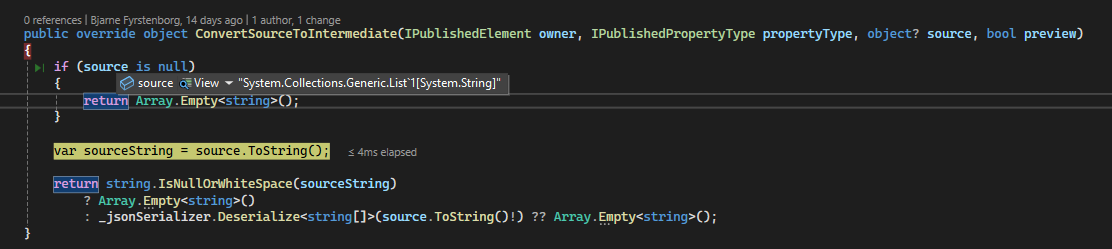
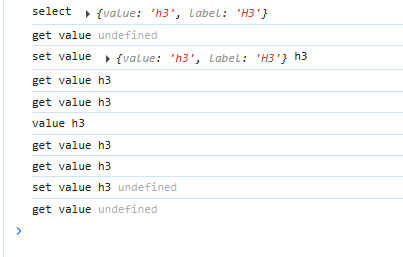
First time I click the button it trigger the click event, but value isn’t set.
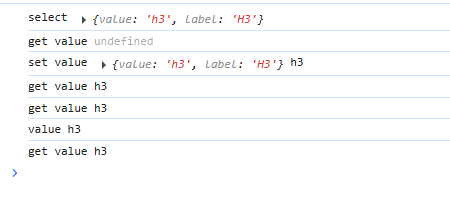
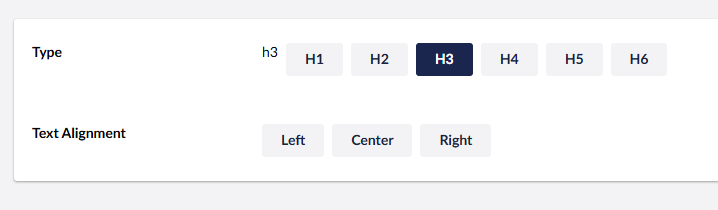
But when I click button again, it sets the value as expected and button gets a different look (selected):
What am I missing since value is undefined on first click?