My Scenario
Umbraco v13.14.0 upgrading to v17.5.0, running locally.
Setup
Do a site upgrade - appeared to succeed (no errors in the site startup and viewing the migration steps)
The site BO displays correctly.
Navigate to Settings → Deploy
The problem
#1 - The table for Schema comparison shows lots of uda file entries but no Name value.
#2 - Click on View Details and there are validation errors.
#3 - For a couple of Commerce email template files that show up as missing in Umbraco, the Create Item action also fails with validation error.
Investigation
Since this is an upgrade to Bellisima for the BO, I had to modify some DataTypes so that the Label field used the new UMF references,
eg from {linkTitle || $contentTypeName} to {umbValue:linkTitle || umbValue:$contentTypeName}
So I have to go back to Settings - Deploy and Update Umbraco schema to renew the item definition.
This succeeds and the type Label fields are now showing correctly.
The Schema Comparison table still does not show a Name value and the validation error shows when trying View Details.
The actual error details gives me this
"errors": {"udi": ["The udi field is required." ]}
I did lots of checking around and repeating my steps from scratch (restoring the v13 db into my new v17 project db each time to force a migration) with no change, no matter what I tweaked.
When viewing the Deploy Settings page in the browser, I noticed that the browser makes a fetch to get the schema object list:
The response is a fully populated list with elements of this format:
        {
            "udi": "umb://data-type/1df9f033e6d4451fb8d2e0cbc50a836f",
            "name": "Image Cropper",
            "fileName": "data-type__1df9f033e6d4451fb8d2e0cbc50a836f.uda",
            "umbracoExists": true,
            "fileExists": true,
            "isUpToDate": true,
            "canDeleteItem": true
        },
I have an Umbraco Cloud starter project for v17.4.2 and when viewing the schema comparison table there, everything shows up correctly with Name value in the table.
Viewing the browser response to a fetch of the schemas, I get elements of this format:
       {
            "udi": {
                "uriValue": "umb://data-type/930861bfe2624eada704f99453565708",
                "entityType": "data-type",
                "isRoot": false
            },
            "label": "Label (bigint)",
            "fileName": "data-type__930861bfe2624eada704f99453565708.uda",
            "umbracoExists": true,
            "fileExists": true,
            "isUpToDate": true,
            "canDeleteItem": true
        },
Cause identified
So I can see that the reason the Schema Comparison table is not showing Name value, and errors when View Details is clicked, is because it is not getting the right data format.
So why is the response data not in the right format?
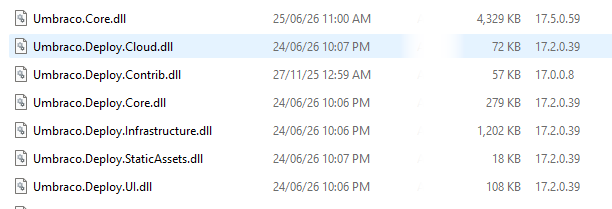
My source project code is admittedly pointing to v17.5.0 and not v17.4.2, but it would seem that the upgrade is not using the correct Umbraco library for the api method call.
I have cleaned my whole solution, checked that all U libraries are using the most latest v17 libraries, and done a full solution rebuild.
Can anyone assist me to fix this issue? Suggestions?
Many thanks,
AJ