Rich text editor: How to add class ".table" to inserted tables?

I want to use Bootstrap table styling and therefore would like that tables inserted in TinyMCE have class .table added:

<table class="table">
...
</table>

According to Table plugin | TinyMCE Documentation I have tried to do this in the Umbraco appsettings.json:

      "Umbraco": {
        "CMS": {
          "RichTextEditor": {
            "CustomConfig": {
              "table_default_attributes": "{\"class\": \"table\"}"
            }
          },
.....
        }
      },

But it has no effect, so I guess I am not doing it right.


This is a companion discussion topic for the original entry at https://our.umbraco.com/forum/111331-rich-text-editor-how-to-add-class-table-to-inserted-tables

Sorry for the bump of this old post but we’re now having issues getting classes to to show on tables in the RTE after updating the app.settings with the recommended solution. (v13 site)

Locally I’ve cleaned the solution, rebuilt, stopped IIS, the app pool , the site and even wiped my browser but it’s not picking up the app settings changes. Any ideas?

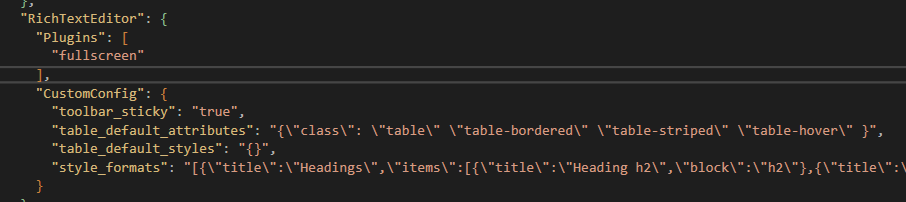
Here’s what we’ve got in the app settings.

Cheers

Chris

Just want to check the obvious but you do have the correct appSettings.json structure?

I’d assume so as the rest of the appsettings entries are working fine and VS isn’t highlighting any syntax errors, I’ve only added the 2 table_default_X lines to it.

Your JSON doesn’t look right; you have each class wrapped in their own quotes. I’d suspect that it would either expect an array of strings or a single string (probably a single string!)

"table_default_attributes": "{\"class\": \"all of your classes in a single set of quotes\"}"
1 Like

Thanks, that’s got it working, couldn’t see for looking!

1 Like