bjarnef
October 24, 2025, 4:23pm
1
It seems the Umb.PropertyEditorUi.IconPicker can be used in settings properties of a property editor. However unlike e.g. Eye Dropper Color Picker, it doesn’t seem to be available directly as a property editor: Icon picker as property editor · Issue #20632 · umbraco/Umbraco-CMS · GitHub
I researched a bit and it seems property & property dataset components can be used to re-use this:
I have something like this:
import { html, customElement, property, state } from '@umbraco-cms/backoffice/external/lit';
import { UmbLitElement } from '@umbraco-cms/backoffice/lit-element';
import type {
	UmbPropertyEditorUiElement,
} from '@umbraco-cms/backoffice/property-editor';
import { UmbChangeEvent } from '@umbraco-cms/backoffice/event';
//import type { UmbPropertyDatasetElement } from '@umbraco-cms/backoffice/property';
import { UMB_PROPERTY_DATASET_CONTEXT } from "@umbraco-cms/backoffice/property";

/**
 * @element mcb-property-editor-ui-icon-picker
 */
@customElement('mcb-property-editor-ui-icon-picker')
export class McbPropertyEditorUIIconPickerElement extends UmbLitElement implements UmbPropertyEditorUiElement {

	_datasetContext?: typeof UMB_PROPERTY_DATASET_CONTEXT.TYPE;

	@property()
	public get alias() {
		return this._alias;
	}
	public set alias(value) {
		this._alias = value;
		this._observeProperty();
	}
	_alias?: string;

	@state()
	_value?: string;

	getValue() {
		return this._value;
	}
	setValue(value: string) {
		if (this._alias) {
			this._datasetContext?.setPropertyValue(this._alias, value);
			this.dispatchEvent(new UmbChangeEvent());
		}
	}

	protected async _observeProperty() {
		if (!this._datasetContext || !this._alias) return;
		this.observe(
			await this._datasetContext.propertyValueByAlias(this._alias),
			(value) => {
				this._value = value as string;
			},
			'observeValue',
		);
	}

	constructor() {
		super();
		this.consumeContext(UMB_PROPERTY_DATASET_CONTEXT, async (variantContext) => {
			this._datasetContext = variantContext;
			this._observeProperty();
		});
	}

	#onDataChange(e: Event) {
		//const oldValue = this._value;
		//this._value = (e.target as UmbPropertyDatasetElement).value;
		//this.requestUpdate('value', oldValue);
	}

	override render() {
		return html`
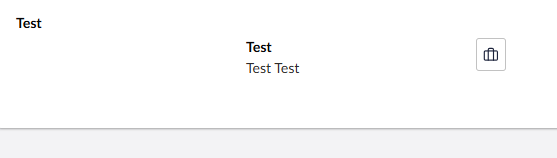
			<umb-property-dataset .value=${this._value} @change=${this.#onDataChange}>
				<umb-property
					alias=${this.alias}
					label="Test"
					description="Test Test"
					property-editor-ui-alias="Umb.PropertyEditorUi.IconPicker">
				</umb-property>
			</umb-property-dataset>
		`;
	}
}

export default McbPropertyEditorUIIconPickerElement;

declare global {
	interface HTMLElementTagNameMap {
		'mcb-property-editor-ui-icon-picker': McbPropertyEditorUIIconPickerElement;
	}
}
In this case wrapped inside a custom property editor ui component.
Also here it isn’t ideal to render label/description, but I can probably omit these - or hide label/description?
Alternatively I can of course implement much of the same logic from icon picker instead, but I would prefer not to re-invent the wheel
import { html, customElement, property, state, ifDefined } from '@umbraco-cms/backoffice/external/lit';
import type {
	UmbPropertyEditorConfigCollection,
	UmbPropertyEditorUiElement,
} from '@umbraco-cms/backoffice/property-editor';
import { umbOpenModal } from '@umbraco-cms/backoffice/modal';
import { UMB_ICON_PICKER_MODAL } from '@umbraco-cms/backoffice/icon';
import { UmbLitElement } from '@umbraco-cms/backoffice/lit-element';
import { extractUmbColorVariable } from '@umbraco-cms/backoffice/resources';
import { UmbChangeEvent } from '@umbraco-cms/backoffice/event';

import { UmbFormControlMixin } from '@umbraco-cms/backoffice/validation';

/**
 * @element umb-property-editor-ui-icon-picker
 */
@customElement('umb-property-editor-ui-icon-picker')
export class UmbPropertyEditorUIIconPickerElement
	extends UmbFormControlMixin<string, typeof UmbLitElement, undefined>(UmbLitElement, undefined)
	implements UmbPropertyEditorUiElement
show original
mirkomaty
March 20, 2026, 10:15am
2
Hi @bjarnef , did you find a solution for this problem? We need a symbol picker, too.
bjarnef
March 24, 2026, 8:03am
3
Yes, I basically created a copy of the core icon picker property editor UI to wrap it inside a property editor, but there’s a open PR which makes it possible to re-use the property editor UI:
main ← bjarnef:feature/icon-picker-property-editor
opened 11:57PM - 11 Dec 25 UTC
### Prerequisites
- [x] I have added steps to test this contribution in the d… escription below
If there's an existing issue for this PR then this fixes https://github.com/umbraco/Umbraco-CMS/issues/20632
### Description
New property editor using `Umb.PropertyEditorUi.IconPicker`.
Most parts were in place, e.g. the icon picker can be used in properties and configuration of datatype. However it wasn't possible to create icon picker as a property editor.
I used the `icon-shapes` icon instead https://lucide.dev/icons/shapes as I think `icon-autofill` was a bit too generic. Furthermore a move the property editor to group **pickers** - well because it's a picker 😅
Not a lot of changes as most was already exists. The property value converter is basically identical with eye dropper color picker. Maybe it can inherit a base value converter, when I just need a simple string value? In future version (depending on colors) it make sense the return an object, e.g. if we even can configure own predefined colors.
I think we should use same color prevalues as in Approved Color Picker (and maybe extended a bit).
Initially I think we shall either make swatches configurable - or hide swatches (or set an empty array) as the brands colors most likely not match in real-world projects and may just confuse editors (unless specific defined colors).
We probably also need to limit icons based on specific registered icons, a prefix or similar.
It depends on https://github.com/umbraco/Umbraco-CMS/pull/20870 how this should be handled.
At the moment the value converter returns a simple string just like eye dropper color picker, but I wonder if an JSON object may be better? E.g. if some want to return color, font style (solid, outline although often included as part of icon name), category/icon set or other meta data later.
---
Datatype **configuration**
<img width="2560" height="1279" alt="image" src="https://github.com/user-attachments/assets/c3fd71c9-b064-4d10-8898-606a8de6cd9d" />
---
**Content editing**
<img width="2560" height="1279" alt="image" src="https://github.com/user-attachments/assets/aedcae41-922d-4bf4-8649-fbe2dacc3e50" />
---
**Colored icon**
<img width="2560" height="1279" alt="image" src="https://github.com/user-attachments/assets/df8c51a8-3ea5-4480-9a4f-f741faf7b6b4" />
---
**Colors hidden**
Maybe this should consider clearing color class? And perhaps in future version it may be better icon picker property editor UI returns an object instead with icon name, color etc.?
<img width="2560" height="1279" alt="image" src="https://github.com/user-attachments/assets/b47a8a6e-3b10-4b58-abb9-209a7516f668" />
---
**Placeholder icon**
<img width="2560" height="1279" alt="image" src="https://github.com/user-attachments/assets/515067d9-0209-49ed-b509-72e704c34abd" />
It works okay when using standard icons (or all registered icons), but I think there’s a need to filter icons, e.g. if using full Lucide icon pack (or any other icon set):
main ← bjarnef:feature/filter-icons
opened 09:47PM - 17 Nov 25 UTC
### Prerequisites
- [x] I have added steps to test this contribution in the d… escription below
If there's an existing issue for this PR then this fixes part of https://github.com/umbraco/Umbraco-CMS/issues/20632 and part of https://github.com/umbraco/Umbraco-CMS/discussions/20647
E.g. in collection layout view icon picker:
```
.umbOpenModal(this, UMB_ICON_PICKER_MODAL, {
value: icon,
data: {
hideColors: true,
filter: (item: UmbIconDefinition) => item.name.includes('document')
}
}
```
<img width="2560" height="1279" alt="image" src="https://github.com/user-attachments/assets/e0bfd817-ac31-49ed-b883-49facb3eb304" />
Content type icon picker still shows all icons:
<img width="2560" height="1279" alt="image" src="https://github.com/user-attachments/assets/fe7a8760-4554-4738-9315-3dc4c8550db4" />
I would be nice if we also can filter icons in content type icon picker, e.g. exclude a specific icon package (normally with a prefix or maybe just specific icons registered for use in dashboards or a third party login provider.
### Description
Other solutions may be to use a package:
mirkomaty
March 25, 2026, 1:20pm
4
I made a copy of the Umbraco UI-Code , which isn’t so huge. I registered it under a new name and alias and are able to use it now. That’s all I currently need. Thanks for your original post, because it pointed me in the right direction.