I have a Umbraco 13 project where we built a custom index for activities that we fetch from a remote API.
I’m trying to do a RangeQuery on one of the fields that contains a date to see if the activity falls within the bounds of 2 different dates.
This is how we set the FieldDefinitions.
var definitions = new FieldDefinitionCollection(
new FieldDefinition(nameof(IActivityIndexItem.FromDate), FieldDefinitionTypes.FullText),
new FieldDefinition(nameof(IActivityIndexItem.ToDate), FieldDefinitionTypes.FullText),
new FieldDefinition(nameof(IActivityIndexItem.FromDateAsDateTime), FieldDefinitionTypes.DateTime));

foreach(var definition in definitions){
options.FieldDefinitions.AddOrUpdate(definition);}
And if i go in the backoffice and search the index i can see that the date is stored correctly in the index.
(FromDate is the same value but stored as FullText)
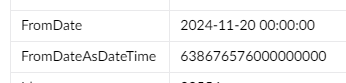
But when i try to do a RangeQuery on the field called “FromDateAsDateTime” like this:
DateTime dateFromDate;
if (DateTime.TryParseExact(dateFrom, "yyyy-MM-dd", null, System.Globalization.DateTimeStyles.None, out dateFromDate))
{
     searchQuery = searchQuery
          .And()
          .RangeQuery<DateTime>([CustomIndexKeys.FromDateAsDateTime], dateFromDate, DateTime.MaxValue);
}
I get the following error:
Message = “Could not perform a range query on the field FromDateAsDateTime, it’s value type is Examine.Lucene.Indexing.FullTextType”
I’ve been pulling my hair about this all week.
Can anyone help me understand why this happens?
This is a companion discussion topic for the original entry at https://our.umbraco.com/forum/114028-rangequery-on-datefield-fails-with-exception-saying-its-a-fulltext-field