Hi everyone. Question regarding best practice here.
I have a website that I’ve based off the Umbraco nuget package. It loads my website fine and I can access the Backoffice.
Now I would like the ability to potentially modify the Backoffice or Core stuff. I cloned the entire repo locally and branched out my own version.
What is the best strategy for my website code to use any changes I’ve made to my branched version of Umbraco? Do I make a nuget package from the repo have my website pull this version of the package?
Thank you.
(P.S. I posted this on Discord - apologies if there’s a problem cross-posting on platforms.)
Sorry for not answering your question, but I would like to know a bit more about your use case.
The backoffice is highly customizable, in order for your project to be adjusted to the needs of your customer’s business. There has been put a lot of effort into that, in order to make it simpler for you, and to have good separation of concerns, so next time there is a new version of Umbraco, you can upgrade, get the fixes and new features without the trouble of managing your build of Umbraco.
So out of pure curiosity, an interest in your use case, To identify if your use case actually needs a custom build, and as well to identify if that could be a common case that should be taken care of in the future. I hope you’re in for it.
I’m still relatively new to Umbraco so perhaps everything I’ll need to do can be extended from the existing API. At this point I can’t predict features we’ll need in the future, as we have many clients with several needs. One example I can think of is having a new Backoffice page/section that ties in with our internal systems. Another one would be the removal of a feature on a Backoffice page because of a security risk (hypothetically). Our code is often audited, and if we’re recommended a fix, sometimes we have to comply.
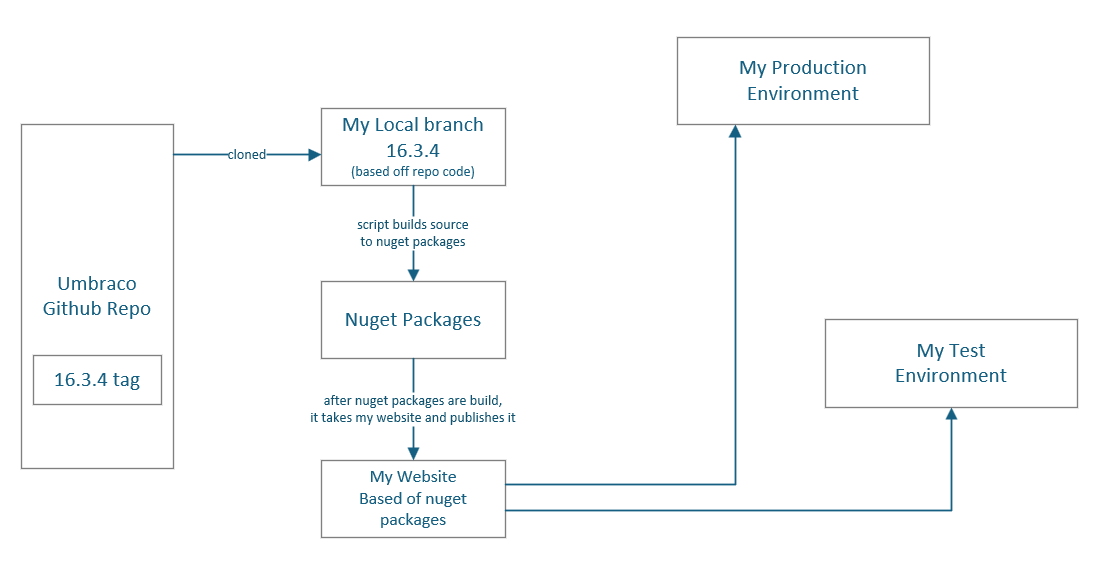
The setup I have in place now is this:
My Website, built from scratch through your README:
dotnet new install Umbraco.Templates
dotnet new umbraco --name MyProject
cd MyProject
dotnet run
I’ve customized this application (it generated) through the Backoffice and added a few view templates, and extended by adding a controller that acts as an API that exposes some data. Pretty basic stuff I think.
So now, if I want to modify the core, I have a Powershell scripts that makes nuget packages from all the source and then builds my website by reloading the packages I’ve updated (built) from source.
Does this flow make sense? Is this the best “typical” way? What do you think?
Sounds about what most projects of Umbraco needs to do.
So regarding adding your own Section, thats been a feature for the past 10+ years.
You can read more about that here:
Removing UI, is also fairly realistic, depending on what UI you like to remove. As most things are extendable and the Core is implemented as extensions it self. Then this should cover your needs:
If its features in general you need to remove from an API point, then that can be more tricky, but you can setup User Group Permissions to match the Features that should be available.
As you said that you are fairly new to Umbraco. From that insight I would advice you to see this talk that I did at this years CodeGarden, this should give you a good idea about how you can customize the experience(The Backoffice UI) without compiling your own version — cause I would not recommend doing that. I hope that helps and inspires you to stay away from that idea.
Regarding your section that needs to tie into the internal system, then the way to go is to bring Management API End-points, as part of your extension/package.
These should then bridge the UI that you put inside the Backoffice to your internal system.
In other words, UI talks to Mangement-API(Avoids any CORS trouble and requires a user that is logged in to Umbraco with the right permissions assigned) that end point is a C# Controller on the server, which then talks to the internal system.
To help you a bit on how to go about that, then the ‘opinionated starter kit’ gives you an idea about how to bring your own management-api end-points and how to use them in your own custom UI(In this case its a Dashboard, but its the same for a Section)
Thanks @nielslyngsoe for the insight and helpful resources. Looks like I have quiet a bit of reading to do. Will follow-up if I have more questions. Thank you again!
I think what @nielslyngsoe is saying here is that your dashboard requirement is reasonably normal requirement for an Umbraco site and the extension points are already there.
I don’t think he’s endorsing your general approach to building/publishing Umbraco…
Best practice is that you use Umbraco’s published nuget packages, then override/extend the behaviour that you want in your own project (s). Umbraco has a lot of public APIs you can use to change its behaviour for most use cases - both in the backoffice UI, and in C#. Umbraco uses Dependency Injection extensively too, so you can replace a lot of Umbraco’s functionality without actually changing Umbraco’s code.
The big problem is that when you start making changes to things in Umbraco that aren’t public APIs you will end up struggling with breaking changes as you try and merge from upstream into your codebase.
Then, of course, there’s the overhead of having to build your own version of Umbraco, which is overkill.
WRT security, your specific examples are doable without modifying Umbraco itself. Plenty of orgs where security matters (financial/govt services etc.) run Umbraco without having to resort to using their own clones. Umbraco is good at security: Security and Umbraco.
 Will follow-up if I have more questions. Thank you again!