But we want a way to do it with out 3rd Party providers, like Google Analytics.
We want to built it all in to Umbraco and control all the code ourselves.
I have been thinking about it, I can add a call to the Master Template to get the ID and store that in the DB, then I just have to add some cusome code to a block grid Item and an a event that runs every 24 hours to build the stats table.
You certainly can do that, but it seems like re-inventing the wheel. Don’t forget you may need to take GDPR into account (depending on where you are) if you are storing anything that could be classed as tracking PII such as IP address.
You would need to store the request details and Umbraco page ID for every visit in a custom table (which is a database write per request), create reports as required and possibly ensure the data is not kept for longer than necessary in case the custom table grows hugely (depending on traffic).
If you’re tracking user journeys you would need a way of identifying users so storing a cookie or similar to differentiate users based on your needs.
There may be some packages that do some of what you need so possibly worth checking here first.
Hi @darrenhunterEmerald
I completely agree with @justin-nevitech and checked the link he shared. The On My Website package is doing something which you’re trying to do. Please check it out.
Just sharing few suggestions, if you’re planning to build a custom solution. Please check the following:
For showing “Top pages” list publicly on the website or on the Backoffice, a Custom Tracker would be a nice idea, but I would recommend not save a record the exact moment a user visits a page. Under heavy traffic, this creates a bottleneck that slows down page load times.
You can use a memory buffer; so when a user visits a page, the system will instantly drop the Page ID into a temporary server memory queue (using System.Threading.Channels). This takes microseconds, allowing the page to finish loading immediately for the user.
A dedicated background worker will pull the ids from the memory queue and saves them to the database. This will completely separate the web traffic from the database writes.
You can have a Daily Cleanup task which will run every night and will group together all hits and updates a Database table which is storing the Top Pages data and then clear out the old raw data.
Be careful with the memory buffer, you can add a capacity limit to it to store some amount of hits and ignore if going beyond that.
Make sure the tracker ignores the bots and logged-in Umbraco admins otherwise stats will be inaccurate.
If you avoid storing IPs and don’t use cookies, you won’t need to add a cookie consent banner for this.
using Microsoft.Extensions.DependencyInjection;
using Microsoft.Extensions.Hosting;
using Microsoft.Extensions.Logging;
using System.Threading.Channels;
using Umbraco.Cms.Core.Composing;
using Umbraco.Cms.Core.DependencyInjection;
using Umbraco.Cms.Core.Events;
using Umbraco.Cms.Core.Notifications;

namespace MyQuickUmbracoSitetestsql10.Core

{
    // 1. THE MEMORY QUEUE
    public class PageTrackingQueue
    {
        private readonly Channel<int> _queue = Channel.CreateUnbounded<int>();
        public void Enqueue(int pageId) => _queue.Writer.TryWrite(pageId);
        public IAsyncEnumerable<int> DequeueAsync(CancellationToken ct) => _queue.Reader.ReadAllAsync(ct);
    }

    // 2. THE PAGE LOAD INTERCEPTOR
    public class PageTrackingHandler : INotificationAsyncHandler<RoutingRequestNotification>
    {
        private readonly PageTrackingQueue _queue;
        public PageTrackingHandler(PageTrackingQueue queue) => _queue = queue;

        public Task HandleAsync(RoutingRequestNotification notification, CancellationToken ct)
        {
            var content = notification.RequestBuilder.PublishedContent;
            if (content != null && content.Id > 0)
            {
                _queue.Enqueue(content.Id);
            }
            return Task.CompletedTask;
        }
    }

    // 3. THE BACKGROUND WORKER (TEST VERSION)
    public class TrackingBackgroundWorker : BackgroundService
    {
        private readonly PageTrackingQueue _queue;
        private readonly ILogger<TrackingBackgroundWorker> _logger;

        public TrackingBackgroundWorker(PageTrackingQueue queue, ILogger<TrackingBackgroundWorker> logger)
        {
            _queue = queue;
            _logger = logger;
        }

        protected override async Task ExecuteAsync(CancellationToken ct)
        {
            await foreach (var pageId in _queue.DequeueAsync(ct))
            {
                // Instead of hitting a DB, we just log it to the console to prove the worker got it!
                _logger.LogInformation("✅ [TRACKER TEST] Background worker successfully captured hit for Node ID: {PageId}", pageId);
            }
        }
    }

    // 4. WIRE IT UP
    public class TrackingComposer : IComposer
    {
        public void Compose(IUmbracoBuilder builder)
        {
            builder.Services.AddSingleton<PageTrackingQueue>();
            builder.Services.AddHostedService<TrackingBackgroundWorker>();
            builder.AddNotificationAsyncHandler<RoutingRequestNotification, PageTrackingHandler>();
        }
    }

}
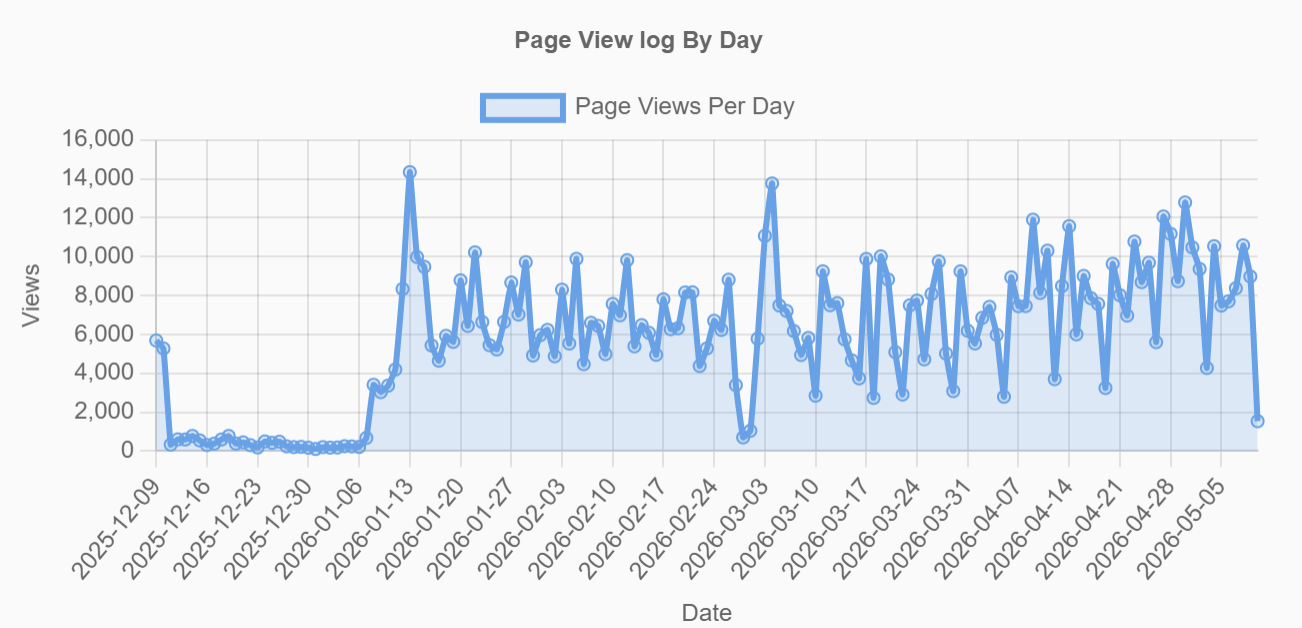
This is from a non umbraco site, but shows the problem. It has bot filtering etc. etc.
This is the page views graph, legitimate visitors would account for maybe 200 of these at most
I don’t use cloudflare, there is a lot of filtering included some country exclusions, but if you drill down into this traffic it just looks like browser hits (mostly from the US) but it defiitely isn’t legitimate browsing