Hello 
The project I am working on at the moment has various types of products that they sell.
Some of the products when added to the cart have specific order properties related to participants attending a course and then there are other products where other information is collected and attached to the property.
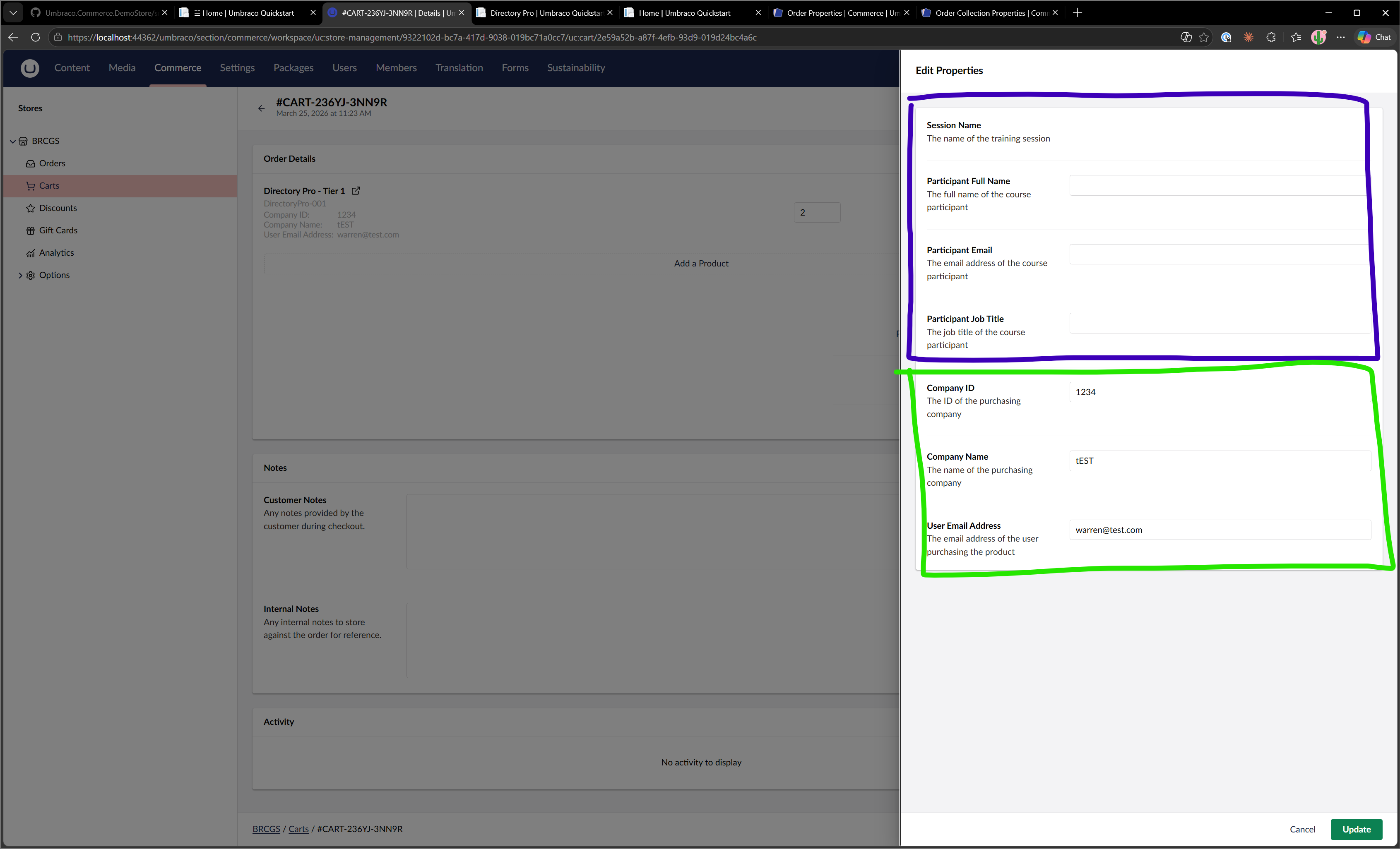
But in the backoffice UI when it shows the view to edit the information it displays all registered orderline properties UI extensions even if that specific order line does not have values set for them.
Question
Is there a way for me to show/hide specific orderline properties in this view?
Screenshot
The area in purple is for a specific product type of course and the green is for another product type that needs to collect information different from the logged in member to attach to the product being purchased. Behind the modal you can see it only displays the properties that have been set which is fab but just odd when I click the icon next to the product name that opens this modal I see all orderline properties.
JSON
Existing umbraco-package.json
{
  "$schema": "../../umbraco-package-schema.json",
  "name": "My Project",
  "version": "1.0.0",
  "extensions": [
    {
      "type": "localization",
      "alias": "myProject.localization.en",
      "name": "My Project English",
      "meta": {
        "culture": "en",
        "localizations": {
          "ucProperties": {
            "sessionNameLabel": "Session Name",
            "sessionNameDescription": "The name of the training session",
            "participantFullNameLabel": "Participant Full Name",
            "participantFullNameDescription": "The full name of the course participant",
            "participantEmailLabel": "Participant Email",
            "participantEmailDescription": "The email address of the course participant",
            "participantJobTitleLabel": "Participant Job Title",
            "participantJobTitleDescription": "The job title of the course participant",
            "companyIdLabel": "Company ID",
            "companyIdDescription": "The ID of the purchasing company",
            "companyNameLabel": "Company Name",
            "companyNameDescription": "The name of the purchasing company",
            "userEmailAddressLabel": "User Email Address",
            "userEmailAddressDescription": "The email address of the user purchasing the product"
          }
        }
      }
    },
    {
      "type": "ucOrderLineProperty",
      "alias": "myProject.orderLineProperty.sessionName",
      "name": "Session Name",
      "weight": 120,
      "forEntityTypes": [ "uc:cart", "uc:order" ],
      "meta": {
        "propertyAlias": "sessionName",
        "readOnly": true,
        "showInOrderLineSummary": true,
        "summaryStyle": "table",
        "labelUiAlias": "Umb.PropertyEditorUi.Label",
        "editorUiAlias": "Umb.PropertyEditorUi.Label"
      }
    },
    {
      "type": "ucOrderLineProperty",
      "alias": "myProject.orderLineProperty.participantFullName",
      "name": "Participant Full Name",
      "weight": 100,
      "forEntityTypes": [ "uc:cart", "uc:order" ],
      "meta": {
        "propertyAlias": "participantFullName",
        "readOnly": true,
        "showInOrderLineSummary": true,
        "summaryStyle": "table",
        "labelUiAlias": "Umb.PropertyEditorUi.Label",
        "editorUiAlias": "Umb.PropertyEditorUi.TextBox"
      }
    },
    {
      "type": "ucOrderLineProperty",
      "alias": "myProject.orderLineProperty.participantEmail",
      "name": "Participant Email",
      "weight": 90,
      "forEntityTypes": [ "uc:cart", "uc:order" ],
      "meta": {
        "propertyAlias": "participantEmail",
        "readOnly": true,
        "showInOrderLineSummary": true,
        "summaryStyle": "table",
        "labelUiAlias": "Umb.PropertyEditorUi.Label",
        "editorUiAlias": "Umb.PropertyEditorUi.TextBox"
      }
    },
    {
      "type": "ucOrderLineProperty",
      "alias": "myProject.orderLineProperty.participantJobTitle",
      "name": "Participant Job Title",
      "weight": 80,
      "forEntityTypes": [ "uc:cart", "uc:order" ],
      "meta": {
        "propertyAlias": "participantJobTitle",
        "readOnly": true,
        "showInOrderLineSummary": true,
        "summaryStyle": "table",
        "labelUiAlias": "Umb.PropertyEditorUi.Label",
        "editorUiAlias": "Umb.PropertyEditorUi.TextBox"
      }
    },
    {
      "type": "ucOrderLineProperty",
      "alias": "myProject.orderLineProperty.companyId",
      "name": "Company ID",
      "weight": 70,
      "forEntityTypes": [ "uc:cart", "uc:order" ],
      "meta": {
        "propertyAlias": "companyId",
        "readOnly": true,
        "showInOrderLineSummary": true,
        "summaryStyle": "table",
        "labelUiAlias": "Umb.PropertyEditorUi.Label",
        "editorUiAlias": "Umb.PropertyEditorUi.TextBox"
      }
    },
    {
      "type": "ucOrderLineProperty",
      "alias": "myProject.orderLineProperty.companyName",
      "name": "Company Name",
      "weight": 60,
      "forEntityTypes": [ "uc:cart", "uc:order" ],
      "meta": {
        "propertyAlias": "companyName",
        "readOnly": true,
        "showInOrderLineSummary": true,
        "summaryStyle": "table",
        "labelUiAlias": "Umb.PropertyEditorUi.Label",
        "editorUiAlias": "Umb.PropertyEditorUi.TextBox"
      }
    },
    {
      "type": "ucOrderLineProperty",
      "alias": "myProject.orderLineProperty.userEmailAddress",
      "name": "User Email Address",
      "weight": 50,
      "forEntityTypes": [ "uc:cart", "uc:order" ],
      "meta": {
        "propertyAlias": "userEmailAddress",
        "readOnly": true,
        "showInOrderLineSummary": true,
        "summaryStyle": "table",
        "labelUiAlias": "Umb.PropertyEditorUi.Label",
        "editorUiAlias": "Umb.PropertyEditorUi.TextBox"
      }
    }
  ]
}
Bugs ?
- The property
readOnlydoes not seem to work as the fields are editable or am I misunderstanding the use of this property ?
Any pointers, ideas or suggestions would be FAB.
Cheers,
Warren 