Newsletter Studio - Custom Control with Image Field display issues

Hi,

I am generating a Custom Control (“Offer Panel”) in Umbraco Newsletter Studio that contains a few different fields, including an image field for said control. Said control is for use in transactional emails and the like.

My Umbraco version is 13.2.4.0, with Newsletter Studio version 13.0.18 installed. I have not yet secured a license, as I wanted to test the capabilities of the software before we purchased it.

In my current test transactional email, I’ve encountered two issues I can’t seem to work out:

  1. Even if the current transactional email template already has and image saved on my custom control, on initial load of the content section, the images in my custom control will not initially be loaded. They only load after you click and “hydrate,” the data on said controller.
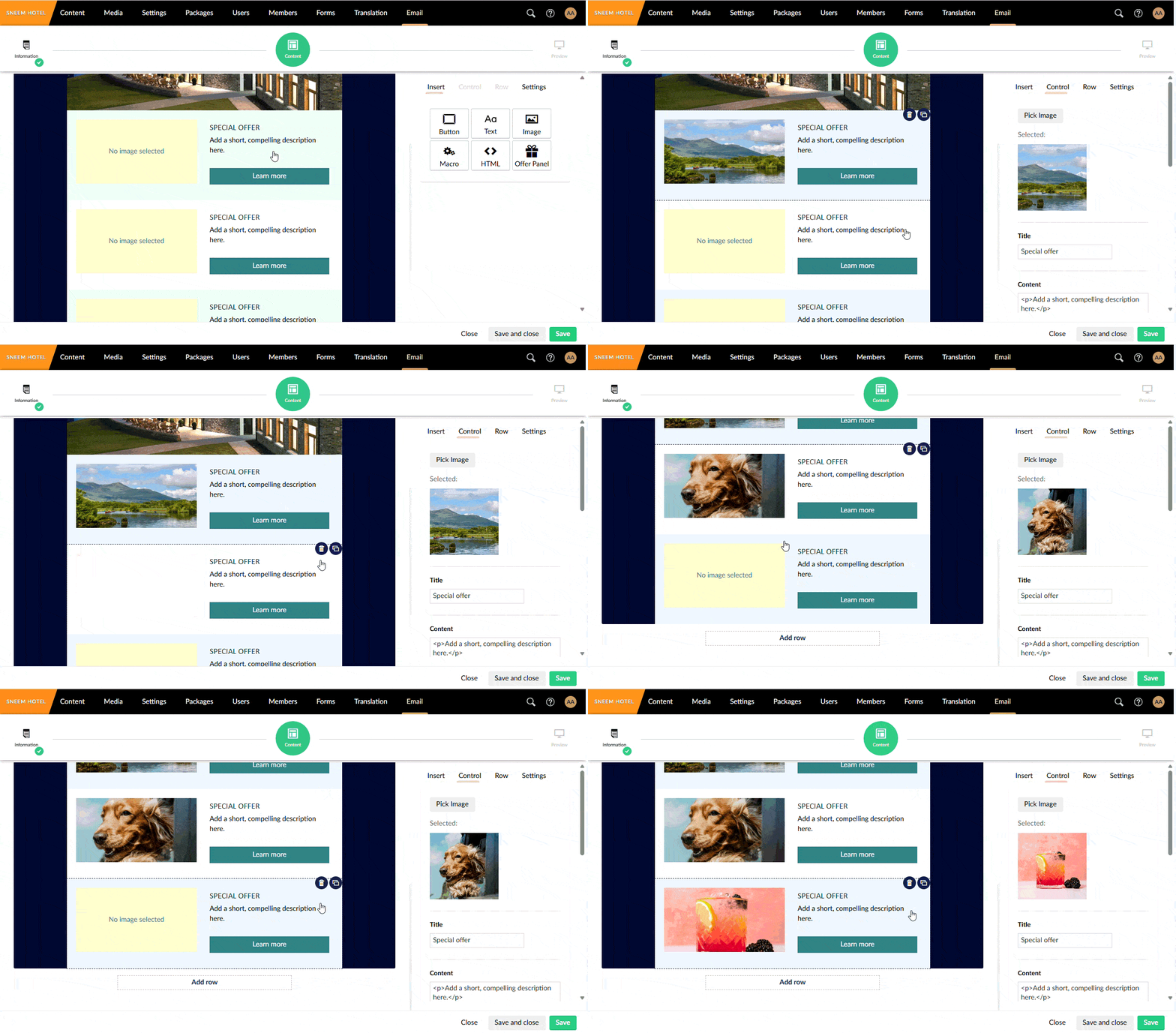
    Recording2026-01-12114017-ezgif.com-optimize

  2. Additionally, if I add the pre-installed “image” field to my email (which is likely as I am looking to use it for email Header Images), it creates a bug where clicking into the image control and then the Custom control, it seems to, “Remove,” the image from my custom control, both in the left side Email builder section and the Edit panel to the right?
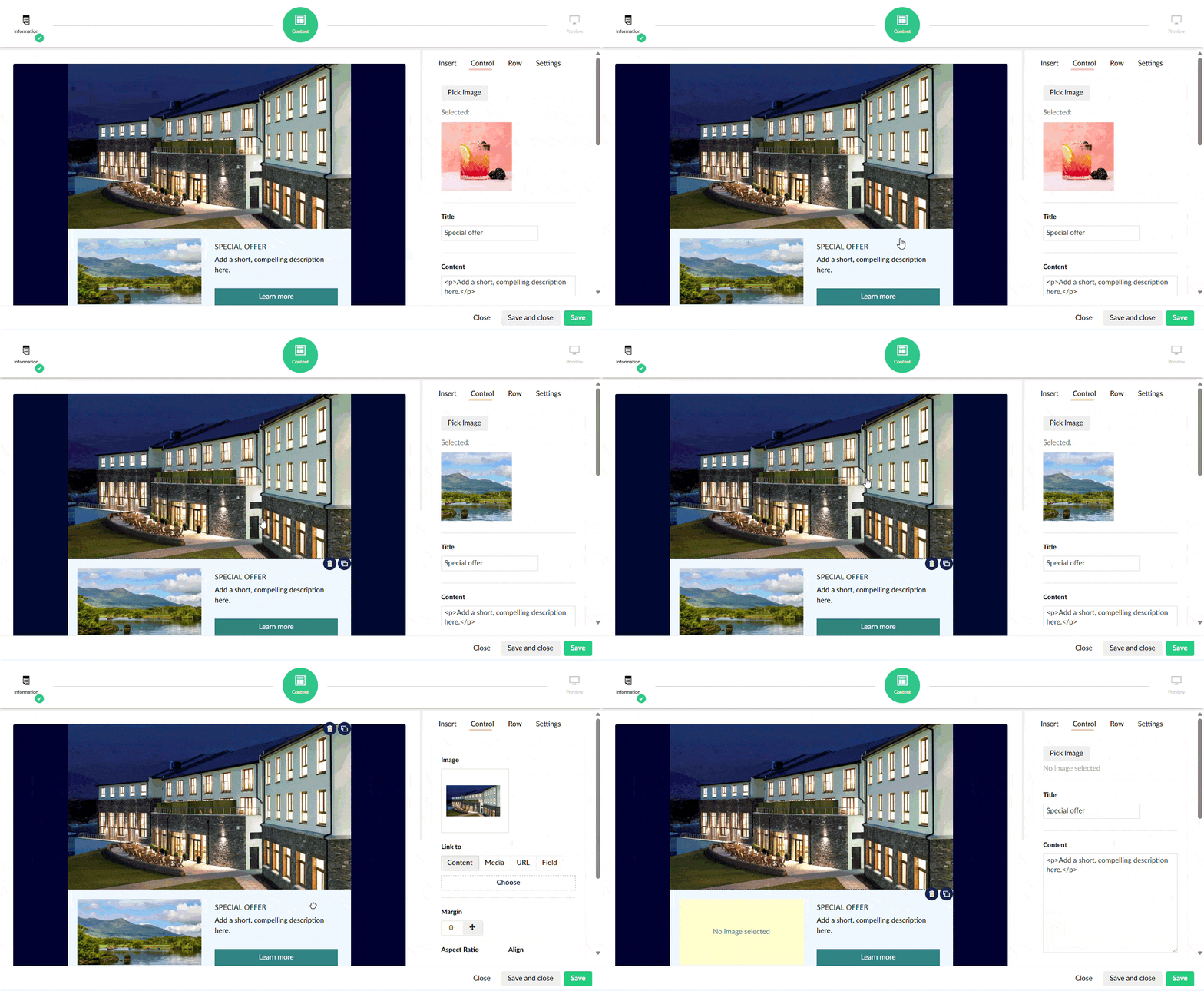
    Recording2026-01-12115020-ezgif.com-optimize

If the images are saved and we go straight to the Email Preview, it does seem to still work correctly and from test sending, emails will contain the images. I believe there must be an issue in how I’ve implemented things causing this issue, since the already provided controls work as intended!

Happy to provide any of my code as needed, but I will include where I would imagine the issue is, in my Edit/View.html for my Custom “Offer Panel” Control and the Edit Controller.

Edit.html

<div ng-controller="NewsletterStudioCustom.OfferPanel.EditController as editVm"
     ng-init="editVm.init(vm,vm.selectedControl)">

  
 <div class="ns-property-group">
    <ns-umb-propertylabel="ns_control_offerPanel_image" description="">
      <button type="button" class="btn btn-default" ng-click="editVm.pickImage()">
        Pick Image
      </button>
      <div ng-if="editVm.imageUrl" style="margin-top:16px; color:#666;">
        Selected: 
        <img ng-src="{{ editVm.imageUrl }}" style="width: 150px; display: block; height: 145px; margin: 10px 0; object-fit: cover;">
      </div>
      <div ng-if="!editVm.imageUrl" style="margin-top:6px; color:#999;">
        No image selected
      </div>
    </ns-umb-property>
  </div>
  <div class="ns-property-group">
    <ns-umb-property label="ns_control_offerPanel_title" description="">
      <input type="text" class="umb-textstring" ng-model="editVm.control.title" maxlength="120" />
    </ns-umb-property>
  </div>
  <div class="ns-property-group">
    <ns-umb-property label="ns_control_offerPanel_body" description="">
      <textarea ng-model="editVm.control.bodyHtml" rows="10" style="width:100%"></textarea>
    </ns-umb-property>
  </div>
  <div class="ns-property-group">
    <ns-umb-property label="ns_control_offerPanel_buttonLabel" description="">
      <input type="text" class="umb-textstring" ng-model="editVm.control.buttonLabel" />
    </ns-umb-property>
  </div>
  <div class="ns-property-group">
    <ns-umb-property label="ns_control_offerPanel_buttonUrl" description="">
      <input type="text" class="umb-textstring" ng-model="editVm.control.buttonUrl" placeholder="https://..." />
    </ns-umb-property>
  </div>
  <div class="ns-property-group">
    <ns-umb-property label="ns_control_offerPanel_bg" description="">
      <input type="text" class="umb-textstring" ng-model="editVm.control.backgroundColor" placeholder="#ffffff" />
    </ns-umb-property>
  </div>
  <div class="ns-property-group">
    <ns-umb-property label="ns_control_offerPanel_btnBg" description="">
      <input type="text" class="umb-textstring" ng-model="editVm.control.buttonBackground" placeholder="#0078d4" />
    </ns-umb-property>
  </div>
  <div class="ns-property-group">
    <ns-umb-property label="ns_control_offerPanel_btnText" description="">
      <input type="text" class="umb-textstring" ng-model="editVm.control.buttonTextColor" placeholder="#ffffff" />
    </ns-umb-property>
  </div>
  <div class="ns-property-group">
    <ns-umb-property label="ns_control_offerPanel_padding" description="">
      <ns-margin-editor ng-model="editVm.control.padding"></ns-margin-editor>
    </ns-umb-property>
  </div>
</div>

View.html

<div ns-control>

  <div ng-style="{
        'padding-top': control.padding.top,
        'padding-bottom': control.padding.bottom,
        'padding-left': control.padding.left,
        'padding-right': control.padding.right,
        'background': control.backgroundColor
      }" style="display: flex;">

    <div class="ns-image" style="text-align:center; margin-bottom:16px; width: 270px;">
      <div ng-if="control.value.imageUrl"
           style="width:100%; height:140px; background:#f0f0f0; color:#888; display:flex; align-items:center; justify-content:center; overflow: hidden;">
        <img ng-src="{{control.value.imageUrl}}"
             style="width: 100%; object-fit: cover; object-position: center;">
      </div>

      <div ng-if="!control.value.imageUrl"
           style="width:100%; height:140px; background:#fff3cd; color:#328186; display:flex; align-items:center; justify-content:center;">
        No image selected
      </div>
    </div>

    <div class="content" style="display: flex; flex-direction: column; justify-content: center; margin-left: 20px;">
      <div style="font-size:18px; margin:0 8px 8px 8px; color: #153538;text-decoration: none;text-transform: uppercase;font-family: Calibri, Candara, Open Sans, Arial, Tahoma, Helvetica, sans-serif;">
        {{control.title}}
      </div>

      <div style="margin:0 8px 16px 8px;">
        <ns-html html="control.bodyHtml"></ns-html>
      </div>

      <div style="margin:0 8px 8px 8px;">
        <span style="display:block; padding:8px 12px; text-align: center;"
              ng-style="{
                'background': control.buttonBackground || '#328186',
                'color': control.buttonTextColor || '#ffffff'
              }">
          {{control.buttonLabel || 'Learn more'}}
        </span>
      </div>
    </div>

  </div>
</div>

Edit.Controller.js

angular.module("umbraco").controller("NewsletterStudioCustom.OfferPanel.EditController",
  ["$scope", "editorService", "entityResource", "mediaResource", function ($scope, editorService, entityResource, mediaResource) {
    var editVm = this;

    editVm.init = function (emailEditor, control) {
      editVm.control = control;
      if ($scope.model && $scope.model.value) { editVm.imageUrl = $scope.model.value.imageUrl; }
      resolveImage();
    };

    editVm.pickImage = function () {
      editorService.mediaPicker({
        multiPicker: false,
        submit: function (model) {
          var item = (model && model.selection && model.selection[0]) || null;
          if (item) {
            editVm.control.imageUdi = item.udi;
            resolveImage();
          }
          editorService.close();
        },
        close: function () {
          editorService.close();
        }
      });
    };

    function resolveImage() { 
      if (!editVm.control || !editVm.control.imageUdi) { 
        editVm.control.value = editVm.control.value || {}; 
        editVm.control.value.imageUrl = null;
        editVm.imageUrl = null; 
        if (!$scope.$$phase) $scope.$applyAsync();
        return; 
      } 
      
      entityResource.getById(editVm.control.imageUdi, "Media").then(function (ent) { 
        mediaResource.getById(ent.id).then(function (media) { 
          editVm.imageUrl = media.mediaLink;
          editVm.control.value = editVm.control.value || {}; 
          editVm.control.value.imageUrl = media.mediaLink;
          if (!$scope.$$phase) $scope.$applyAsync();
        }); 
      }); 
    }

    var evtHandler = $scope.$on("nsSelectedControlChanged", function ($event, ctrl) {
      editVm.init(null, ctrl);
    });

    var controlInitHandler = $scope.$on("nsControlInitialized", function ($event, ctrl) {

        if (!ctrl.value) ctrl.value = {};

        if (ctrl.imageUdi) {
            entityResource.getById(ctrl.imageUdi, "Media").then(function (ent) {
                mediaResource.getById(ent.id).then(function (media) {
                    ctrl.value.imageUrl = media.mediaLink;
                });
            });
        } else {
            ctrl.value.imageUrl = null;
        }
    });

    $scope.$on("$destroy", function () { 
      evtHandler();
      controlInitHandler();
    });
  }]
);

Any help here would be greatly appreciated!!

Hi @ZacheryObAro!

Happy that you’re checking out Newsletter Studio, I’m Markus the creator of the package. Really cool that you’re extending the package with some custom controls as well!

It seems like you are hitting a couple of issues at the same time here.

It looks like you are trying to use a nsControlInitialized event that does not exists, we only fire nsSelectedControlChanged when the selection changes - the initial values would have to be set in the constructor of the controller.

I assume that you’ve seen the docs already.

The problem is that Angular will often keep the controller instance alive so you’d have to re-resolve Image urls if/when the selection changes.

The built in image control uses the DoPrepareForEdit method of the C# EmailControlTypeBase to set the initial image URL as meta data to avoid a second request to the server for each image (speeding up the load initial rendering).

Depending on “where” to store the information the initial controller (where you’ve stored the image URL) might be destroyed. It looks like you are storing the image URL in the value of the controls data which could work (but a image file could be replaced with another file, while the id/guid is still the same) so it’s probably recommended to only store the GUID.

I’ll try to find some time tomorrow to try to replicate your issues and figure out a way to get it to work.

Cheers!

// Markus

Hi again!

I just played around with this a little.

The fact that you’re adding a the “value” object to the controller model in the AngularJS-view seems to be the issue. I think that this is wiped when the controller is re-created.

I converted it into using the meta-object (same approach as the core controls) and it seems to work better.

c-sharp code

using NewsletterStudio.Core.Editor.Controls;
using NewsletterStudio.Core.Editor.Models;
using NewsletterStudio.Core.Rendering;
using NewsletterStudio.Core.Rendering.ViewModels;
using Umbraco.Cms.Core;
using Umbraco.Cms.Core.Web;

namespace NsUmb13120_1327.App_Plugins.newsletterStudioCustom.offerPanelControl.Models;

public class OfferPanelControlData : EmailControl
{
    public override string ControlTypeAlias => OfferEmailControlType.ControlTypeAlias;

    public string? Title { get; set; }
    public string? BodyHtml { get; set; }
    public string? ButtonLabel { get; set; }
    public string? ButtonUrl { get; set; }
    public string? BackgroundColor { get; set; }
    public string? ButtonBackground { get; set; }
    public string? ImageUdi { get; set; }

    public Padding? Padding { get; set; }
}

public class OfferPanelControlViewModel : EmailControlViewModelBase
{
    public string Title { get; set; }
    public string BodyHtml { get; set; }
    public string ButtonLabel { get; set; }
    public string ButtonUrl { get; set; }
    public string BackgroundColor { get; set; }
    public string ButtonBackground { get; set; }
    public string ImageUdi { get; set; }
    
}

public class OfferEmailControlType : EmailControlTypeBase<OfferPanelControlData, OfferPanelControlViewModel>
{
    private readonly IUmbracoContextFactory _umbracoContextFactory;
    internal const string ControlTypeAlias = "offerPanel";
    public override string Alias => ControlTypeAlias;
    public override string ViewRender => "/app_plugins/newsletterStudioCustom/offerPanelControl/view.html";
    public override string ViewEdit => "/app_plugins/newsletterStudioCustom/offerPanelControl/edit.html";
    public override string Icon => "icon-bill-dollar";
    public override string IconSvg { get; }

    public OfferEmailControlType(IUmbracoContextFactory umbracoContextFactory)
    {
        _umbracoContextFactory = umbracoContextFactory;
    }

    public override OfferPanelControlViewModel DoBuildViewModel(OfferPanelControlData model, EmailControlRenderingData renderingData)
    { 
        var vm = new OfferPanelControlViewModel();
        vm.Title = model.Title;
        vm.BodyHtml = model.BodyHtml;
        vm.BackgroundColor = model.BackgroundColor;
        vm.ButtonBackground = model.ButtonBackground;
        vm.ButtonLabel = model.ButtonLabel;
        vm.ImageUdi = model.ImageUdi;

        return vm;
    }

    public override OfferPanelControlViewModel DoUpdateUniqueViewModel(OfferPanelControlViewModel model, IRecipientDataModel recipient)
    {
        return model;
    }

    public override OfferPanelControlData BuildEmptyInstance()
    {
        return new OfferPanelControlData()
        {
            Padding = Padding.Default
        };
    }

    public override void DoPrepareForEdit(OfferPanelControlData control)
    {
        using var ctx = _umbracoContextFactory.EnsureUmbracoContext();

        if (!string.IsNullOrEmpty(control.ImageUdi))
        {
            var media = ctx.UmbracoContext.Media!.GetById(UdiParser.Parse(control.ImageUdi));
            if (media != null)
            {
                control.Meta.Add("imageUrl", media.Url());
            }
        }
        
        base.DoPrepareForEdit(control);
    }
}

edit.html

<div ng-controller="NewsletterStudioCustom.OfferPanel.EditController as editVm"
     ng-init="editVm.init(vm,vm.selectedControl)">

 <div class="ns-property-group">
    <ns-umb-property label="ns_control_offerPanel_image" description="">
      <button type="button" class="btn btn-default" ng-click="editVm.pickImage()">
        Pick Image
      </button>
      <div ng-if="editVm.control.meta.imageUrl" style="margin-top:16px; color:#666;">
        Selected: 
        <img ng-src="{{ editVm.control.meta.imageUrl }}" style="width: 150px; display: block; height: 145px; margin: 10px 0; object-fit: cover;">
      </div>
      <div ng-if="!editVm.control.meta.imageUrl" style="margin-top:6px; color:#999;">
        No image selected
      </div>
    </ns-umb-property>
  </div>
  <div class="ns-property-group">
    <ns-umb-property label="ns_control_offerPanel_title" description="">
      <input type="text" class="umb-textstring" ng-model="editVm.control.title" maxlength="120" />
    </ns-umb-property>
  </div>
  <div class="ns-property-group">
    <ns-umb-property label="ns_control_offerPanel_body" description="">
      <textarea ng-model="editVm.control.bodyHtml" rows="10" style="width:100%"></textarea>
    </ns-umb-property>
  </div>
  <div class="ns-property-group">
    <ns-umb-property label="ns_control_offerPanel_buttonLabel" description="">
      <input type="text" class="umb-textstring" ng-model="editVm.control.buttonLabel" />
    </ns-umb-property>
  </div>
  <div class="ns-property-group">
    <ns-umb-property label="ns_control_offerPanel_buttonUrl" description="">
      <input type="text" class="umb-textstring" ng-model="editVm.control.buttonUrl" placeholder="https://..." />
    </ns-umb-property>
  </div>
  <div class="ns-property-group">
    <ns-umb-property label="ns_control_offerPanel_bg" description="">
      <input type="text" class="umb-textstring" ng-model="editVm.control.backgroundColor" placeholder="#ffffff" />
    </ns-umb-property>
  </div>
  <div class="ns-property-group">
    <ns-umb-property label="ns_control_offerPanel_btnBg" description="">
      <input type="text" class="umb-textstring" ng-model="editVm.control.buttonBackground" placeholder="#0078d4" />
    </ns-umb-property>
  </div>
  <div class="ns-property-group">
    <ns-umb-property label="ns_control_offerPanel_btnText" description="">
      <input type="text" class="umb-textstring" ng-model="editVm.control.buttonTextColor" placeholder="#ffffff" />
    </ns-umb-property>
  </div>
  <div class="ns-property-group">
    <ns-umb-property label="ns_control_offerPanel_padding" description="">
      <ns-margin-editor ng-model="editVm.control.padding"></ns-margin-editor>
    </ns-umb-property>
  </div>
</div>

view.html

<div ns-control>

  <div ng-style="{
        'padding-top': control.padding.top,
        'padding-bottom': control.padding.bottom,
        'padding-left': control.padding.left,
        'padding-right': control.padding.right,
        'background': control.backgroundColor
      }" style="display: flex;">

    <div class="ns-image" style="text-align:center; margin-bottom:16px; width: 270px;">
      <div ng-if="control.meta.imageUrl"
           style="width:100%; height:140px; background:#f0f0f0; color:#888; display:flex; align-items:center; justify-content:center; overflow: hidden;">
        <img ng-src="{{control.meta.imageUrl}}"
             style="width: 100%; object-fit: cover; object-position: center;">
      </div>

      <div ng-if="!control.meta.imageUrl"
           style="width:100%; height:140px; background:#fff3cd; color:#328186; display:flex; align-items:center; justify-content:center;">
        No image selected
      </div>
    </div>

    <div class="content" style="display: flex; flex-direction: column; justify-content: center; margin-left: 20px;">
      <div style="font-size:18px; margin:0 8px 8px 8px; color: #153538;text-decoration: none;text-transform: uppercase;font-family: Calibri, Candara, Open Sans, Arial, Tahoma, Helvetica, sans-serif;">
        {{control.title}}
      </div>

      <div style="margin:0 8px 16px 8px;">
        <ns-html html="control.bodyHtml"></ns-html>
      </div>

      <div style="margin:0 8px 8px 8px;">
        <span style="display:block; padding:8px 12px; text-align: center;"
              ng-style="{
                'background': control.buttonBackground || '#328186',
                'color': control.buttonTextColor || '#ffffff'
              }">
          {{control.buttonLabel || 'Learn more'}}
        </span>
      </div>
    </div>

  </div>
  <pre>
    {{control | json}}
  </pre>
</div>

edit.controller.js

angular.module("umbraco").controller("NewsletterStudioCustom.OfferPanel.EditController",
  ["$scope", "editorService", "entityResource", "mediaResource", function ($scope, editorService, entityResource, mediaResource) {
    var editVm = this;

    editVm.init = function (emailEditor, control) {
      console.log('init custom control');
      editVm.control = control;
      //if ($scope.model && $scope.model.value) { editVm.imageUrl = $scope.model.value.imageUrl; }
      //resolveImage();
    };

    editVm.pickImage = function () {
      editorService.mediaPicker({
        multiPicker: false,
        submit: function (model) {
          var item = (model && model.selection && model.selection[0]) || null;
          if (item) {
            editVm.control.imageUdi = item.udi;
            resolveImage();
          }
          editorService.close();
        },
        close: function () {
          editorService.close();
        }
      });
    };

    function resolveImage() { 
      if (!editVm.control || !editVm.control.imageUdi) { 
        editVm.control.value = editVm.control.value || {}; 
        editVm.control.value.imageUrl = null;
        editVm.imageUrl = null; 
        if (!$scope.$$phase) $scope.$applyAsync();
        return; 
      } 
      
      entityResource.getById(editVm.control.imageUdi, "Media").then(function (ent) { 
        mediaResource.getById(ent.id).then(function (media) { 
          editVm.imageUrl = media.mediaLink;
          editVm.control.value = editVm.control.value || {}; 
          editVm.control.meta.imageUrl = media.mediaLink;
          if (!$scope.$$phase) $scope.$applyAsync();
        }); 
      }); 
    }

    var evtHandler = $scope.$on("nsSelectedControlChanged", function ($event, ctrl) {
      editVm.init(null, ctrl);
    });

    var controlInitHandler = $scope.$on("nsControlInitialized", function ($event, ctrl) {
        console.log('nsControlInitialized');
        if (!ctrl.value) ctrl.value = {};

        if (ctrl.imageUdi) {
            entityResource.getById(ctrl.imageUdi, "Media").then(function (ent) {
                mediaResource.getById(ent.id).then(function (media) {
                    ctrl.value.imageUrl = media.mediaLink;
                });
            });
        } else {
            ctrl.value.imageUrl = null;
        }
    });

    $scope.$on("$destroy", function () { 
      evtHandler();
      controlInitHandler();
    });
  }]
);

Let me know if this points to in the right direction?

Cheers!

1 Like

Hi Markus,

Apologies from my delayed response here! And thank you so much for your speedy reply and assistance. I am not the most familiar with Angular and customisation of Umbraco like this, hence I was trying any snippets I could find online, along with the documentation to try and figure out how to get things working.

What you have provided was the exact fix I was looking for, thank you very much :slight_smile: That disappearing image issue is gone and the image is persisting now when editing the template before preview!
I’ve marked your response as the solution, but just wondering if you have any info on the below? Or happy to create a new topic instead!

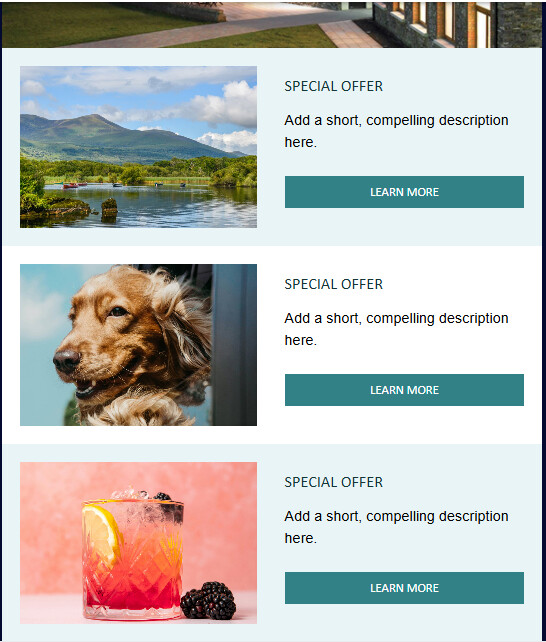
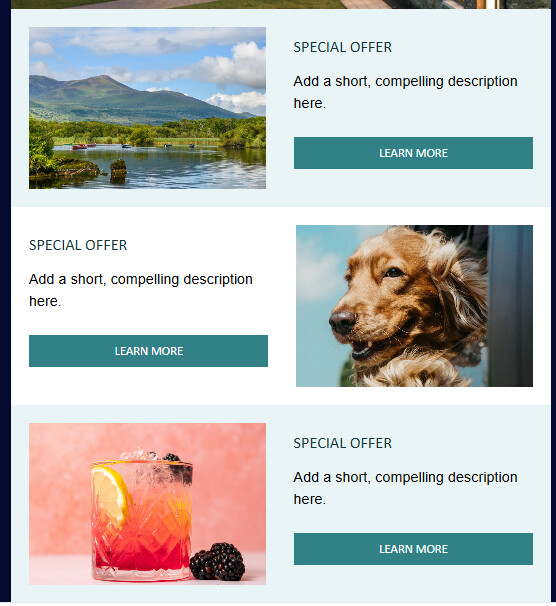
I am just wondering if its possible when multiple of this same control are placed on the template, is there anyway to have some sort of enumerator/index persist that I could use to optionally style something?

I will have something like the below, where I have 3 different Offer Panels placed one after the other:

And I am just looking to be able to do something like the below, where in the code I could check if the index of the current panel is an odd or even number and change the layout accordingly:

Just because I imagine it is worth sharing, this is the offerPanel.cshtml I use to render the control before we send an email in the preview section:

@inherits Umbraco.Cms.Web.Common.Views.UmbracoViewPage<NewsletterStudio.Core.Rendering.ViewModels.ControlWithEmailViewModel>
@using Umbraco.Extensions
@using UmbracoProject.EmailControls
@using Umbraco.Cms.Core.Models.PublishedContent

@{
    var vm = Model.Model as OfferPanelViewModel;

    string imageUrl = "";
    if (!string.IsNullOrWhiteSpace(vm?.ImageUdi))
    {
        var mediaItem = Umbraco.Media(vm.ImageUdi);
        imageUrl = mediaItem?.Url(mode: UrlMode.Absolute) ?? "";
    }

    var bg = vm?.BackgroundColor ?? "#ffffff";
    var btnBg = vm?.ButtonBackground ?? "#0078d4";
    var btnTxt = vm?.ButtonTextColor ?? "#ffffff";
    var padding = vm?.Padding;
}

@if (vm != null)
{
<table class="full-width" border="0" cellpadding="0" cellspacing="0" align="center" width="100%" style="background-color:@bg; margin:0; padding: @padding">
    <tr>
        <td>

            <!-- LEFT COLUMN (IMAGE) -->
            <table class="full-width" border="0" cellpadding="0" cellspacing="0" align="left" width="100%" style="width: 47%">
                <tr>
                    <td valign="middle">
                        <table border="0" cellpadding="0" cellspacing="0" align="center" width="100%">
                            <tr>
                                <td align="center" valign="middle" style="line-height:180px;" height="180">
                                    @if (!string.IsNullOrWhiteSpace(imageUrl))
                                    {
                                        <a href="@vm.ButtonUrl" style="text-decoration:none;">
                                            <img src="@imageUrl"
                                                 alt="@vm.Title"
                                                 style="display:block !important; width:100%; max-width:270px; margin:0 auto; background-color:#589263; height: 180px; object-fit:cover;"
                                                 border="0" />
                                        </a>
                                    }
                                </td>
                            </tr>
                        </table>
                    </td>
                </tr>
            </table>

            <!-- RIGHT COLUMN (TEXT + BUTTON) -->
            <table class="full-width" border="0" cellpadding="0" cellspacing="0" align="right" width="100%" style="width: 47.5%">
                <tr>
                    <td valign="top">
                        <table border="0" cellpadding="0" cellspacing="0" align="center" width="100%">
                            <tr>
                                <td valign="middle">

                                    <table border="0" cellpadding="0" cellspacing="0" align="left" width="100%">

                                        <!-- TITLE -->
                                        @if (!string.IsNullOrWhiteSpace(vm.Title))
                                        {
                                            <tr>
                                                <td style="padding:10px 0; font-size:18px; line-height:24px; font-family:Calibri,Candara,Open Sans,Arial,Tahoma,Helvetica,sans-serif; color:#153538; text-align:left; text-transform:uppercase;">
                                                    <a href="@vm.ButtonUrl"
                                                       style="text-decoration:none; color:#153538; font-size:18px; text-transform:uppercase;">
                                                        @vm.Title
                                                    </a>
                                                </td>
                                            </tr>
                                        }

                                        <!-- DESCRIPTION -->
                                        @if (!string.IsNullOrWhiteSpace(vm.BodyHtml))
                                        {
                                            <tr>
                                                <td style="padding:5px 0; font-size:14px; line-height:24px; font-family:Calibri,Candara,Open Sans,Arial,Tahoma,Helvetica,sans-serif; color:#153538; text-align:left;">
                                                    @Html.Raw(vm.BodyHtml)
                                                </td>
                                            </tr>
                                        }

                                        <!-- BUTTON -->
                                        @if (!string.IsNullOrWhiteSpace(vm.ButtonLabel) && !string.IsNullOrWhiteSpace(vm.ButtonUrl))
                                        {
                                            <tr>
                                                <td valign="top" width="100%">
                                                    <table border="0" cellpadding="0" cellspacing="0" align="left" width="100%">
                                                        <tr>
                                                            <td align="center" style="padding:10px 0;">
                                                                <table border="0" cellpadding="0" cellspacing="0">
                                                                    <tr>
                                                                        <td align="center" valign="middle"
                                                                            style="background-color:@btnBg; font-size:14px; font-family:Calibri,Candara,Open Sans,Arial,Tahoma,Helvetica,sans-serif; color:@btnTxt; padding:10px 15px; text-transform:uppercase;">
                                                                            <a href="@vm.ButtonUrl"
                                                                               style="text-decoration:none; color:@btnTxt; text-transform:uppercase;display:block;width:100%;">
                                                                                @vm.ButtonLabel
                                                                            </a>
                                                                        </td>
                                                                    </tr>
                                                                </table>
                                                            </td>
                                                        </tr>
                                                    </table>
                                                </td>
                                            </tr>
                                        }

                                    </table>

                                </td>
                            </tr>
                        </table>
                    </td>
                </tr>
            </table>

        </td>
    </tr>
</table>
}

Thanks so much again for your help here, I was really scratching my head on getting those bugs I had fixed :slight_smile:

Hi!

No worries!

Great to hear that my tips pointed you i the right direction.

About your question around indexes and alternating layout, it might be possible to get it to work as you’re describing but you’d have to rely on some hacky stuff, handle multiple threads etc.

If a collection of offers are dependent on each other for rendering I would consider having a collection of offers to be configured on one control (like Block List) and not try to render it conditionally based on the placement.

Another approach to avoid a complicated re-write could be to have a setting on the current control to let the editor choose if the image should be rendered on the left or the right.

1 Like

This topic was automatically closed 30 days after the last reply. New replies are no longer allowed.