If you run several sites from one Umbraco installation, you probably share document types between them, and some of their fields only matter on one site. Up to Umbraco 13 you could hide those with a SendingContentNotification handler. That notification is gone since v14, and out of the box Umbraco hides properties per user group, but not tabs or groups, and not per site.
I built Property Visibility for exactly that. You write rules per site (a root node) and the backoffice hides the matching properties, tabs and groups for editors on that site.
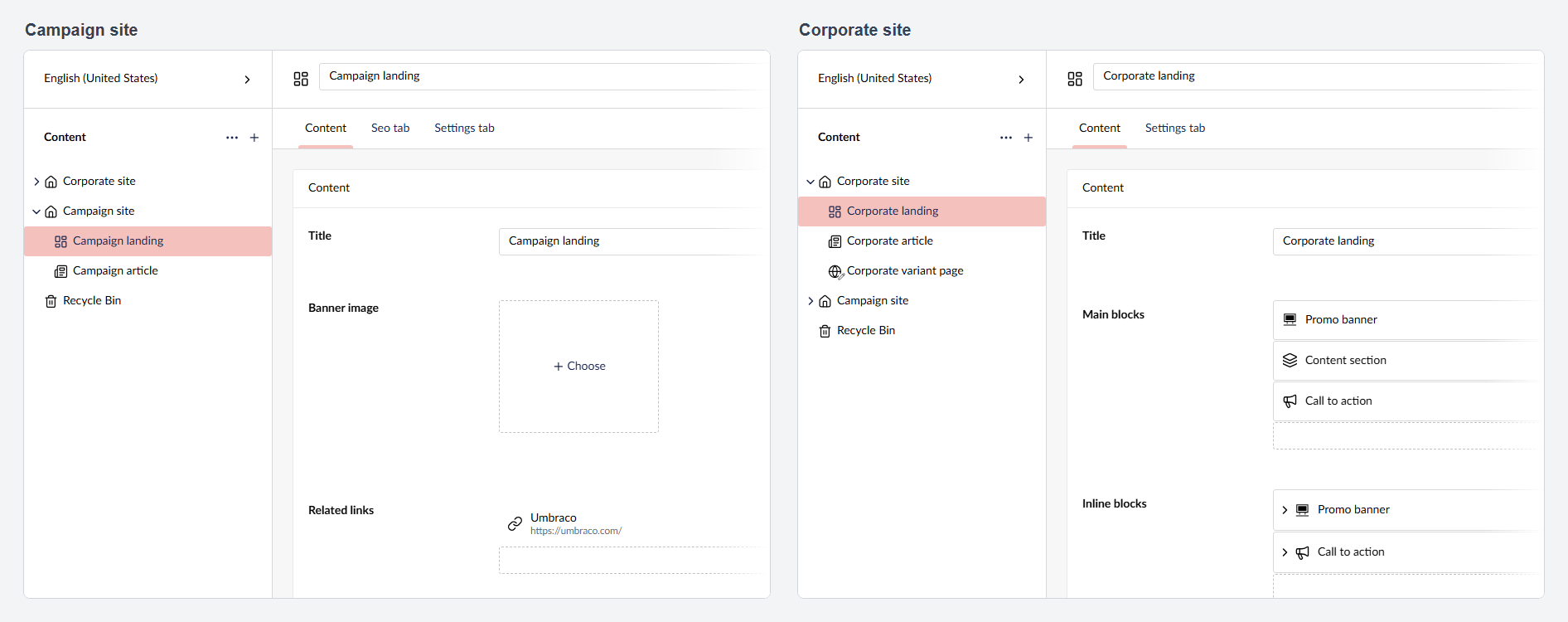
What it does:
- Hides properties, tabs and groups by alias: on every site, on one site, or on the sites that share a rule set
- Works inside blocks too: Block List, Block Grid, Single Block and blocks in the rich text editor
- Rules live in appsettings or a JSON file and reload without a restart. JSON schemas give IntelliSense, and a health check reports every alias or root node that doesn’t resolve
A minimal example:
"PropertyVisibility": {
  "Sites": {
    "corporate": {
      "RootNodeKey": "5c2b4d7e-9f1a-4c3e-8b6d-2a1f0e9d8c7b",
      "ContentTypes": {
        "landingPage": { "Containers": ["seoTab"], "Properties": ["relatedLinks"] }
      }
    }
  }
}
To be clear: it changes what editors see, not what they’re allowed to do. Hidden values are still in the Management API, the Delivery API and on the website. For permissions, use Umbraco’s property permissions on user groups.
1.x is for Umbraco 17 (from 17.6.2), 2.x for Umbraco 18 (from 18.2.1), both on .NET 10. On Umbraco 17, use the latest 1.x.
dotnet add package Umbraco.Community.PropertyVisibility
Marketplace · NuGet · GitHub (docs and issues)
Replacing your own v13 handler? The README has a short section on that.
Curious how others handle this today: do you hide fields per site in your own installs, and how?