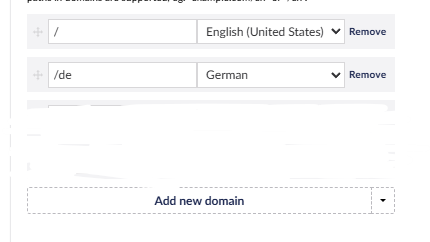
The # means Umbraco can’t resolve a routable URL for that node in the non-English culture context. The MNTP path display depends entirely on URL routing working correctly per culture.
Most likely … check these in order:
Culture & Hostnames on the root node every language needs a domain assigned, otherwise Umbraco has no base URL to build from for that culture.
The picked node’s URL segment must be saved for that language variant open it, switch to the non-English language in the back office, confirm it has a name/slug saved and published for that variant.
MNTP property varies by culture if the property itself isn’t culture-variant, it has no language context to route against.
Thank you very much for your answer, it helped me a lot.
What happens is that the section containing my MNTP items is not located under the root node, which I think is why Umbraco cannot generate a route for those items.
And unrelated to your problem, but still important: please upgrade to the latest Umbraco 13 version. It has some mitigations for security risks. And in general, if you have an issues, it might already have been fixed in the latest minor version.
In my experience it’s basically what @BishalTimalsina12 says. The # is shown when a url cannot be resolved. What’s mostly the case for me with this issue is that someone just trashed that content or did not publish a variant for the current culture.
Hopefully this helps in the future with more # related issues!