Is there a way to stop paging caching

Is here any way to stop one or more pages caching, I have a couple of HTML forms that post back to the page that call it, to act as a filter.

If I leave the page for about 1 or 2 mins, then I can use the filters on the page. But if page loads and then I try to apply the filter they filters are not applying, and the page is not reloading.

I tried it using method=get on the form and also using JQuery and Javascript.

Nothing seems to work.

Can any one help.

Thanks

Darren

Hey @darrenhunterEmerald

It sounds like the browser or server is aggressively caching your GET requests. POST requests usually bust the cache, but GET requests get trapped by CDNs or output caching unless configured otherwise.

Could you share a quick snippet of two things?

  1. The controller method you are posting/getting to

  2. The jQuery/JS function you used

Seeing those will help nail down exactly which layer is holding onto the cache.

Regards,
Shekhar

Hi,

Here is the Javascript I have been playing around with

<script type=“text/javascript”>

            $(document).ready(function() {              


                            $('form').on('submit', function(event) {

                                            event.preventDefault();

                                            var c = $('#newsCategory').find(":selected").val();

                                            var url="@Url?category=" +c;

                                            //window.location.href = url;

                                            window.open(url, '\_self')


                            });

            });

</script>

I also did a version of the script, that we called from an OnClick on the button, we changed the button from submit to a normal form button.

This still did not work.

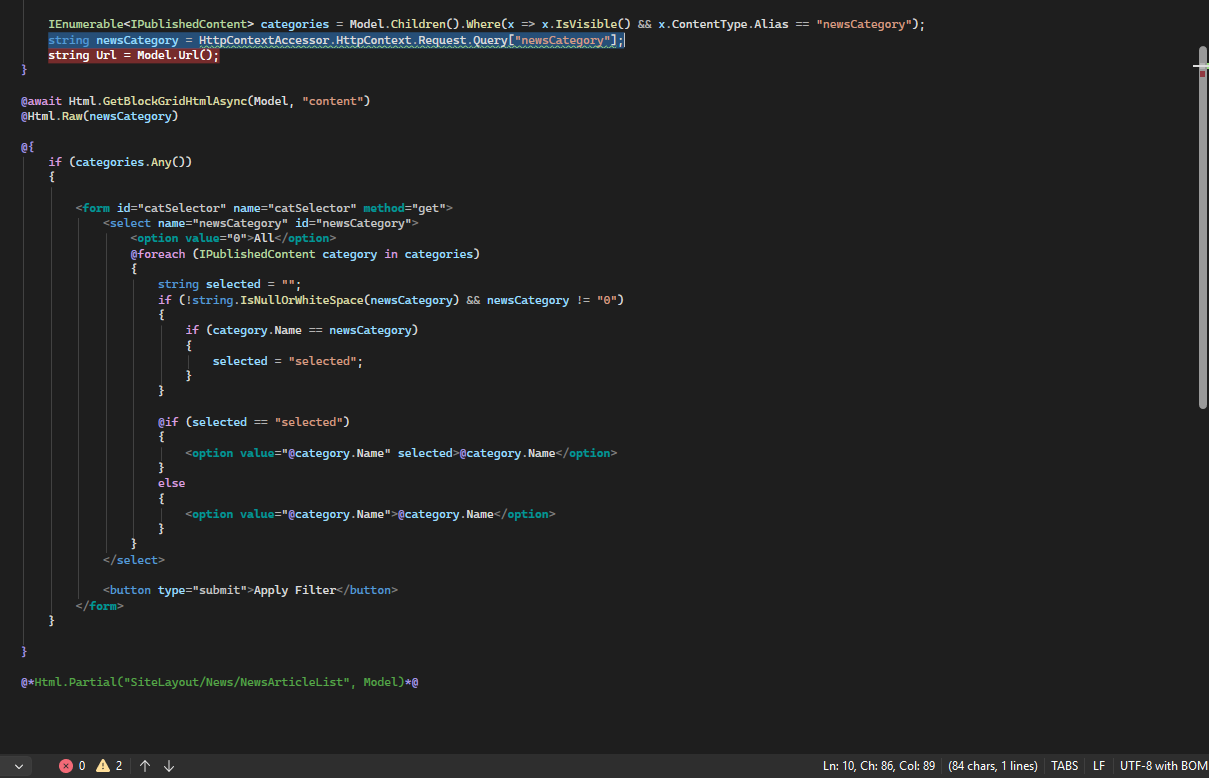
The form now looks like this

And I am using the following code to get the values from the post back.

@injectinjectinjectinject Microsoft.AspNetCore.Http.IHttpContextAccessor HttpContextAccessor
string newsCategory = HttpContextAccessor.HttpContext.Request.Query[“newsCategory”];

It looks like a cache issue, If I leave the page for about 1 or 2 mins then I can post back. But if I try and post back with in a few secs of the page been displayed.

It seems to not reload the page.

I have put brake points in the code and when the form is posted it not refreshing the page and not hitting the brake points.

But if I leave it 1 and 2 mins and then change the filder it post backs and hits the brake points.

It odd behavior.

Hope that helps.

Darren

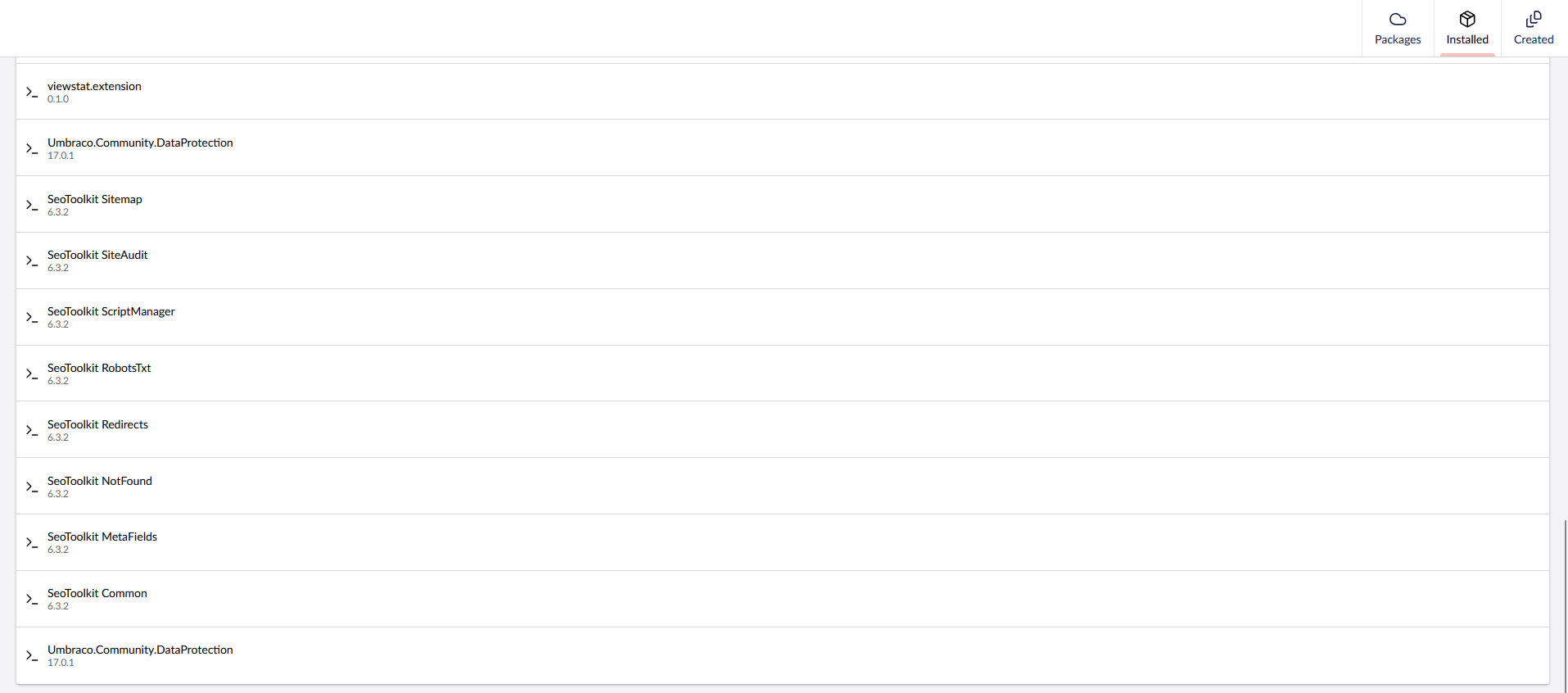
Here are all the packages I have installed.

Hi @darrenhunterEmerald ,

Could you please try the following fixes:

  1. Delete the JS code, you don’t need it as native <form method="get"> with a <select name="newsCategory"> already appends the value to the query string automatically when submitted. Also important: your JS was building the URL with ?category=, but your C# is reading newsCategory. Those don’t match, so even without caching the filter would silently fail.

  2. You don’t need to inject IHttpContextAccessor. Inside a Razor view, Context is already available natively.
    Replace:

    @inject Microsoft.AspNetCore.Http.IHttpContextAccessor HttpContextAccessor
    string newsCategory = HttpContextAccessor.HttpContext.Request.Query["newsCategory"];


    With:

    @{
    string newsCategory = Context.Request.Query["newsCategory"];
    }
    
    
  3. Since you’re not using a controller, you can’t use [ResponseCache] attributes. Instead, add this middleware in Program.cs right after BootUmbracoAsync() and before UseUmbraco():

    await app.BootUmbracoAsync();
    
    // Prevent caching when filter query parameters are present
    app.Use(async (context, next) =>
    {
        if (context.Request.Query.ContainsKey("newsCategory"))
        {
            context.Response.Headers.Append("Cache-Control", "no-cache, no-store, must-revalidate");
            context.Response.Headers.Append("Pragma", "no-cache");
            context.Response.Headers.Append("Expires", "0");
        }
        await next();
    });
    
    app.UseUmbraco()
        .WithMiddleware(u =>
        {
            u.UseBackOffice();
            u.UseWebsite();
        })
        .WithEndpoints(u =>
        {
            u.UseBackOfficeEndpoints();
            u.UseWebsiteEndpoints();
        });
    
    await app.RunAsync();


    What this does: When the request URL contains ?newsCategory=something, the middleware tells both the browser and any server-side cache to skip caching entirely. Your breakpoints will hit immediately every time.

Note for 3rd point: If you want to cover all pages that use query string filtering (not just the above one), then add this:

await app.BootUmbracoAsync();

// Prevent caching for any request with query parameters (filters, pagination, etc.)
app.Use(async (context, next) =>
{
    if (context.Request.QueryString.HasValue)
    {
        context.Response.Headers.Append("Cache-Control", "no-cache, no-store, must-revalidate");
        context.Response.Headers.Append("Pragma", "no-cache");
        context.Response.Headers.Append("Expires", "0");
    }
    await next();
});

app.UseUmbraco()
    .WithMiddleware(u =>
    {
        u.UseBackOffice();
        u.UseWebsite();
    })
    .WithEndpoints(u =>
    {
        u.UseBackOfficeEndpoints();
        u.UseWebsiteEndpoints();
    });

await app.RunAsync();

This way every filtered page across the site — news categories, blog filters, pagination, search — gets fresh content without adding code for each one. Pages without query strings still benefit from normal caching.

If you’d prefer to be more conservative (only bust cache for known params), swap the condition:

if (context.Request.Query.ContainsKey("newsCategory") ||
    context.Request.Query.ContainsKey("page") ||
    context.Request.Query.ContainsKey("search"))

Also, could you check a couple of things for me:

  • Open DevTools (F12) → Network tab → click on the page request after submitting the form → share the Response Headers. That will tell us exactly which layer is caching.
  • Check your appsettings.json — is there anything related to OutputCache, WebRouting, or DeliveryApi configured?
  • Are you running behind Cloudflare, Azure CDN, or IIS with output caching enabled?

Regards,
Shekhar

(post deleted by author)

This is happening on my pc, in Visual Studio. This has not been deployed to the server yet.

Here is my program.cs file

*
 * How to use the Block Preview https://github.com/rickbutterfield/BlockPreview
 */
using Umbraco.App_Code.Helpers;
using Umbraco.App_Code.Media;
using Umbraco.App_Code.Wcag;
using Umbraco.Cms.Core.Notifications;
using Umbraco.Community.BlockPreview.Extensions;
using Umbraco.Community.PagespeedOptimizer.Extensions;
using Umbraco.App_Code.CORS;


WebApplicationBuilder builder = WebApplication.CreateBuilder(args);

IWebHostEnvironment _env = builder.Environment;
ConfigurationManager _config = builder.Configuration;

CorsStartup cors = new CorsStartup(_config);
cors.AddCorse(builder);


settings Settings = new settings();

string environment = Environment.GetEnvironmentVariable("ASPNETCORE_ENVIRONMENT");
Console.WriteLine("HostingEnvironmentName: '{0}'", environment);

builder.Configuration.AddJsonFile($"appsettings.{Environment.MachineName}.json", true, true);
builder.Configuration.AddJsonFile($"appsettings.{environment}.json", true, true);
builder.Configuration.AddEnvironmentVariables();


builder.CreateUmbracoBuilder()
    .AddBackOffice()
    .AddWebsite()
    .AddComposers()
    /*
     * Added By Darren Hunter
     * Date:26-05-2026
     * Added for Block Grid Preview
     */
    .AddBlockPreview(options =>
    {
        options.BlockGrid = new()
        {
            Enabled = true,
            ContentTypes = ["button", 
                "embdedVideo", 
                "embed", 
                "expandingBox", 
                "faqHeader", 
                "faqListBox",
                "fileDownload",
                "formSelect",
                "galleryBlock",
                "GridImage",
                "GridImageWithLink",
                "inpageModel",
                "richText",
                "statistic",
                "headlineH1",
                "headlineH2",
                "headlineH3",
                "headlineH4",
                "headlineH5",
                "headlineH6",
                "footerFeatureBlock",
                "mainBlock",
                "blockWithImage",
                "blockWithText",
                "login",
                "staticHero",
                "homePageButtons",
                "propertiesToBuy",
                "homePageNewsDemo"
            ],
            IgnoredContentTypes = [],
            ViewLocations = [],
            Stylesheets = []
        };

        options.BlockList = new()
        {
            Enabled = true,
            ContentTypes = [
                "/Views/Partials/blocklist/Components/helpSectionTopic",
                "/Views/Partials/blocklist/Components/helpSectionCategory",
                "/Views/Partials/blocklist/Components/staffMember"
            ],
            IgnoredContentTypes = [],
            ViewLocations = [],
            Stylesheets = []
        };

        options.RichText = new()
        {
            Enabled = true,
            ContentTypes = [],
            IgnoredContentTypes = [],
            ViewLocations = [],
            Stylesheets = []
        };
    })
    /*
     * Added for WCAG 
     */
     .AddNotificationHandler<ContentPublishingNotification, saveNotificationHandler>() 
     .AddNotificationHandler<ContentSavingNotification, BlockGridNotificationHandler>()

    /*
    * Back to Original code!
    */
    .Build();

WebApplication app = builder.Build();

cors.useCores(app);

builder.Services.AddResponseCaching();

/*
 * Added By Darren Hunter
 * Date:26-05-2026
 * To add headers ect for securety!
 * 
 * Update: 08-05-2026 - Moved back to the Web Config. 
 */
//app.Use(async (context, next) =>
//{
//    context.Response.Headers.Add("X-Frame-Options", "SAMEORIGIN");
//    context.Response.Headers.Append("X-Content-Type-Options", "nosniff");
//    await next();
//});

/*
 * Added By Darren Hunter
 * Date:26-05-2026
 * See:https://github.com/dawoe/umbraco-pagespeed-optimization
 */

app.EnableResponseCompression();


await app.BootUmbracoAsync();

app.UseHttpsRedirection();
app.UseMiddleware<MediaMiddleware>();

// Prevent caching when filter query parameters are present
app.Use(async (context, next) =>
{
    if (context.Request.QueryString.HasValue)
    {
        context.Response.Headers.Append("Cache-Control", "no-cache, no-store, must-revalidate");
        context.Response.Headers.Append("Pragma", "no-cache");
        context.Response.Headers.Append("Expires", "0");
    }
    await next();
});


app.UseUmbraco()
    .WithMiddleware(u =>
    {
        u.UseBackOffice();
        u.UseWebsite();
    })
    .WithEndpoints(u =>
    {
        u.UseBackOfficeEndpoints();
        u.UseWebsiteEndpoints();
    });

await app.RunAsync();

It seems to allow the form to post back after about 25 secs.

This is odd…

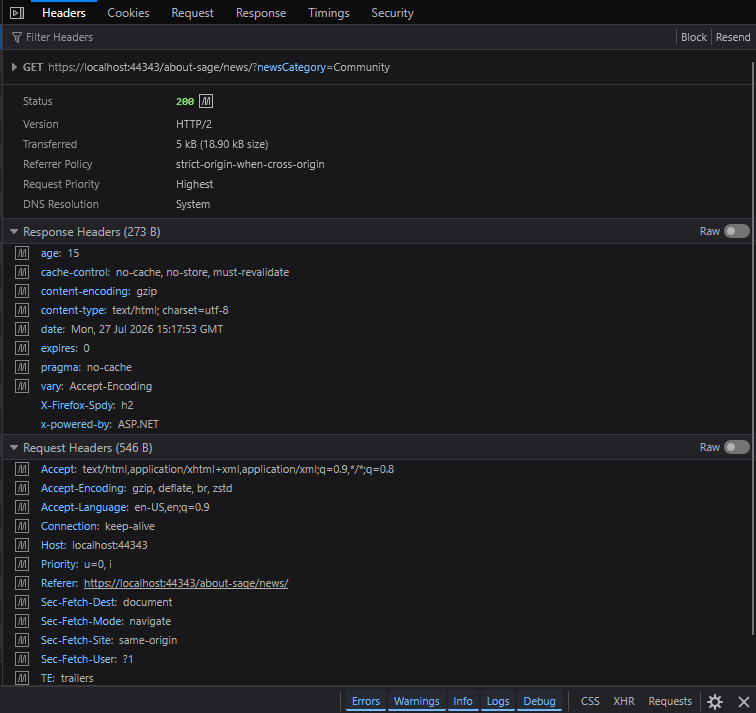
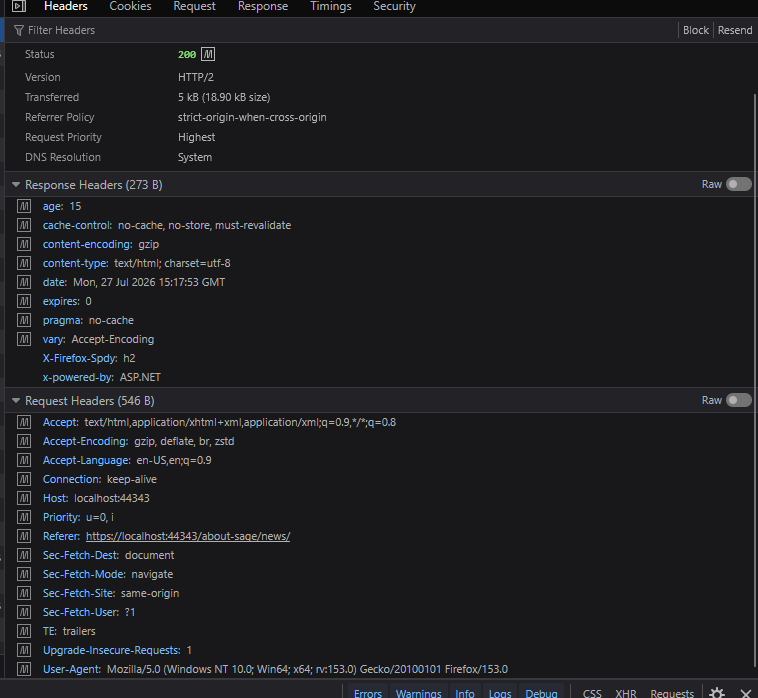
Here are the response headers

Hope this helps!

Screenshots confirms the middleware is working and setting correct headers but something is still serving the cached pages despite those headers.

Since you’re running on localhost:44343, it’s not a CDN. That leaves the PageSpeed Optimizer as the most likely source. It uses output caching internally and may be caching responses before your middleware headers are evaluated.

Try this: temporarily comment out both builder.Services.AddResponseCaching() and app.EnableResponseCompression() in your Program.cs and test again. If the age header disappears and breakpoints hit immediately, one of those two is the source. Then re-enable them one at a time to isolate which one.

If that’s confirmed, you’ll need to configure the PageSpeed Optimizer to exclude pages with query strings, or move your cache-busting middleware inside the Umbraco pipeline so it runs after the PageSpeed Optimizer has already decided to cache.

I found it

I had this in the App Settings file.

"CMS": {
  "Website": {
    "OutputCache": {
      "Enabled": true,
      "ContentDuration": "00:00:00"
    }
  },
It was set to 30 secs, once I switched it off it works as expected.


There it is. Glad you found it.