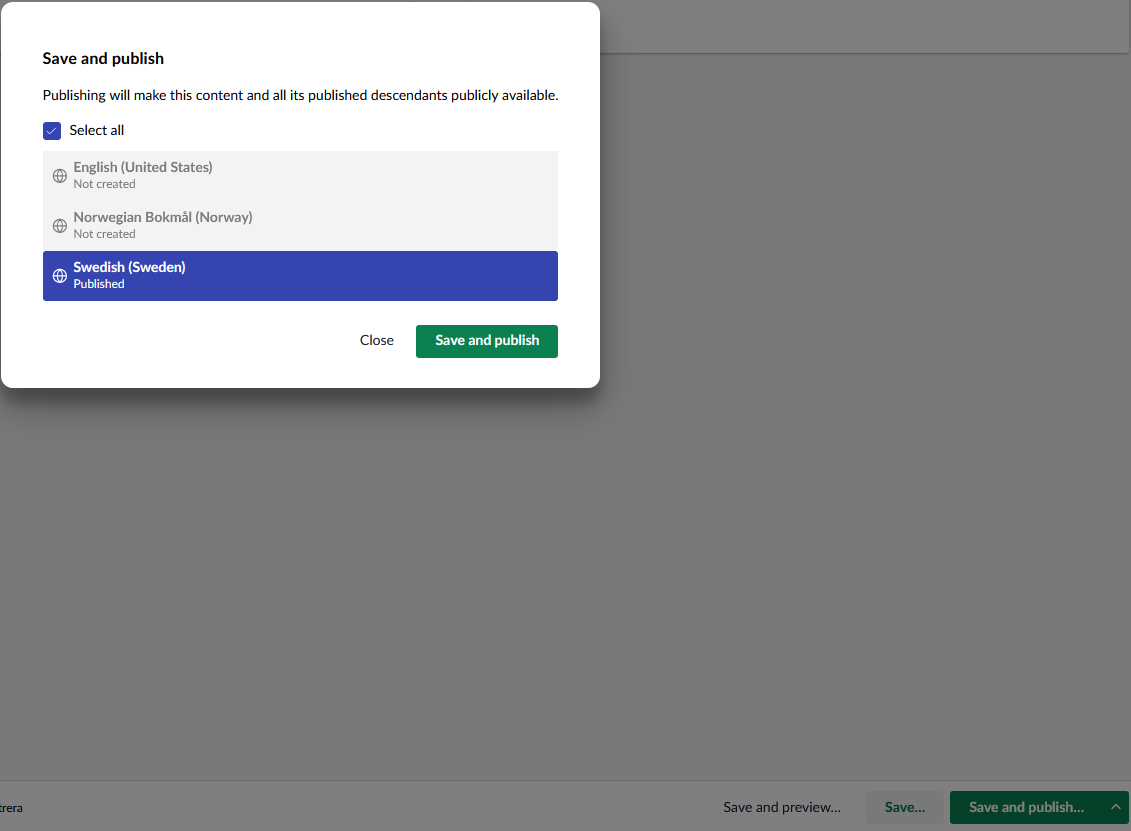
The umb-document-publish-modal gives an unnecessary step for “Save and publish” when a page is only edited for one language like the image below. Is it possible to remove it, and just handle the “Save and publish” like a non-multilingual site?
hi
Why not make the document type invariant? If the content doesn’t actually need language variants, you can disable “Allow varying by culture” on the document type. In that case, publishing behaves like a single-language site again ,no extra modal, just a one-click Save and publish.
@krirav I agree it is an unnecessary extra click at this point.
@BishalTimalsina12 the annoyance here is that the language versions haven’t been created yet.. but could be later. So we don’t want to simply remove variants.
So in the instance where this is only one language to be updated it should just go and do that.. Unticking select all, for instance can’t alter the intention here. 
1 Like
Hi Bishal thanks for the reply. It’s not an option for this particular site, we need a part of the site in multiple languages. And very often the editor for the Norwegian site isn’t the same person editing the Swedish site, so in most cases for us there is always only one of the variants that are edited. Mike’s suggestion with an option to “unticking select all” seems like a good idea, it might be a setting in appsettings so that we can use the function based on site scenario?
I have a client that has 12 languages and this popup annoys him to bits sine he’s mostly updating one language at a time.
It would be nice if Umbraco could notice that an editor has only edited one language variant when clicking Save and publish and if it’s only one language edited then the popup shouldn’t be shown.
1 Like