To handle time-sensitive publishing scheduling, I am interacting with Umbraco looking at the content schedule.
I get the schedule for an item as such:
var schedule = _contentService.GetContentScheduleByContentId(item.Id);
I noticed however that the resulting schedule.FullSchedule.First().Date is correct when running locally, and incorrect when running in Umbraco Cloud.
At first I thought this was a timezone issue within dotnet/Umbraco itself, but I see the error directly in the backoffice frontend.
For example, let’s say I schedule something for 21:00 on my local dev machine, running either on UTC or my own timezone (UTC+1), then the release.Date from the schedule has a value of {2025-12-02 21:00:00}.
This is paired with my browser, in the backoffice, doing a request to /umbraco/backoffice/umbracoapi/content/PostSave where the posted JSON has variants[0].releaseDate value of "2025-12-02 21:00:00"
However, in the Umbraco Cloud installation, the release.Date from the schedule has a value of {2025-12-02 20:00:00} . Even if I set it to 21:00. The picker still says 21:00.
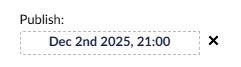
Likewise, the request to /umbraco/backoffice/umbracoapi/content/PostSave where the posted JSON has variants[0].releaseDate now has a value of "2025-12-02 20:00:00"
It has removed one hour!
Where did it go? I wonder if there’s some timezone shenanigans within the backoffice? I haven’t found any setting that would relate to that however?
I can’t just go and bruteforce “change” these values, since the actual publishing still happens in the correct times (give/take couple of minutes, hence my need to look at this).
Any tips on what to try?