Incease speed of uSync ProcessPipeline?

Hi,
I have a uSync-Pack that I’m importing via uSync Complete Import, it’s 15mb with a lot of content nodes in it. It’s been running since 9:30am this morning and still going. I was wondering, is there a way to speed up the import ProcessPipeline tasks - maybe for the next time I need to do this?

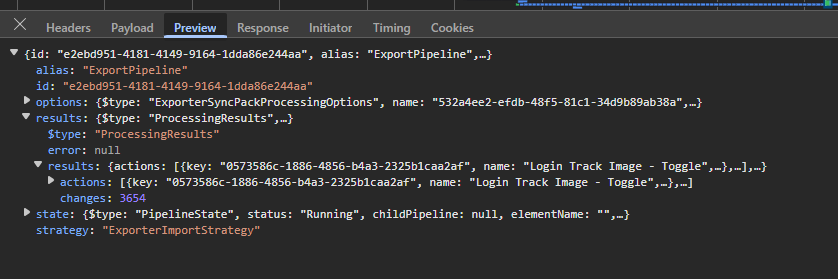
I can see that the size is increasing and the payload is also increasing to I am presuming that it’s still doing stuff :slight_smile: I would just like it to do some faster.

I am running this on localhost but the connection to the DB is external i.e SQL server on Azure, rather than SQL Server localhost (if that maybe makes a difference). Anyone else ran in to this before?

I think it’s Azure SQL. Either latency or you’re using the max DTUs because it’s a lot of work.

Whenever you’re doing anything chatty with SQL, using Azure for your development database is going to be orders of magnitude slower because you’re introducing network latency.

Or, if you’re doing anything CPU/IO intensive (for a database), Azure SQL’s standard tiers are tiny compared to the resources you’ll likely have available on your dev machine.

Here you’re doing both.

I know a lot of devs swear by using Azure SQL, but for latency alone it’s practically unworkable for me. I can only theorize that devs that find Azure SQL fine either…

  • Work in an office on top of an Azure Datacenter.
  • Are experiencing the effects of time dilation (perhaps they’re moving really fast or are near an incredibly dense object).
  • Are gaslighting their boss so they can spend that time on their side hustle/meditating/playing Tetris.
1 Like

Ye, that was what I was hoping wasnt going to be the case :smiley: Unfortunately, I’m trying to update a “staging” database to replicate a potential go live situation. However, I think what this has shown is, I might need to copy the DB down locally, do the uSync Import on a local DB server and then push the DB back up to Azure as a work around which will be faster - I would hope!

Yes this is probably a server thing, rather than a processing thing, there are a few things you can look at.

underneath the hood, uSync will be warning you if it thinks the notification part of the save/publish is taking to long. and you will see warnings like this :

“Processing notifications is slow, you should check for custom code running on notification events that may slow this down”

this means something that is running code on a ContentSaved, ContentPublished, MediaSaved… type event it taking a longer than normal (over 2 seconds per item) amount of time to execute, and you should take a look to see if you have any custom code doing strange things. You can have things happening in notifications that are fine, until they get under load of loads of things being saved and then they slow right down :frowning:

You should also check examine settings - but if you are running local, with reasonable disk speed that’s usually not a thing.

-

You can increase the “page size” for imports and this will increase the number of items per request that the processing step handles (by default it’s 25 or 50 depending on version, for media its lower at 5).

Changing this probably won’t speed it up a lot - it will remove some of the overhead for the request (so the auth, validation, packing/unpacking will happen less) but all of that is actually a very small bit (sub 1/2 a second max) part of any request. and upping this number puts you closer to the risk of timing out, locally that might not be an issue, for example on azure it’s around 240 seconds and you will hit the wall.

Media and Blob storage

If there is actual media items in the import (and the media files) then i can be quicker to move the media files using something like storage explorer, and only have the media entries (so don’t include the files) in the uSync export.

when you import this, the files will already be on disk, so there is a lot less coping, and uSync/Umbraco just created the db entry for the media - which can be a bit quicker.


For clarity the ‘processing’ steps when you are importing is only really doing the following:

  1. you upload the import
  2. it’s extracted to a temp folder
  3. the exporter loops through the folder (so you see lots of steps). importing items just as if you have done it via the uSync dashboard, execpt it does it in ‘pages’ to skip timeouts.
1 Like

Thanks Kevin.
I’ll take a look at all of the above but I think the bottom line is, its just trying to import a shed load of stuff and its taking a while. I’ve brought the DB local to see if this helps, it does seem to be running faster but may still take an hour to run - but that’s got to be better than 4 hours.

No errors shown in the logs with regards to something in a notification handler getting in the way - which is good I guess.

Running locally and still slow so just going to leave it running over night :smiley: Will see how long it takes. It might be a case of exporting in to smaller chunks rather than all the content at once. All this due to some bad data in the DB that I need to change within the uSync files before importing again so that it’s fixed!

So far 3654 changes :smiley:

Hi @OwainWilliams ,

I’ve been looking into this, and while i am seeing quick times than you (that might just be the type of content)- there are some things we can speed up on large imports using exporter, so we are going to try to see what improvements we can get.

at the moment an import via the normal uSync dashboard, is much quicker in some cases than the import via uSync.Exporter, and its probably down to some of the internal caching and results that we pass around getting bigger - especially when we don’t actually need to pass them around until the end.

If you want to try, you could make an export file using the uSync dashboard (got to export, and their is a drop down for export to file). this export is a zip file you can just go in and remove all but the content if that is all you want. - if you import this file to a new site via the normal dashboard (import from file on the import dropdown). you will probably see it be quicker.

For exporter i am playing about with what bits we can improve, its mainly the caching between calls i think - and we will see how much quicker we can get that.

1 Like

Amazing! Thanks @KevinJump
I’ve had a look at the uSync-pack file this morning and in the content folder, I’ve 14k items :smiley: So not a small import and makes sense why it’s taking so long, however, what I’m going to do today is export in smaller chunks to maybe help with speeding things up a bit, also so I can exclude the one section of the site that I know has the most nodes.

For more context. I’ve now ran a powershell script over all the content files, moved out 7000 nodes which are the slow to process ones and then copied the other 7000 in to the uSync folder and ran an import from the dashboard, rather than using Importer e.g. not using a Zip file.

That import, with the DB local, now only takes 15mins. So I’m not sure if the 7000 other nodes have something odd about them that slows things down or if its something else.

I’m going to introduce 100 at a time to see speed on these other content files later.

Well,

I have gotten this much faster, it was mainly an issue with the choice we made around how uSync behaves when uSync.Exporter imports!

We chose a few versions ago, to say, when exporter imports, uSync should treat this as if the user entered it on the site, which triggers a standard uSync export.

the problem mainly is uSync exports do an extra check in case you have just renamed something. that check involves reading the other files of the same type to see if a rename has just happened.

on a large import, this means uSync was checking all the files (so 1000’s) after every successfull import, so it slows it down a bit :frowning:

we have a fix ready for that, but also in the checking of this, we’ve optimised a few other things (that on the grand scale of it, will make very little difference) so the requests and responses are a little smaller for the browser.

just need to do all the checks, make sure we haven’t broken any thing else and we will sneak this out.

1 Like