To ensure customers get a default package rollout when we initially install Umbraco we build a package through the Umbraco - Packages|Created|Create Package Button and call IPackageService.InstallCompiledPackageData() with the contents from the downloaded package.xml file.
This has always worked from the days of Umbraco 10 through to Umbraco 13, right up until we upgraded to Umbraco 17 whereby now the process completes successfully (according to the response from InstallCompiledPackageData()) but no content, document types, data types or templates are actually imported when you log into Umbraco. I’ve determined everything works if you omit the templates from the import package but nothing is imported if they are included.
Code below:
var summary = _packagingService.InstallCompiledPackageData(packageXml);
I’ve used AI to help research this one as it’s not something I’m familiar with. It looks like a regression in PackageDataInstallation.ImportTemplates, which is what InstallCompiledPackageData calls for the template part.
The template import changed somewhere between v13 and v17. The master is no longer read from the element, and I think the new detection is being fed the wrong input. Templates are also saved one at a time now instead of in a single batch, so one that fails can quietly drop out while the install still reports success. That fits in with what you are seeing, including it only happening when templates are included.
It is worth checking your logs for any warnings or errors relating to templates when this is called.
To get it working, you can either import the templates separately via ITemplateService first so the views exist, then call InstallCompiledPackageData for the rest, or move the rollout to a package migration, which HQ maintains these days.
Either way I’d raise it as a regression, since it’s the same package.xml behaving differently between v13 and v17.
Thanks Justin. I have fixed this issue now. It was related to changes to the templates in two specific areas:
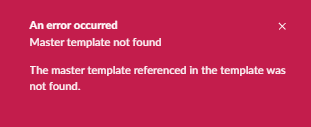
When you now save a template that references another template that template must also be saved in the Umbraco Back Office or you get the following error:
This was not enforced in Umbraco 13 and you could save a template that referenced another template without having to have both stored in the Back Office (once the master template was included in the project’s Views folder all worked fine).
What’s more worrying about this though is that while its obvious in the Back Office that there is an issue and it explains what that issue is, the InstallCompiledPackageData() gives the illusion of completing successfully even though it can’t import any templates if one of them violates the condition above.
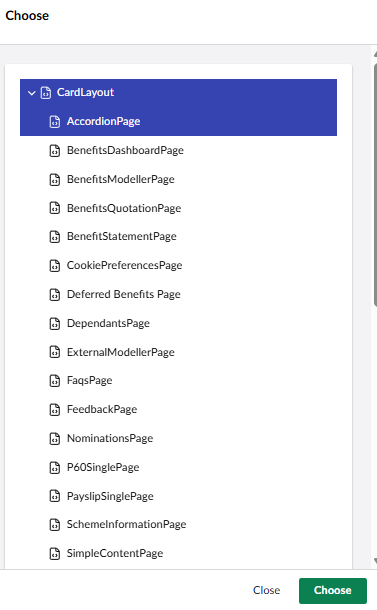
The second and even stranger issue is that when creating the import package the order that you select the templates determines the order at which they appear in the generated package.xml file:
In the screenshot above this means that if you selected Accordion prior to CardLayout your import would fail because CardLayout appears after Accordion in the package.xml and Accordion references CardLayout in its html. Alternatively if you selected CardLayout first and then Accordion the import will work. If not a bug this is a very strange bit of functionality.
Thanks for the update - that is interesting and it sounds like the importing should either fail or warn you of the template dependency order - it should not just fail silently. Equally, if this is important than generating a package should also output templates in dependency order.
I would urge you to raise this as an issue, especially if this was not the case in v13 as it is a regression.